




Flutter应用栏集成搜索与切换功能插件app_bar_with_search_switch的使用
Flutter应用栏集成搜索与切换功能插件app_bar_with_search_switch的使用
目录
简介
AppBarWithSearchSwitch 是一个可以切换为搜索框的应用栏组件,它是 AppBar 的替代类。它根据是否处于搜索模式返回不同的应用栏。
注意:
- 版本1.5+ 是轻量级版本。
- 版本2.0+ 使用了
SpeechToText包以支持语音识别。
这个包是 flutter_search_bar 的完全重写,并支持以下特性:
特性
- 支持
StatelessWidget - 内置
ValueNotifier,可以直接使用或轻松与其他状态管理工具配合使用 - 完全可自定义
- 不需要额外的变量
- 支持自定义动画(如
AppBarAnimationSlideDown和AppBarAnimationSlideLeft) - 提供多个辅助类(如
AppBarSearchButton、AppBarOnEditListener、AppBarOnSubmitListener等)
快速概览
使用 appBarBuilder 参数构建默认的 AppBar,其中包含:
- 一个搜索按钮,点击时调用
startSearch - 或者使用标准的搜索按钮
AppBarSearchButton
appBarBuilder 是唯一必需的参数,其他参数均为可选。
获取 TextField 中文本的方式:
onChanged回调onSubmitted回调- 监听
textEditingController - 使用
ValueNotifier(textNotifier)
其他回调:
onClearedonClosed
示例代码
下面是一个完整的示例代码,展示了如何在应用中使用 AppBarWithSearchSwitch。
import 'package:app_bar_with_search_switch/app_bar_with_search_switch.dart';
import 'package:flutter/material.dart';

void main() {
  runApp(const MyApp());
}

class MyApp extends StatelessWidget {
  const MyApp({Key? key}) : super(key: key);

  @override
  Widget build(BuildContext context) {
    return MaterialApp(
      debugShowCheckedModeBanner: false,
      title: 'AppBarWithSearch demo',
      theme: ThemeData(
        primarySwatch: Colors.blue,
      ),
      home: MyHomePage(title: 'AppBarWithSearch widget main'),
    );
  }
}

class MyHomePage extends StatelessWidget {
  MyHomePage({Key? key, required this.title}) : super(key: key);

  final String title;
  final searchText = ValueNotifier<String>('');
  final words = ("There is no justice in the laws of nature, no term for fairness in the equations of motion. "
          "The Universe is neither evil, nor good, it simply does not care. "
          "The stars don't care, or the Sun, or the sky. "
          "But they don't have to! WE care! There IS light in the world, and it is US! "
          "Why does any kind of cynicism appeal to people? Because it seems like a mark of maturity, of sophistication, like you’ve seen everything and know better. "
          "Or because putting something down feels like pushing yourself up. "
          "There is light in the world, and it is us! "
          "World domination is such an ugly phrase. I prefer to call it world optimisation. ")
      .split(' ');

  @override
  Widget build(BuildContext context) {
    return Scaffold(
      appBar: AppBarWithSearchSwitch(
        onChanged: (text) {
          searchText.value = text;
        },
        animation: AppBarAnimationSlideLeft.call,
        appBarBuilder: (context) {
          return AppBar(
            title: Text(title),
            actions: const [
              AppBarSearchButton(),
            ],
          );
        },
      ),
      body: Center(
        child: SingleChildScrollView(
          child: AnimatedBuilder(
            animation: Listenable.merge([searchText]),
            builder: (BuildContext context, _) {
              return Wrap(
                children: [
                  for (var i = 0; i < words.length; i++)
                    if (words[i].contains(searchText.value))
                      SizedBox(
                        height: 110,
                        width: 110,
                        child: Card(
                          child: Column(
                            children: [
                              Expanded(
                                child: Center(
                                  child: Text(
                                    words[i],
                                    style: Theme.of(context).textTheme.headlineSmall,
                                    textAlign: TextAlign.center,
                                  ),
                                ),
                              ),
                            ],
                          ),
                        ),
                      ),
                ],
              );
            },
          ),
        ),
      ),
    );
  }
}
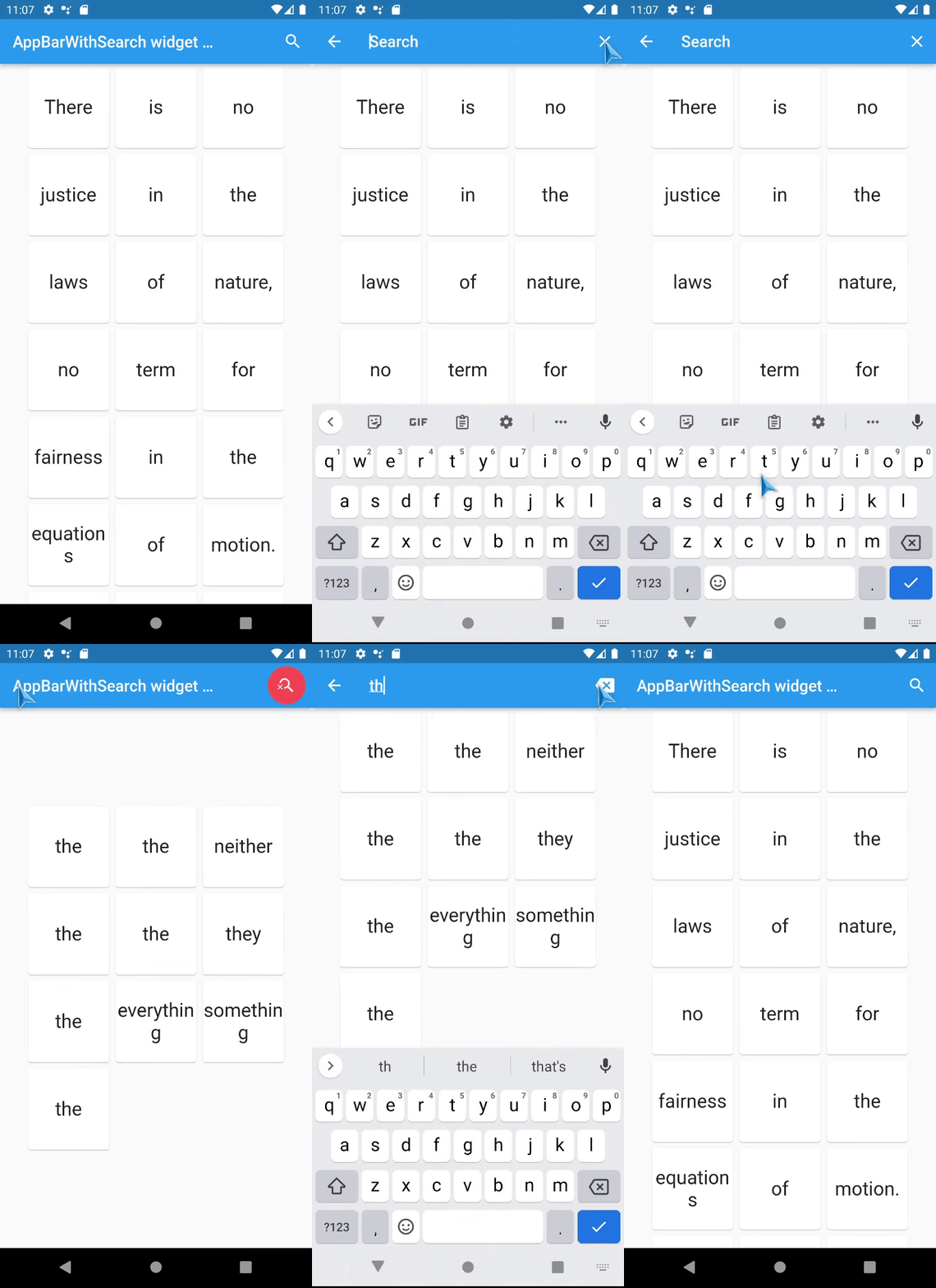
截图
FAQ
如何从远处激活搜索字段?
如果 AppBarWithSearchSwitch 在同一个 Scaffold 或其子组件中:
- 使用
AppBarWithSearchFinder - 调用
AppBarWithSearchFinder.of(context)?.triggerSearch()
如果 AppBarWithSearchSwitch 在 Scaffold 外部:
- 初始化
ValueNotifier类型的变量 - 设置
customIsSearchModeNotifier属性 - 设置
ValueNotifier的值为true以显示搜索栏
如何使 Android 返回按钮关闭搜索?
- 初始化
ValueNotifier类型的isSearchMode和searchText变量 - 将这些变量分配给
customIsSearchModeNotifier和customTextNotifier - 使用
WillPopScope包裹Scaffold并定义onWillPop参数
final isSearchMode = ValueNotifier<bool>(false);
final searchText = ValueNotifier<String>('');

@override
Widget build(BuildContext context) {

  return WillPopScope(
    onWillPop: () async { // android back button handler
      if (searchText.value != '') {
        isSearchMode.value = false;
        searchText.value = '';
        return false;
      }
      return true;
    },
    child: Scaffold(
      appBar: AppBarWithSearchSwitch(
        customIsSearchModeNotifier: isSearchMode,
        customTextNotifier: searchText,
        appBarBuilder: (context) {
          return AppBar(
            // your code here
          );
        },
      ),
    ),
  );
}
已知问题
- 已修复上游问题:
keepAppBarColors = true没有改变文本选择句柄的颜色,这是由于上游问题导致的。 - 如果在同一页面上有多个
AppBarWithSearchSwitch,请为每个实例提供独立的customIsSearchModeNotifier、customTextNotifier等。
通过以上内容,您可以更好地理解和使用 app_bar_with_search_switch 插件来增强您的 Flutter 应用程序。
更多关于Flutter应用栏集成搜索与切换功能插件app_bar_with_search_switch的使用的实战教程也可以访问 https://www.itying.com/category-92-b0.html

更多关于Flutter应用栏集成搜索与切换功能插件app_bar_with_search_switch的使用的实战系列教程也可以访问 https://www.itying.com/category-92-b0.html
当然,以下是如何在Flutter应用中集成app_bar_with_search_switch插件来实现应用栏的搜索与切换功能的代码示例。假设你已经添加了app_bar_with_search_switch到你的pubspec.yaml文件中。
首先,确保你的pubspec.yaml文件中包含以下依赖:
dependencies:
  flutter:
    sdk: flutter
  app_bar_with_search_switch: ^最新版本号  # 请替换为实际版本号
然后,运行flutter pub get来安装依赖。
接下来,你可以按照以下步骤在你的Flutter应用中集成和使用app_bar_with_search_switch插件。
示例代码
import 'package:flutter/material.dart';
import 'package:app_bar_with_search_switch/app_bar_with_search_switch.dart';

void main() {
  runApp(MyApp());
}

class MyApp extends StatelessWidget {
  @override
  Widget build(BuildContext context) {
    return MaterialApp(
      title: 'Flutter App Bar with Search and Switch',
      theme: ThemeData(
        primarySwatch: Colors.blue,
      ),
      home: MyHomePage(),
    );
  }
}

class MyHomePage extends StatefulWidget {
  @override
  _MyHomePageState createState() => _MyHomePageState();
}

class _MyHomePageState extends State<MyHomePage> {
  bool isSearching = false;
  String searchQuery = '';

  @override
  Widget build(BuildContext context) {
    return Scaffold(
      appBar: AppBarWithSearchSwitch(
        title: Text('My App'),
        leading: IconButton(
          icon: Icon(Icons.menu),
          onPressed: () {
            ScaffoldMessenger.of(context).showDrawer(null);
          },
        ),
        actions: <Widget>[
          IconButton(
            icon: Icon(Icons.settings),
            onPressed: () {
              // 打开设置页面
            },
          ),
        ],
        onSearchStateChanged: (bool isSearching) {
          setState(() {
            this.isSearching = isSearching;
          });
        },
        onSearchQueryChanged: (String query) {
          setState(() {
            searchQuery = query;
          });
        },
        body: isSearching
            ? SearchScreen(searchQuery: searchQuery)
            : HomeScreen(),
      ),
      drawer: Drawer(
        child: ListView(
          padding: EdgeInsets.zero,
          children: <Widget>[
            DrawerHeader(
              child: Text('Drawer Header'),
              decoration: BoxDecoration(
                color: Colors.blue,
              ),
            ),
            ListTile(
              title: Text('Item 1'),
              onTap: () {
                // 打开Item 1页面
                Navigator.pop(context);
              },
            ),
            ListTile(
              title: Text('Item 2'),
              onTap: () {
                // 打开Item 2页面
                Navigator.pop(context);
              },
            ),
          ],
        ),
      ),
    );
  }
}

class HomeScreen extends StatelessWidget {
  @override
  Widget build(BuildContext context) {
    return Center(
      child: Text('Home Screen'),
    );
  }
}

class SearchScreen extends StatelessWidget {
  final String searchQuery;

  SearchScreen({required this.searchQuery});

  @override
  Widget build(BuildContext context) {
    return Center(
      child: Column(
        mainAxisAlignment: MainAxisAlignment.center,
        children: <Widget>[
          Text('Search Results for: $searchQuery'),
          // 这里可以添加搜索结果的显示逻辑
        ],
      ),
    );
  }
}
解释
- 依赖引入:确保在
pubspec.yaml文件中添加了app_bar_with_search_switch依赖。 - 创建主应用:在
MyApp类中,定义了应用的主题和主页。 - 主页逻辑:在
MyHomePage类中,定义了应用栏(AppBarWithSearchSwitch),并在状态改变时更新UI。 - 搜索和主页屏幕:定义了
HomeScreen和SearchScreen两个屏幕,分别用于显示主页和搜索结果。 - 抽屉导航:在
Scaffold中添加了抽屉导航(Drawer),方便用户从侧边栏导航到其他页面。
这段代码展示了如何使用app_bar_with_search_switch插件来集成搜索和切换功能。你可以根据实际需求进一步扩展和修改这个示例。
