


Flutter气泡动画插件awesome_bubble的使用
Flutter气泡动画插件awesome_bubble的使用
简介
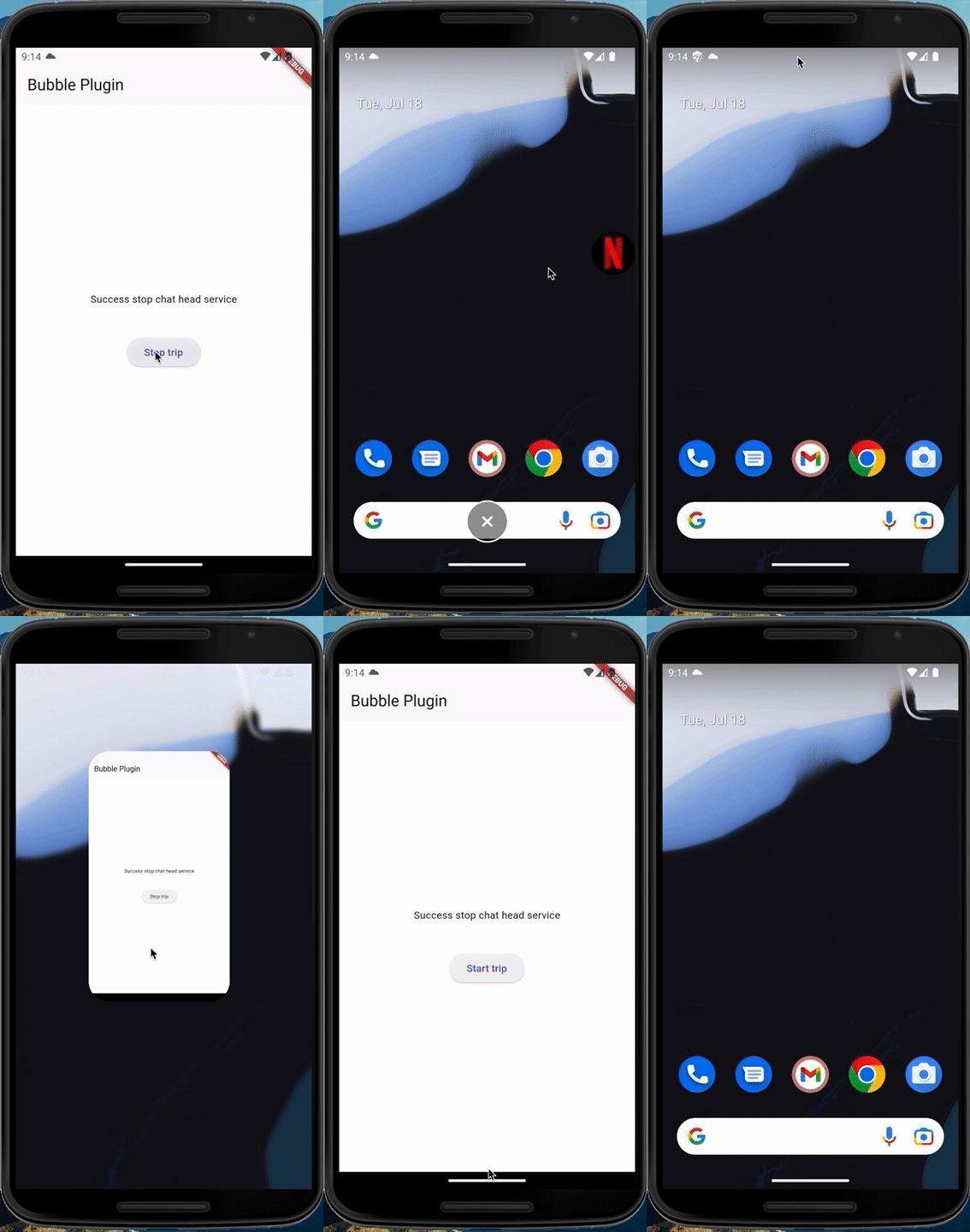
awesome_bubble 是一个用于在所有其他应用程序之上显示消息气泡的 Flutter 插件。该插件可以显示覆盖层气泡和通知。
支持平台
Android
关于
awesome_bubble 提供了快速且简便地显示消息气泡的功能。只需按照以下步骤操作即可。
该插件完全依赖于在所有应用之上显示气泡,因此它仅适用于 Android 系统,因为 iOS 不提供此功能。
使用方法
-
首先,在
pubspec.yaml文件中添加插件:awesome_bubble: ^updated_version -
转到
AndroidManifest.xml文件以添加应用程序所需的权限:<uses-permission android:name="android.permission.FOREGROUND_SERVICE" /> <uses-permission android:name="android.permission.SYSTEM_ALERT_WINDOW" /> <uses-permission android:name="android.permission.POST_NOTIFICATIONS"/> -
现在你可以快速使用该插件,并可以查看 示例项目 以轻松发现所有优点。
插件功能
initService
必须在开始时使用,以便能够使用插件。它需要一组属性来设置气泡。
| 参数 | 必填 | 描述 |
|---|---|---|
screenHeight |
是 | 需要从 MediaQuery 发送逻辑像素屏幕高度 |
chatHeadIcon |
否 | 如果需要更改聊天头图标,可以在 drawable 文件夹中添加新图标,并传递图像名称(不带格式)。如果未传递图标,默认图标为插件内部的 android chat head icon。 |
notificationIcon |
否 | 与 chatHeadIcon 相同当未传递图标时,默认图标为插件内部的 android notification icon。 |
notificationTitle |
否 | 当关闭聊天头时,会显示包含标题和正文的通知。如果不发送任何标题,默认通知标题为 App Name |
notificationBody |
否 | 与 notificationTitle 相同,但默认通知正文为 Your Service is still working |
notificationCircleHexColor |
否 | 在 Android 13 及以上版本,系统会将通知图标置于圆圈内。可以通过此参数更改圆圈颜色。 但在 Android 10 及以下版本,此参数用于更改通知图标 |
checkPermission
用于检查应用程序是否具有显示在所有应用之上的权限。此函数返回布尔值。
true表示已允许权限,因此可以启动气泡。false表示未允许权限,因此需要首先使用askPermission函数。
askPermission
通过使用此函数,你将被自动引导至系统设置,具体是在与显示在其他应用之上的部分相关的区域,以便给你的应用授予此权限。
startService
通过此函数可以启动服务以显示气泡。
| 参数 | 必填 | 描述 |
|---|---|---|
notificationTitle |
否 | 如果要在启动服务之前更改通知标题,可以通过传递新的通知标题来实现,否则如果在 initService 中使用了通知标题,则服务将使用它。 |
stopService
通过此函数可以停止服务以关闭气泡。
clearNotificationService
通过此函数可以清除状态栏中的气泡通知。
示例代码
以下是完整的示例代码,展示了如何使用 awesome_bubble 插件。
import 'dart:async';
import 'dart:developer';
import 'dart:math' as math;

import 'package:awesome_bubble/awesome_bubble.dart';
import 'package:device_info_plus/device_info_plus.dart';
import 'package:flutter/material.dart';
import 'package:flutter/services.dart';
import 'package:flutter_local_notifications/flutter_local_notifications.dart';

void main() {
  runApp(const MyApp());
}

class MyApp extends StatefulWidget {
  const MyApp({super.key});

  [@override](/user/override)
  State<MyApp> createState() => _MyAppState();
}

class _MyAppState extends State<MyApp> with WidgetsBindingObserver {
  String msg = 'Unknown';
  final _bubblePlugin = BubbleService.I;
  final FlutterLocalNotificationsPlugin flutterLocalNotificationsPlugin =
      FlutterLocalNotificationsPlugin();

  bool inTrip = false;

  bool serviceStarted = true;

  [@override](/user/override)
  void didChangeAppLifecycleState(AppLifecycleState state) {
    log(state.name, name: 'APP STATE');
    log(inTrip.toString(), name: 'IS SERVICE WORKING?');

    if (!inTrip) return;
    switch (state) {
      case AppLifecycleState.resumed:
        clearNotificationService();
        stopService();
        break;
      case AppLifecycleState.paused:
        startService();
        break;
      default:
        break;
    }
  }

  [@override](/user/override)
  void initState() {
    clearNotificationService();
    WidgetsBinding.instance.addObserver(this);
    // 请求 Android 13 及以上的通知权限
    flutterLocalNotificationsPlugin
        .resolvePlatformSpecificImplementation<AndroidFlutterLocalNotificationsPlugin>()?
        .requestPermission();

    // 初始化服务,不初始化服务则无法启动
    WidgetsBinding.instance.addPostFrameCallback((timeStamp) {
      _bubblePlugin
          .initService(
        screenHeight: MediaQuery.sizeOf(context).height,
      )
          .then((value) {
        serviceStarted = value ?? false;
        setState(() {});
      });
    });
    super.initState();
  }

  [@override](/user/override)
  void didChangeMetrics() {
    stopService();
    super.didChangeMetrics();
  }

  [@override](/user/override)
  void dispose() {
    WidgetsBinding.instance.removeObserver(this);
    super.dispose();
  }

  Future<void> startService() async {
    bool serviceWorks;
    try {
      final double navigationBar = await getNavHeight();
      if (!mounted) return;
      final double density = MediaQuery.of(context).devicePixelRatio;
      final double screenHeight = MediaQuery.of(context).size.height;
      final double screenWidth = MediaQuery.of(context).size.width * density;
      log(
        {
          'screenWidth-P.P': screenWidth,
          'screenHeight-L.P': screenHeight,
          'density-DPR': density,
          'navigationBarHeight': navigationBar,
        }.toString(),
        name: 'From Flutter Side'.toUpperCase(),
      );
      int randomNum = math.Random().nextInt(500);
      serviceWorks = await _bubblePlugin.startService() ?? false;

      if (!serviceWorks) return;
    } on PlatformException catch (e) {
      serviceWorks = false;
      log(e.message.toString(), name: 'START SERVICE ERROR');
    }
    if (!mounted) return;

    setState(() {
      msg = (serviceWorks
          ? "Success starting chat head service"
          : "Error when starting chat head service");
    });
  }

  Future<void> stopService() async {
    bool serviceStop;
    try {
      serviceStop = await _bubblePlugin.stopService() ?? false;
    } on PlatformException catch (e) {
      log(e.message.toString(), name: 'START SERVICE ERROR');
      serviceStop = false;
    }
    if (!mounted) return;

    setState(() {
      msg = (serviceStop
          ? "Success stop chat head service"
          : "Error when stop hat head service");
    });
  }

  Future<void> clearNotificationService() async =>
      _bubblePlugin.clearNotificationService();

  Future<double> getNavHeight() async {
    final devicePixelRatio = MediaQuery.of(context).devicePixelRatio;
    final screenHeight = MediaQuery.of(context).size.height;

    final DeviceInfoPlugin deviceInfoPlugin = DeviceInfoPlugin();
    final AndroidDeviceInfo androidInfo = await deviceInfoPlugin.androidInfo;
    final deviceHeight = androidInfo.displayMetrics.heightPx;

    final androidNavHeight = deviceHeight / devicePixelRatio - screenHeight;
    return androidNavHeight;
  }

  [@override](/user/override)
  Widget build(BuildContext context) {
    return MaterialApp(
      theme: ThemeData(
        useMaterial3: true,
      ),
      home: Scaffold(
        backgroundColor: Colors.white,
        appBar: AppBar(
          title: const Text('Bubble Plugin'),
        ),
        body: SizedBox(
          width: MediaQuery.of(context).size.width,
          child: Column(
            mainAxisAlignment: MainAxisAlignment.center,
            children: [
              Text('$msg\n'),
              if (serviceStarted) ...[
                const SizedBox(height: 20),
                ElevatedButton(
                  onPressed: () async {
                    if (!inTrip) {
                      final hasAPermission =
                          await _bubblePlugin.checkPermission();

                      if (!(hasAPermission ?? true)) {
                        await _bubblePlugin.askPermission();
                        return;
                      }
                    }
                    inTrip = !inTrip;

                    log(inTrip.toString(), name: 'bubbleIsWorking');
                    setState(() {});
                  },
                  child: Text(inTrip ? 'Stop trip' : 'Start trip'),
                ),
              ]
            ],
          ),
        ),
      ),
    );
  }
}

class BubbleService {
  BubbleService._();
  static BubbleService I = BubbleService._();

  final AwesomeBubble _bubble = AwesomeBubble.I;

  Future<bool?> initService({
    required double screenHeight,
    String? chatHeadIcon,
    String? notificationIcon,
    String? notificationTitle,
    int? notificationCircleHexColor,
    String? notificationBody,
  }) =>
      _bubble.initService(
        screenHeight: screenHeight,
        chatHeadIcon: chatHeadIcon,
        notificationIcon: notificationIcon,
        notificationTitle: notificationTitle,
        notificationCircleHexColor: notificationCircleHexColor,
        notificationBody: notificationBody,
      );

  Future<bool?> startService({String? notificationTitle}) =>
      _bubble.startService(
        notificationTitle: notificationTitle,
      );

  Future<bool?> stopService() => _bubble.stopService();

  Future<bool?> checkPermission() => _bubble.checkPermission();

  Future<bool?> askPermission() => _bubble.askPermission();

  Future<bool?> clearNotificationService() =>
      _bubble.clearServiceNotification();
}
更多关于Flutter气泡动画插件awesome_bubble的使用的实战教程也可以访问 https://www.itying.com/category-92-b0.html

更多关于Flutter气泡动画插件awesome_bubble的使用的实战系列教程也可以访问 https://www.itying.com/category-92-b0.html
awesome_bubble 是一个用于在 Flutter 应用中创建气泡动画效果的插件。它可以帮助你轻松地在应用中添加动态的气泡效果,通常用于背景装饰或增强用户体验。
安装
首先,你需要在 pubspec.yaml 文件中添加 awesome_bubble 依赖:
dependencies:
  flutter:
    sdk: flutter
  awesome_bubble: ^1.0.0  # 确保使用最新的版本
然后运行 flutter pub get 来安装依赖。
基本用法
awesome_bubble 提供了 Bubble 小部件,你可以将它添加到你的 UI 中。以下是一个简单的示例,展示如何在应用中使用气泡动画:
import 'package:flutter/material.dart';
import 'package:awesome_bubble/awesome_bubble.dart';

class BubbleExample extends StatelessWidget {
  [@override](/user/override)
  Widget build(BuildContext context) {
    return Scaffold(
      appBar: AppBar(
        title: Text('Bubble Animation Example'),
      ),
      body: Center(
        child: Container(
          width: 300,
          height: 300,
          child: Bubble(
            child: Center(
              child: Text(
                'Hello, Bubble!',
                style: TextStyle(fontSize: 24, color: Colors.white),
              ),
            ),
            color: Colors.blue,
            radius: 100,
            duration: Duration(seconds: 3),
            repeat: true,
          ),
        ),
      ),
    );
  }
}

void main() {
  runApp(MaterialApp(
    home: BubbleExample(),
  ));
}
参数说明
child: 气泡内部的子组件,通常是你想要显示的文本或图标。color: 气泡的颜色。radius: 气泡的半径。duration: 气泡动画的持续时间。repeat: 是否重复播放动画。
自定义气泡动画
你还可以通过 BubbleController 来控制气泡的动画。例如,你可以手动启动、停止或重置动画:
import 'package:flutter/material.dart';
import 'package:awesome_bubble/awesome_bubble.dart';

class CustomBubbleExample extends StatefulWidget {
  [@override](/user/override)
  _CustomBubbleExampleState createState() => _CustomBubbleExampleState();
}

class _CustomBubbleExampleState extends State<CustomBubbleExample> {
  BubbleController _bubbleController = BubbleController();

  [@override](/user/override)
  Widget build(BuildContext context) {
    return Scaffold(
      appBar: AppBar(
        title: Text('Custom Bubble Animation'),
      ),
      body: Center(
        child: Column(
          mainAxisAlignment: MainAxisAlignment.center,
          children: [
            Container(
              width: 200,
              height: 200,
              child: Bubble(
                controller: _bubbleController,
                child: Center(
                  child: Text(
                    'Custom Bubble',
                    style: TextStyle(fontSize: 24, color: Colors.white),
                  ),
                ),
                color: Colors.green,
                radius: 80,
                duration: Duration(seconds: 2),
                repeat: false,
              ),
            ),
            SizedBox(height: 20),
            ElevatedButton(
              onPressed: () {
                _bubbleController.start();
              },
              child: Text('Start Animation'),
            ),
            ElevatedButton(
              onPressed: () {
                _bubbleController.stop();
              },
              child: Text('Stop Animation'),
            ),
            ElevatedButton(
              onPressed: () {
                _bubbleController.reset();
              },
              child: Text('Reset Animation'),
            ),
          ],
        ),
      ),
    );
  }
}

void main() {
  runApp(MaterialApp(
    home: CustomBubbleExample(),
  ));
}