




Flutter UI组件插件lenore_ui的使用
Flutter UI组件插件lenore_ui的使用
Beautiful、可定制且易于使用的UI小部件,可以帮助我(或者也许是你)更快地开发我的(或者也许是你)的应用程序。这是我个人用来开发应用程序的包之一。它帮助我快速构建它们,而无需担心UI方面的困难。
我在开发这个包并添加小部件,但我只是根据我的需求来做的。我不期望任何人使用它,但如果你确实使用了它,并希望在其中实现某些功能,请联系我添加它们或在GitHub上提出请求(这让我很开心 :))。
已实现的小部件
- LenoreButton
- LenoreDatatable
- LenoreDatePicker
- LenoreDropDown
- LenoreCheckBox
- LenoreFlatButton
- LenoreLoading
- LenoreTextFormField
- LenoreAppBar
- LenoreDrawer 与 LenoreDrawerItem
- LenoreNoDataWidget
- LenoreNoInternetWidget
- LenoreAppTheme 一个示例主题
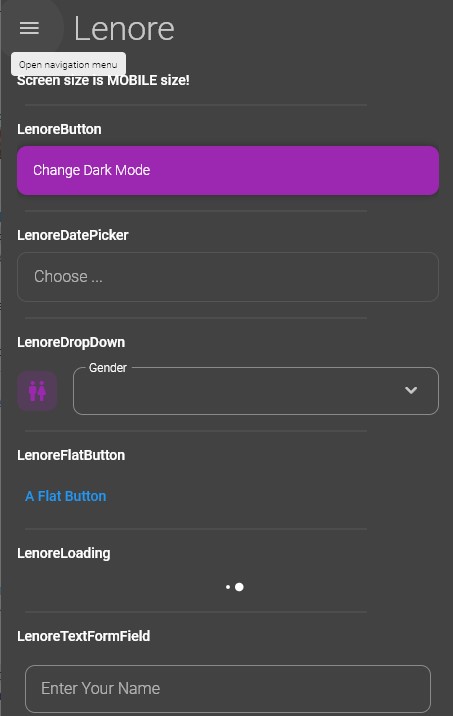
使用示例
以下是一个完整的示例,展示如何使用lenore_ui包中的多个组件。
示例代码
import 'package:example/widgets/main/core/MainViewModel.dart';
import 'package:flutter/material.dart';
import 'package:lenore_ui/lenore_ui.dart';
import 'package:provider/src/provider.dart';

class MainView extends StatefulWidget {
  const MainView({Key? key}) : super(key: key);

  @override
  _MainViewState createState() => _MainViewState();
}

class _MainViewState extends State<MainView> {
  @override
  Widget build(BuildContext context) {
    return SafeArea(
      child: Scaffold(
        appBar: LenoreAppBar(
          titleText: 'Lenore',
        ),
        drawer: LenoreDrawer(
          header: Container(
            height: 100,
            alignment: Alignment.center,
            color: Theme.of(context).disabledColor,
          ),
          drawerItems: [
            LenoreDrawerItem(
              text: 'First Drawer Item Selected',
              icon: Icons.person,
              isSelected: true,
            ),
            LenoreDrawerItem(
              text: 'Second Drawer Item',
              icon: Icons.dashboard,
              isSelected: false,
            ),
          ],
        ),
        body: Container(
          padding: EdgeInsets.only(left: 16, right: 16, top: 16),
          child: Scrollbar(
            controller: context.read<MainViewModel>().scrollController,
            child: ListView(
              controller: context.read<MainViewModel>().scrollController,
              children: [
                // 响应式布局
                Text(
                  Responsive.isDesktop(context)
                      ? "Screen size is DESKTOP size!"
                      : Responsive.isMobile(context)
                          ? "Screen size is MOBILE size!"
                          : "Screen size is TABLET size!",
                  style: Theme.of(context).textTheme.bodyText1,
                ),

                Padding(
                  padding: const EdgeInsets.all(8.0),
                  child: Divider(endIndent: 64),
                ),
                // LenoreButton
                Text(
                  'LenoreButton',
                  style: Theme.of(context).textTheme.bodyText1,
                ),
                SizedBox(height: 8),
                LenoreButton(
                  caption: 'Change Dark Mode',
                  onPressed: () {
                    context.read<MainViewModel>().toggleDarkMode(context);
                  },
                ),
                Padding(
                  padding: const EdgeInsets.all(8.0),
                  child: Divider(endIndent: 64),
                ),
                // LenoreDatePicker
                Text(
                  'LenoreDatePicker',
                  style: Theme.of(context).textTheme.bodyText1,
                ),
                SizedBox(height: 8),
                LenoreDatePicker(
                  onPressed: () {
                    context.read<MainViewModel>().pickDate(context);
                  },
                ),
                Padding(
                  padding: const EdgeInsets.all(8.0),
                  child: Divider(endIndent: 64),
                ),
                // LenoreDropDown
                Text(
                  'LenoreDropDown',
                  style: Theme.of(context).textTheme.bodyText1,
                ),
                SizedBox(height: 16),
                LenoreDropDown(
                  items: context.read<MainViewModel>().genders,
                  value: context.watch<MainViewModel>().genderValue,
                  onChange: (newValue) =>
                      context.read<MainViewModel>().onGenderChange(newValue),
                  label: 'Gender',
                  icon: Icons.wc_rounded,
                ),
                Padding(
                  padding: const EdgeInsets.all(8.0),
                  child: Divider(endIndent: 64),
                ),
                // LenoreFlatButton
                Text(
                  'LenoreFlatButton',
                  style: Theme.of(context).textTheme.bodyText1,
                ),
                SizedBox(height: 16),
                LenoreFlatButton(
                  caption: 'A Flat Button',
                  onPressed: () {},
                ),
                Padding(
                  padding: const EdgeInsets.all(8.0),
                  child: Divider(endIndent: 64),
                ),
                // LenoreLoading
                Text(
                  'LenoreLoading',
                  style: Theme.of(context).textTheme.bodyText1,
                ),
                SizedBox(height: 16),
                LenoreLoading(),
                Padding(
                  padding: const EdgeInsets.all(8.0),
                  child: Divider(endIndent: 64),
                ),
                // LenoreTextFormField
                Text(
                  'LenoreTextFormField',
                  style: Theme.of(context).textTheme.bodyText1,
                ),
                SizedBox(height: 16),
                LenoreTextFormField(
                  controller: TextEditingController(),
                  label: 'Enter Your Name',
                ),
                Padding(
                  padding: const EdgeInsets.all(8.0),
                  child: Divider(endIndent: 64),
                ),
                // LenoreNoDataWidget
                Text(
                  'LenoreNoDataWidget',
                  style: Theme.of(context).textTheme.bodyText1,
                ),
                SizedBox(height: 16),
                LenoreNoDataWidget(),
                Padding(
                  padding: const EdgeInsets.all(8.0),
                  child: Divider(endIndent: 64),
                ),
                // LenoreNoInternetWidget
                Text(
                  'LenoreNoInternetWidget',
                  style: Theme.of(context).textTheme.bodyText1,
                ),
                SizedBox(height: 16),
                LenoreNoInternetWidget(
                  reloadFunction: () {
                    ScaffoldMessenger.of(context).showSnackBar(SnackBar(
                      content: Text(
                        "Refresh Page",
                        textAlign: TextAlign.center,
                      ),
                      duration: Duration(seconds: 2),
                    ));
                  },
                ),
                Padding(
                  padding: const EdgeInsets.all(8.0),
                  child: Divider(endIndent: 64),
                ),
              ],
            ),
          ),
        ),
      ),
    );
  }
}
主题使用示例
MaterialApp(
      title: 'Lenore Demo',
      theme: LenoreAppTheme(isDark: context.watch<MainViewModel>().isDark)
          .themeData,
      initialRoute: '/',
      debugShowCheckedModeBanner: false,
      onGenerateRoute: (RouteSettings settings) {
        switch (settings.name) {
          case '/MainView':
            return MaterialPageRoute(builder: (context) => const MainView());
          case '/':
            return MaterialPageRoute(builder: (context) => const MainView());
          default:
            return MaterialPageRoute(builder: (context) => const MainView());
        }
      },
    )
更多关于Flutter UI组件插件lenore_ui的使用的实战教程也可以访问 https://www.itying.com/category-92-b0.html

更多关于Flutter UI组件插件lenore_ui的使用的实战系列教程也可以访问 https://www.itying.com/category-92-b0.html
lenore_ui 是一个 Flutter UI 组件库,旨在帮助开发者快速构建美观且功能丰富的用户界面。它提供了一系列预定义的组件和样式,可以显著减少开发时间。以下是如何使用 lenore_ui 插件的基本步骤:
1. 添加依赖
首先,你需要在 pubspec.yaml 文件中添加 lenore_ui 依赖:
dependencies:
  flutter:
    sdk: flutter
  lenore_ui: ^1.0.0  # 请使用最新版本
然后运行 flutter pub get 来获取依赖。
2. 导入包
在你的 Dart 文件中导入 lenore_ui 包:
import 'package:lenore_ui/lenore_ui.dart';
3. 使用组件
lenore_ui 提供了多种 UI 组件,你可以直接在项目中使用。以下是一些常见组件的示例:
按钮 (LenoreButton)
LenoreButton(
  text: 'Click Me',
  onPressed: () {
    print('Button Pressed!');
  },
)
输入框 (LenoreTextField)
LenoreTextField(
  hintText: 'Enter your name',
  onChanged: (value) {
    print('Input: $value');
  },
)
卡片 (LenoreCard)
LenoreCard(
  child: Text('This is a card'),
)
对话框 (LenoreDialog)
LenoreDialog(
  title: 'Alert',
  content: Text('This is a dialog'),
  actions: [
    LenoreButton(
      text: 'OK',
      onPressed: () {
        Navigator.of(context).pop();
      },
    ),
  ],
)
加载指示器 (LenoreLoadingIndicator)
LenoreLoadingIndicator()
4. 自定义主题
lenore_ui 允许你自定义主题以适应你的应用风格。你可以通过 LenoreTheme 来设置全局主题:
MaterialApp(
  theme: LenoreTheme.lightTheme,
  home: MyHomePage(),
)
或者自定义主题:
MaterialApp(
  theme: ThemeData(
    primaryColor: Colors.blue,
    accentColor: Colors.green,
    // 其他自定义主题设置
  ),
  home: MyHomePage(),
)
5. 其他组件
lenore_ui 还提供了其他组件,如 LenoreAppBar、LenoreBottomNavigationBar、LenoreListTile 等。你可以根据项目需求选择合适的组件。
6. 示例代码
以下是一个简单的示例,展示了如何使用 lenore_ui 组件构建一个基本的界面:
import 'package:flutter/material.dart';
import 'package:lenore_ui/lenore_ui.dart';

void main() {
  runApp(MyApp());
}

class MyApp extends StatelessWidget {
  [@override](/user/override)
  Widget build(BuildContext context) {
    return MaterialApp(
      theme: LenoreTheme.lightTheme,
      home: Scaffold(
        appBar: LenoreAppBar(
          title: Text('Lenore UI Example'),
        ),
        body: Center(
          child: LenoreCard(
            child: Column(
              mainAxisSize: MainAxisSize.min,
              children: [
                LenoreTextField(
                  hintText: 'Enter your name',
                ),
                SizedBox(height: 16),
                LenoreButton(
                  text: 'Submit',
                  onPressed: () {
                    print('Submitted!');
                  },
                ),
              ],
            ),
          ),
        ),
      ),
    );
  }
}