




Golang Excelize 2.0.0 全新发布
Golang Excelize 2.0.0 全新发布 Excelize 是一个用纯 Go 语言编写的库,提供了一系列函数,允许您读取和写入 XLSX 文件。支持读写由 Microsoft Excel™ 2007 及更高版本生成的 XLSX 文件。支持保存文件而不丢失 XLSX 中的原始图表。此库需要 Go 1.8 或更高版本。
我们很高兴地宣布发布 2.0.0 版本。此版本包含一些新的功能领域和大量的错误修复。
GitHub: github.com/360EntSecGroup-Skylar/excelize
变更摘要可在发布说明中查看。
发布说明
此版本中最显著的变化包括:
API 变更
下表列出了 v2.0.0 与 v1.4.1 相比的 API 变更:
| 函数 | 增加 error 返回值 |
行号变更* | 删除 | 新增 |
|---|---|---|---|---|
| ToALphaString | × | × | √ | × |
| TitleToNumber | × | × | √ | × |
| SplitCellName | × | × | × | √ |
| JoinCellName | × | × | × | √ |
| ColumnNameToNumber | × | × | × | √ |
| ColumnNumberToName | × | × | × | √ |
| CellNameToCoordinates | × | × | × | √ |
| CoordinatesToCellName | × | × | × | √ |
| SetCellFloat | × | × | × | √ |
| SetCellStyle | √ | × | × | × |
| InsertCol | √ | × | × | × |
| RemoveCol | √ | × | × | × |
| RemoveRow | √ | √ | × | × |
| InsertRow | √ | √ | × | × |
| DuplicateRow | √ | × | × | × |
| DuplicateRowTo | √ | × | × | × |
| SetRowHeight | √ | × | × | × |
| GetRowHeight | √ | × | × | × |
| GetCellValue | √ | × | × | × |
| GetCellFormula | √ | × | × | × |
| GetCellHyperLink | √ | × | × | × |
| SetCellHyperLink | √ | × | × | × |
| SetCellInt | √ | × | × | × |
| SetCellBool | √ | × | × | × |
| SetCellStr | √ | × | × | × |
| SetCellDefault | √ | × | × | × |
| GetCellStyle | √ | × | × | × |
| SetCellValue | √ | × | × | × |
| MergeCell | √ | × | × | × |
| SetSheetRow | √ | × | × | × |
| SetRowVisible | √ | √ | × | × |
| GetRowVisible | √ | √ | × | × |
| SetRowOutlineLevel | √ | √ | × | × |
| GetRowOutlineLevel | √ | √ | × | × |
| GetRows | √ | × | × | × |
| Columns | √ | × | × | × |
| SearchSheet | √ | × | × | × |
| GetPicture | √ | × | × | × |
| GetColVisible | √ | × | × | × |
| SetColVisible | √ | × | × | × |
| GetColOutlineLevel | √ | × | × | × |
| SetColOutlineLevel | √ | × | × | × |
| SetColWidth | √ | × | × | × |
| GetColWidth | √ | × | × | × |
| GetMergeCells | √ | × | × | × |
| ProtectSheet | √ | × | × | × |
| UnprotectSheet | √ | × | × | × |
| UpdateLinkedValue | √ | × | × | × |
| SetSheetVisible | √ | × | × | × |
| adjustHelper | √ | × | × | × |
| adjustMergeCells | √ | × | × | × |
| adjustAutoFilter | √ | × | × | × |
| prepareCell | √ | × | × | × |
| setDefaultTimeStyle | √ | × | × | × |
| timeToExcelTime | √ | × | × | × |
| addDrawingChart | √ | × | × | × |
| addDrawingVML | √ | × | × | × |
| addDrawingPicture | √ | × | × | × |
| getTotalRowsCols | √ | × | × | × |
| checkRow | √ | × | × | × |
| addDrawingShape | √ | × | × | × |
| addTable | √ | × | × | × |
| workSheetReader | √ | × | × | × |
| copySheet | √ | × | × | × |
- 从 2.0.0 版本开始,所有行操作方法都使用 Excel 的行编号,从
1开始,而不是早期版本中某些方法使用的从零开始的编号,相关问题 #349。
功能
- 新增函数
DuplicateRowTo(),用于将行复制到指定的行位置 - 函数
SetPageLayout()现在支持设置页面方向,相关问题 #318 - 函数
SetPageLayout()现在支持设置页面大小
错误修复
- 修复了在样式格式中未指定填充时创建空白填充的问题
- 修复了 Excel 工作表中数据验证列表在公式字符超过
255时消失的问题,相关问题 #339 - 修复了删除单元格公式后 xlsx 文件损坏的问题,相关问题 #346
- 修复了在某些情况下
GetComment()返回的工作表与注释之间的映射不正确的问题,相关问题 #345 - 修复问题 #346,解决了删除单元格公式后 xlsx 文件损坏的问题
- 修复问题 #377,避免 GetRows 结果中出现空列
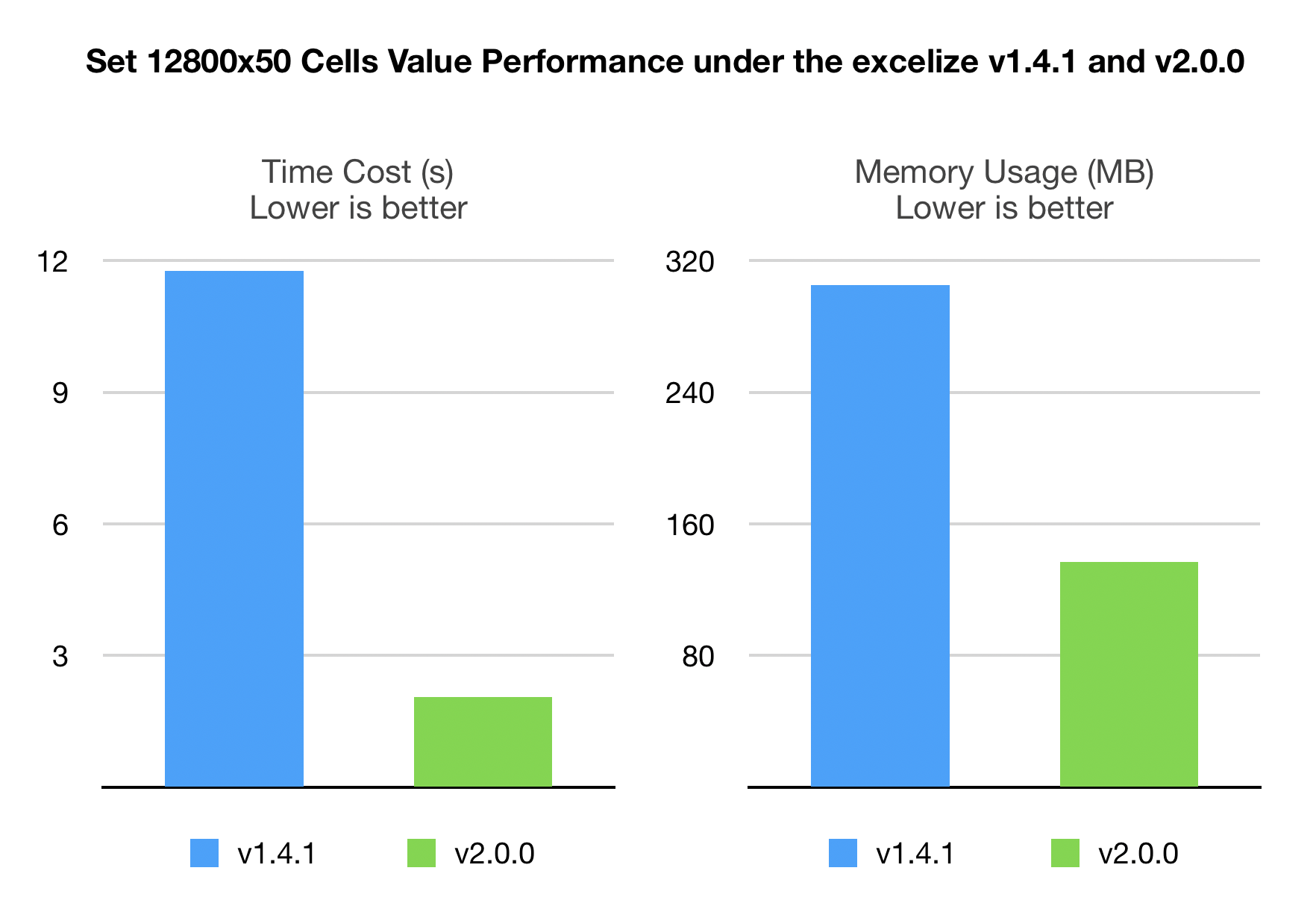
性能
- 性能优化,添加注释更快,相关问题 #347,添加图片、图表和形状更快,相关问题 #274
- 添加相同的图片应创建一个引用已存储图片副本的绘图,相关问题 #359
杂项
- 修复了拼写错误并更新了 godoc
- 测试更加健壮,测试矩阵中添加了 go1.12
更多关于Golang Excelize 2.0.0 全新发布的实战教程也可以访问 https://www.itying.com/category-94-b0.html

更多关于Golang Excelize 2.0.0 全新发布的实战系列教程也可以访问 https://www.itying.com/category-94-b0.html
Excelize 2.0.0 的发布确实带来了显著的改进和 API 变更。以下是一些关键点的示例代码,帮助用户快速适应新版本:
-
API 变更示例:许多函数现在返回
error值,需要处理错误。例如,SetCellValue在 v2.0.0 中必须检查错误:package main import ( "fmt" "github.com/360EntSecGroup-Skylar/excelize/v2" ) func main() { f := excelize.NewFile() index := f.NewSheet("Sheet1") // 在 v2.0.0 中,SetCellValue 返回 error,需要处理 err := f.SetCellValue("Sheet1", "A1", "Hello World") if err != nil { fmt.Println(err) return } f.SetActiveSheet(index) if err := f.SaveAs("Book1.xlsx"); err != nil { fmt.Println(err) } } -
行号变更示例:行操作方法现在使用基于 1 的索引,而不是从 0 开始。例如,
RemoveRow在 v2.0.0 中:package main import ( "fmt" "github.com/360EntSecGroup-Skylar/excelize/v2" ) func main() { f, err := excelize.OpenFile("Book1.xlsx") if err != nil { fmt.Println(err) return } // 删除第 2 行(在 v2.0.0 中行号从 1 开始) err = f.RemoveRow("Sheet1", 2) if err != nil { fmt.Println(err) return } if err := f.SaveAs("Book1_modified.xlsx"); err != nil { fmt.Println(err) } } -
新增函数示例:
DuplicateRowTo允许复制行到指定位置:package main import ( "fmt" "github.com/360EntSecGroup-Skylar/excelize/v2" ) func main() { f := excelize.NewFile() index := f.NewSheet("Sheet1") // 设置原始行数据 err := f.SetCellValue("Sheet1", "A1", "Original Data") if err != nil { fmt.Println(err) return } // 复制第 1 行到第 3 行 err = f.DuplicateRowTo("Sheet1", 1, 3) if err != nil { fmt.Println(err) return } f.SetActiveSheet(index) if err := f.SaveAs("Book1.xlsx"); err != nil { fmt.Println(err) } } -
性能优化示例:添加图片和图表现在更快。例如,使用
AddPicture:package main import ( "fmt" "github.com/360EntSecGroup-Skylar/excelize/v2" ) func main() { f := excelize.NewFile() // 添加图片到工作表 err := f.AddPicture("Sheet1", "A1", "image.png", "") if err != nil { fmt.Println(err) return } if err := f.SaveAs("Book1.xlsx"); err != nil { fmt.Println(err) } }
这些示例展示了 v2.0.0 的核心变更,包括错误处理、行号调整和新功能的使用。用户应更新代码以兼容新 API,避免因未处理错误或行号混淆导致的问题。
