




HarmonyOS鸿蒙Next中pdf kit使用报错 Cannot read property PdfDocument of undefined
HarmonyOS鸿蒙Next中pdf kit使用报错 Cannot read property PdfDocument of undefined 【问题描述】:
import { pdfService } from ‘@kit.PDFKit’;
// 创建 PdfDocument 实例 let pdfDocument: pdfService.PdfDocument = new pdfService.PdfDocument();
发现这个生成pdf文档的kit有问题,总是报错 error --> TypeError: Cannot read property PdfDocument of undefined
检查了,导入也是正确的
【问题现象】:
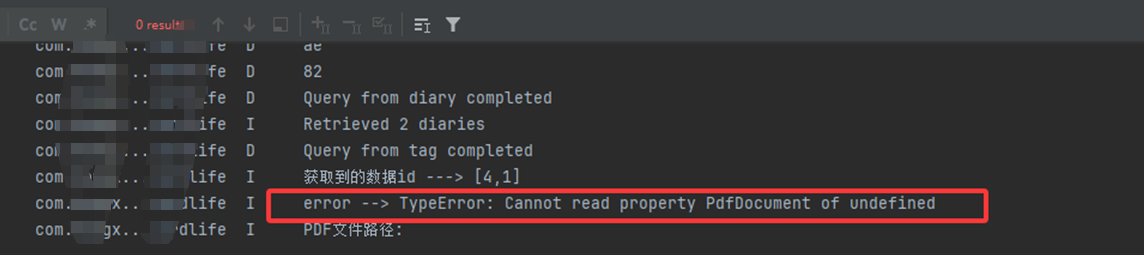
【版本信息】:不涉及
【复现代码】:不涉及
【尝试解决方案】:经查阅文档发现,PDF Kit(PDF服务)在X86版本不支持。https://developer.huawei.com/consumer/cn/doc/harmonyos-guides/ide-emulator-specification#section38231424133213
但是在使用文档的时候没有任何提示,报错也不明显,排查起来很困难,希望能在kit使用文档里添加一下使用限制说明
更多关于HarmonyOS鸿蒙Next中pdf kit使用报错 Cannot read property PdfDocument of undefined的实战教程也可以访问 https://www.itying.com/category-93-b0.html

PDF Kit(PDF服务)在X86版本不支持。https://developer.huawei.com/consumer/cn/doc/harmonyos-guides/ide-emulator-specification#section38231424133213 ,请使用真机测试该能力
更多关于HarmonyOS鸿蒙Next中pdf kit使用报错 Cannot read property PdfDocument of undefined的实战系列教程也可以访问 https://www.itying.com/category-93-b0.html

在HarmonyOS Next中,PdfKit模块未正确导入或初始化导致该错误。请检查是否在代码中正确引用了@ohos.pdf模块,并使用import pdf from '@ohos.pdf'导入。确保在调用pdf.createPdfDocument()前,模块已成功加载。

这个错误通常是因为PDF Kit在当前运行环境(如x86模拟器)中不可用。根据官方文档,PDF Kit目前仅支持ARM架构的设备,在x86模拟器上运行会返回undefined。
解决方案:
- 更换运行设备:在ARM架构的真机或模拟器上运行代码。
- 增加环境判断:在调用前检查
pdfService是否可用:
import { pdfService } from '@kit.PDFKit';
if (pdfService) {
  let pdfDocument = new pdfService.PdfDocument();
} else {
  console.error('PDF Kit is not supported in current environment.');
}
建议:开发时注意查看Kit的API参考文档,部分Kit有架构或系统版本限制。真机调试能更准确反映功能可用性。
