




uni-app 安卓 nvue list-swiper-waterfall 结构下 waterfall 内的 header 内容不显示
uni-app 安卓 nvue list-swiper-waterfall 结构下 waterfall 内的 header 内容不显示
产品分类:
uniapp/App
PC开发环境操作系统:
Mac
PC开发环境操作系统版本号:
macOS Big Sur 11.2.3
HBuilderX类型:
正式
HBuilderX版本号:
3.1.22
手机系统:
Android
手机系统版本号:
Android 11
手机厂商:
小米
手机机型:
MI 8
页面类型:
nvue
打包方式:
云端
项目创建方式:
HBuilderX
示例代码:
<template>
  <list class="scroll" id="parent" :bounce="false" :fix-freezing="true">
    <cell ref="header">
      <view class="card" v-for="idx in 10" :key="idx">
        <text>{{ idx }}</text>
      </view>
    </cell>
    <cell :style="{ height }">
      <hbb-swiper-bar :names="['页面A', '页面B', '页面C']" :current="current" @change="onChange" />
      <swiper style="flex: 1" :current="current" @change="onSwiper" @animationfinish="onSwiper">
        <swiper-item @appear="onEffects(0)">
          <hbb-waterfall ref="page0" :bounce="false" :fix-freezing="true" />
        </swiper-item>
        <swiper-item>
          <hbb-waterfall ref="page1" :bounce="false" :fix-freezing="true" />
        </swiper-item>
        <swiper-item>
          <hbb-waterfall ref="page2" :bounce="false" :fix-freezing="true" />
        </swiper-item>
      </swiper>
    </cell>
  </list>
</template>

<script>
import { getRefRect } from './weex'

const sys = uni.getSystemInfoSync()

export default {
  data() {
    return {
      current: 0,
      height: sys.windowHeight - sys.statusBarHeight, // 可视高度 - 状态栏高度
    }
  },
  async mounted() {
    const rect = await getRefRect(this.$refs.header)
    this.headerHeight = rect.height - sys.statusBarHeight // 头部高度 - 状态栏高度
    this.onEffects(this.current) // 问题1:此处设置无效,因为 waterfall 不在可视区域内
  },
  methods: {
    onChange(idx) {
      this.onEffects(idx)
      if (this.current === idx) return
      this.current = idx
    },
    onSwiper(e) {
      const idx = e.detail.current
      this.onChange(idx)
    },
    onEffects(idx) {
      const page = this.$refs[`page${idx}`]
      page.setEffects('parent', this.headerHeight)
      console.log('setEffects', idx, this.headerHeight)
    },
  },
}
</script>

<style lang="scss" scoped>
.scroll {
  background: #fff;
}

.card {
  align-items: center;
  justify-content: center;
  margin: 30rpx;
  margin-bottom: 0;
  width: 690rpx;
  height: 200rpx;
  border-radius: 10rpx;
  background: rgba(red, 0.1);
}
</style>
操作步骤:
安卓真机运行
预期结果:
显示waterfall 内 header 显示正常
实际结果:
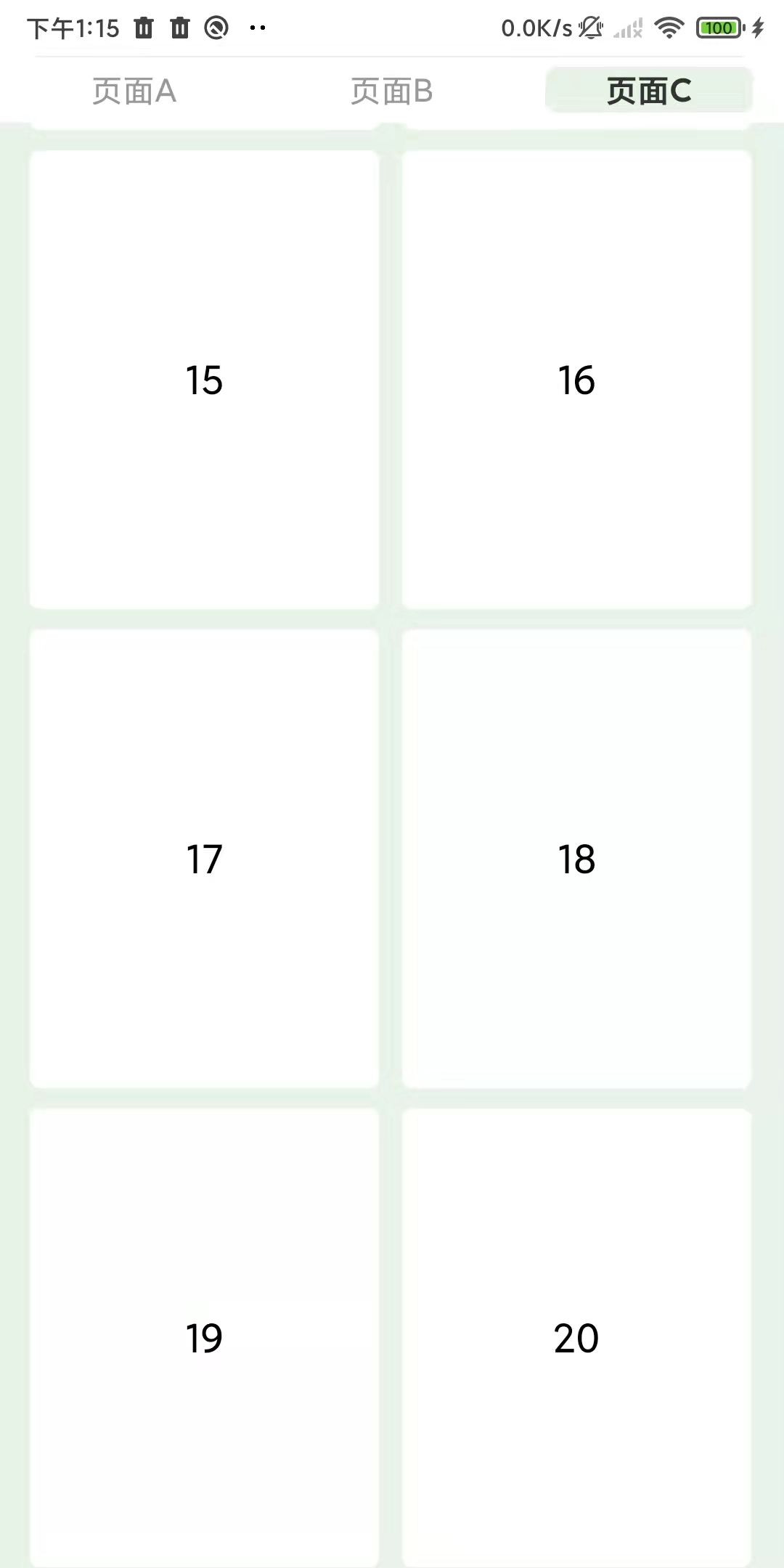
显示waterfall 内 header 不显示
bug描述:
安卓 nvue list-swiper-waterfall 这种结构下相关问题
- 当 swiper 离屏后waterfall 设置 specialEffects 无效,检查
hbb-swiper-list.vue - waterfall 内的 header 内容不显示,检查
hbb-waterfall.vue - waterfall 内的 header 设置 position absolute 也不显示,设置 fixed 能正常显示 tips: 花了不少时间裁剪了业务相关代码,问题稳定复现,希望官方重视
更多关于uni-app 安卓 nvue list-swiper-waterfall 结构下 waterfall 内的 header 内容不显示的实战教程也可以访问 https://www.itying.com/category-93-b0.html

上拉加载处理逻辑,这块建议封装成组件
<template>
<waterfall
ref=“list”
:style="{ flex: 1 }"
:left-gap=“padding”
:right-gap=“padding”
:column-gap=“margin”
:column-width=“width”
:column-count=“2”
:show-scrollbar=“false”
:scroll-to-begin=“false”
:bounce=“false”
:fix-freezing=“true”
:loadmoreoffset=“offset”
@loadmore=“onLoadmore()”
v-bind="$attrs"
v-on="$listeners"
<header :style="{ height: margin }"></header>
<slot></slot>
更多关于uni-app 安卓 nvue list-swiper-waterfall 结构下 waterfall 内的 header 内容不显示的实战教程也可以访问 https://www.itying.com/category-93-b0.html


回复 DCloud_Android_ST: header 无法显示的问题已确认。android平台setspecialEffects 中的headerHeight暂时不支持 文档有说明


这个问题是由于在 list-swiper-waterfall 嵌套结构中,当 swiper-item 离屏时,waterfall 组件的 specialEffects 设置失效导致的。具体分析如下:
-
核心问题:
waterfall组件在非当前显示的swiper-item中(即离屏状态)无法正确应用specialEffects配置,导致其内部的header无法正常渲染。 -
临时解决方案:
- 将
waterfall的header样式改为position: fixed,这可以绕过specialEffects失效的问题,确保内容显示。 - 在
swiper的@change事件中,手动触发当前显示页面的waterfall重新应用specialEffects(例如调用setEffects方法)。
- 将
-
代码调整建议:
- 在
onSwiper或onChange方法中,确保对当前激活的waterfall组件显式设置specialEffects,例如:onEffects(idx) { const page = this.$refs[`page${idx}`]; if (page) { page.setEffects('parent', this.headerHeight); } }
- 在
