




HarmonyOS鸿蒙Next中AppLinking跳转问题
HarmonyOS鸿蒙Next中AppLinking跳转问题
-
在域名下配置完applinking.json文件后,最终访问链接是https://www.xxx.com/.well-known/applinking.json且成功访问。
-
在AGC也创建了应用链接,配置的域名是https://www.xxx.com,发布也通过,且正常下载json文件。
-
在entry的module.json中配置了
// App Linking
{
  "entities": [
    // entities必须包含"entity.system.browsable"
    "entity.system.browsable"
  ],
  "actions": [
    // actions必须包含"ohos.want.action.viewData"
    "ohos.want.action.viewData"
  ],
  "uris": [
    {
      // scheme须配置为https
      "scheme": "https",
      // host须配置为关联的域名
      "host": "xxx.com",
      // path可选,表示域名服务器上的目录或文件路径,例如www.example.com/path1中的path1
      // 如果应用只能处理部分特定的path,则此处应该配置应用所支持的path,避免出现应用不能处理的path链接也被引流到应用中的问题
//                "pathRegex": "/index/startApp"
    }
  ],
  // domainVerify须设置为true
  "domainVerify": true
}
在最终需要访问时需要去掉pathRegex才能正确访问,求助一下如果想通过https://www.xxx.com/index/startApp?param=xxxm 来正常访问,该怎么修改?
更多关于HarmonyOS鸿蒙Next中AppLinking跳转问题的实战教程也可以访问 https://www.itying.com/category-93-b0.html

小伙伴你好,参考以下代码段
// App Linking
{
  "entities": [
    // entities必须包含"entity.system.browsable"
    "entity.system.browsable"
  ],
  "actions": [
    // actions必须包含"ohos.want.action.viewData"
    "ohos.want.action.viewData"
  ],
  "uris": [
    {
      // scheme须配置为https
      "scheme": "https",
      // host须配置为关联的域名
      "host": "xxx.com",
      // 路径前缀,该字段在scheme存在时才有意义,表示域名服务器上的目录或文件路径的前缀,用于前缀匹配。
      "pathStartWith": "index/startApp"
    }
  ],
  // domainVerify须设置为true
  "domainVerify": true
}
更多关于HarmonyOS鸿蒙Next中AppLinking跳转问题的实战系列教程也可以访问 https://www.itying.com/category-93-b0.html

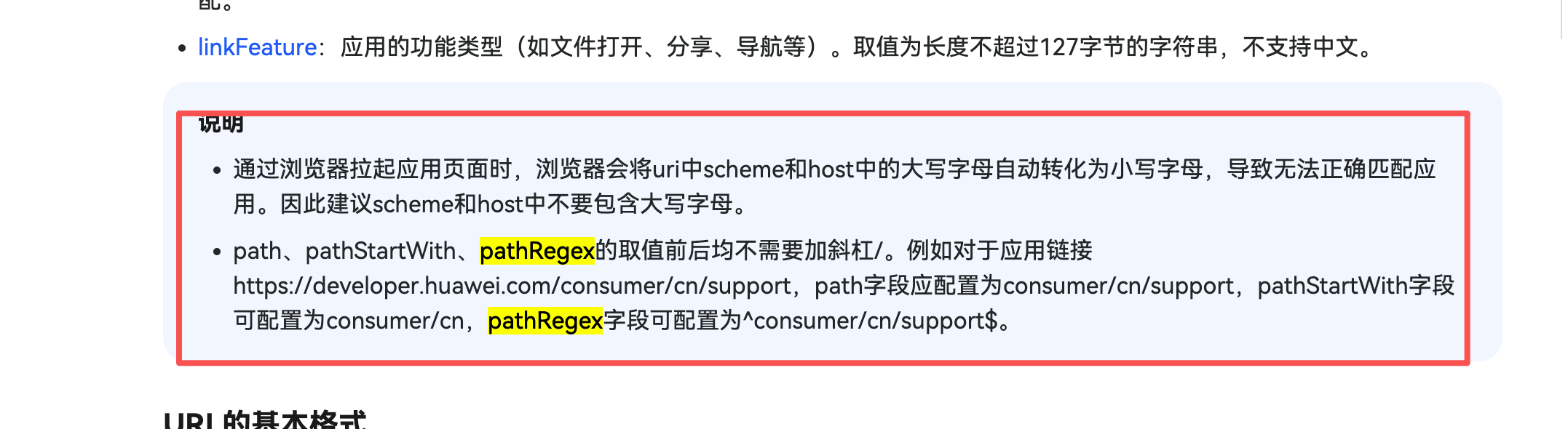
还有就是 pathRegex 这个应该是正则匹配,不是直接写路径吧
- 全路径表达式:scheme://host:port/path
- 路径前缀表达式:scheme://host:port/pathStartWith
- 路径正则表达式:scheme://host:port/pathRegex

应用链接说明:https://developer.huawei.com/consumer/cn/doc/harmonyos-guides/app-uri-config
去掉pathRegex的/试试
鸿蒙Next中AppLinking跳转需在module.json5的abilities下配置skills,声明actions为ohos.want.action.viewData,entities包含entity.system.default,并设置uris的scheme。通过wantAgent模块的trigger方法触发跳转。

根据你的描述,问题核心在于如何让AppLinking正确匹配并跳转带有特定路径(/index/startApp)的URL。你的配置目前只匹配了域名(xxx.com),没有限定路径,所以去掉pathRegex注释后反而无法跳转。
要实现通过 https://www.xxx.com/index/startApp?param=xxx 访问,需要对 module.json 中的 uris 配置进行精确调整。正确的配置示例如下:
{
  "entities": ["entity.system.browsable"],
  "actions": ["ohos.want.action.viewData"],
  "uris": [
    {
      "scheme": "https",
      "host": "xxx.com",
      // 关键修改:使用 pathRegex 精确匹配路径
      "pathRegex": "^/index/startApp$",
      // 或者使用 path 进行精确匹配(如果路径完全固定)
      // "path": "/index/startApp"
    }
  ],
  "domainVerify": true
}
关键点解析:
-
pathRegex的使用:你遇到的问题很可能是因为pathRegex的值不正确。示例中配置的"^/index/startApp$"是一个正则表达式,它表示:^:匹配字符串开始(即路径的开始)。/index/startApp:精确匹配这个路径字符串。$:匹配字符串结束(确保路径到此为止,不会匹配更长的路径如/index/startApp/extra)。 这个配置能确保只有访问https://www.xxx.com/index/startApp及其携带的任意查询参数(如?param=xxx)时,才会触发应用跳转。查询参数(?之后的部分)不会被pathRegex匹配规则影响。
-
path作为替代方案:如果你的目标路径是固定的,完全不含动态部分,也可以使用"path": "/index/startApp"进行简单字符串匹配。效果与上述pathRegex类似。 -
域名验证:请确保你的
applinking.json文件在https://www.xxx.com/.well-known/applinking.json可访问,且内容正确。这是"domainVerify": true生效的前提。
修改后步骤:
- 将
module.json中的uris配置按上述示例修改。 - 重新编译并安装应用。
- 在设备浏览器或短信等场景中,点击
https://www.xxx.com/index/startApp?param=xxx链接进行测试。
这样配置后,只有符合该特定路径的链接才会拉起你的应用,并可以通过 want.parameters 获取到URL中的查询参数(如 param=xxx)进行后续处理。
