




Golang中如何同时运行多个模块的测试
Golang中如何同时运行多个模块的测试
我正在使用 Go 来测试一些 Terraform 代码,并且对这种语言还比较陌生。我想要做的是在多个 Go 模块上运行测试,这些模块分别测试独立的 Terraform 模块。目前我的测试模块结构如下:
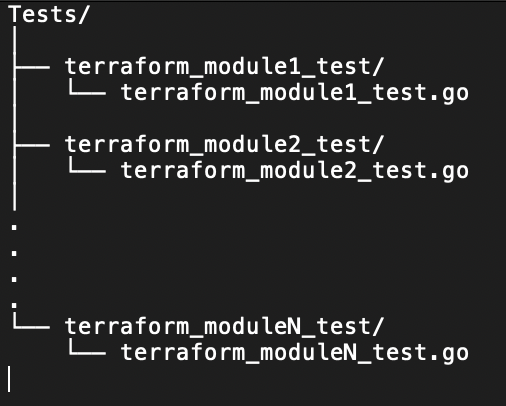
为了运行各个测试,我目前的解决方案(可能比较初级)是进入每个测试模块并运行:
go mod init
go mod tidy
go test -v <TEST_MODULE.GO FILE>
有没有办法可以一起运行位于各个模块中的测试,而不是分别运行它们?目前我使用一个脚本来一起运行它们,但在那种情况下没有很好的快速失败机制。 由于我对 Go 非常陌生,我可能没有用正确的方式来做这件事,任何建议都会非常有帮助。
更多关于Golang中如何同时运行多个模块的测试的实战教程也可以访问 https://www.itying.com/category-94-b0.html

目前,如果我的任何测试失败,它仍然会发送零状态码。我是否需要修改 go test 代码,使其在失败时以非零状态码退出?
更多关于Golang中如何同时运行多个模块的测试的实战系列教程也可以访问 https://www.itying.com/category-94-b0.html

我不知道有原生的 Go 方法,但 failfast 应该能很好地工作……
如果我没记错的话,set -e 应该可以完成这个任务。也可能是 set -x……通常我同时使用这两个,不需要关心哪个会向上传递失败,哪个会输出命令……
// 代码示例
func example() {
    // 这里可以放置一些Go代码
}
明白了。只需要在根目录下有一个 go mod 文件。如果 go mod init 不生效,只需创建一个包含以下内容的 go.mod 文件:
module <模块名称。可以是 Git 项目的链接>
go <版本号>
然后我运行了以下步骤:
go mod tidy
go test [flags] ./...
这可能不是标准做法,但它确实有效,希望能帮助到其他人。

在Go中同时运行多个模块的测试,有几种方法可以实现:
方法1:使用go test ./...递归运行测试
如果你的模块都在同一个根目录下,可以使用:
// 在项目根目录运行
go test ./... -v

// 或者指定特定目录
go test ./module1 ./module2 ./module3 -v
方法2:使用Makefile统一管理
创建Makefile:
.PHONY: test-all test-module1 test-module2 test-module3

test-all: test-module1 test-module2 test-module3

test-module1:
    cd module1 && go test -v ./...

test-module2:
    cd module2 && go test -v ./...

test-module3:
    cd module3 && go test -v ./...
运行:
make test-all
方法3:使用Go 1.18+的工作区功能
创建go.work文件:
go 1.18

use (
    ./module1
    ./module2
    ./module3
)
然后在根目录运行:
go test ./... -v
方法4:编写Go脚本统一运行
创建run_tests.go:
package main

import (
    "fmt"
    "os"
    "os/exec"
    "path/filepath"
)

func main() {
    modules := []string{
        "module1",
        "module2",
        "module3",
    }

    for _, module := range modules {
        fmt.Printf("Testing %s...\n", module)

        cmd := exec.Command("go", "test", "-v", "./...")
        cmd.Dir = module
        cmd.Stdout = os.Stdout
        cmd.Stderr = os.Stderr

        if err := cmd.Run(); err != nil {
            fmt.Printf("Tests failed in %s: %v\n", module, err)
            os.Exit(1)
        }
    }

    fmt.Println("All tests passed")
}
运行:
go run run_tests.go
方法5:使用并行执行加速测试
package main

import (
    "context"
    "fmt"
    "os"
    "os/exec"
    "path/filepath"
    "sync"
)

func testModule(ctx context.Context, module string, wg *sync.WaitGroup, results chan<- error) {
    defer wg.Done()

    cmd := exec.CommandContext(ctx, "go", "test", "-v", "./...")
    cmd.Dir = module
    cmd.Stdout = os.Stdout
    cmd.Stderr = os.Stderr

    results <- cmd.Run()
}

func main() {
    modules := []string{
        "module1",
        "module2",
        "module3",
    }

    ctx := context.Background()
    var wg sync.WaitGroup
    results := make(chan error, len(modules))

    for _, module := range modules {
        wg.Add(1)
        go testModule(ctx, module, &wg, results)
    }

    wg.Wait()
    close(results)

    for err := range results {
        if err != nil {
            fmt.Printf("Test failed: %v\n", err)
            os.Exit(1)
        }
    }

    fmt.Println("All tests passed")
}
对于Terraform测试,你可能还需要考虑:
// 在测试中设置环境变量
os.Setenv("TF_ACC", "1")  // 启用Terraform验收测试

// 使用t.Parallel()加速测试
func TestTerraformModule(t *testing.T) {
    t.Parallel()
    // 测试代码
}
选择哪种方法取决于你的具体需求。如果模块相互独立,方法4或5提供了更好的控制和快速失败机制。
