




Windows环境下Clang编译错误排查指南(Golang相关)
Windows环境下Clang编译错误排查指南(Golang相关) 你好,我有些用C语言编写的Go包。我需要在C/C++文件中使用这个C语言包,因此我使用以下命令创建了.so文件:
go build -o libuplinkc.so -buildmode=c-shared
并且我在C/C++文件中使用了这个文件。 当我在Linux和macOS上编译代码时,代码运行正常。以下是相关编译器的详细信息。
macOS
Apples-MBP-3:~ Apple$ gcc --version
Configured with: --prefix=/Library/Developer/CommandLineTools/usr --with-gxx-include-dir=/Library/Developer/CommandLineTools/SDKs/MacOSX.sdk/usr/include/c++/4.2.1
Apple clang version 11.0.0 (clang-1100.0.33.17)
Target: x86_64-apple-darwin19.3.0
Thread model: posix
InstalledDir: /Library/Developer/CommandLineTools/usr/bin
Apples-MBP-3:~ Apple$ g++ --version
Configured with: --prefix=/Library/Developer/CommandLineTools/usr --with-gxx-include-dir=/Library/Developer/CommandLineTools/SDKs/MacOSX.sdk/usr/include/c++/4.2.1
Apple clang version 11.0.0 (clang-1100.0.33.17)
Target: x86_64-apple-darwin19.3.0
Thread model: posix
InstalledDir: /Library/Developer/CommandLineTools/usr/bin
Ubuntu
shivam@zz:~$ gcc --version
gcc (Ubuntu 5.5.0-12ubuntu1~16.04) 5.5.0 20171010
Copyright (C) 2015 Free Software Foundation, Inc.
This is free software; see the source for copying conditions.  There is NO
warranty; not even for MERCHANTABILITY or FITNESS FOR A PARTICULAR PURPOSE.

shivam@zz:~$ g++ --version
g++ (Ubuntu 5.5.0-12ubuntu1~16.04) 5.5.0 20171010
Copyright (C) 2015 Free Software Foundation, Inc.
This is free software; see the source for copying conditions.  There is NO
warranty; not even for MERCHANTABILITY or FITNESS FOR A PARTICULAR PURPOSE.
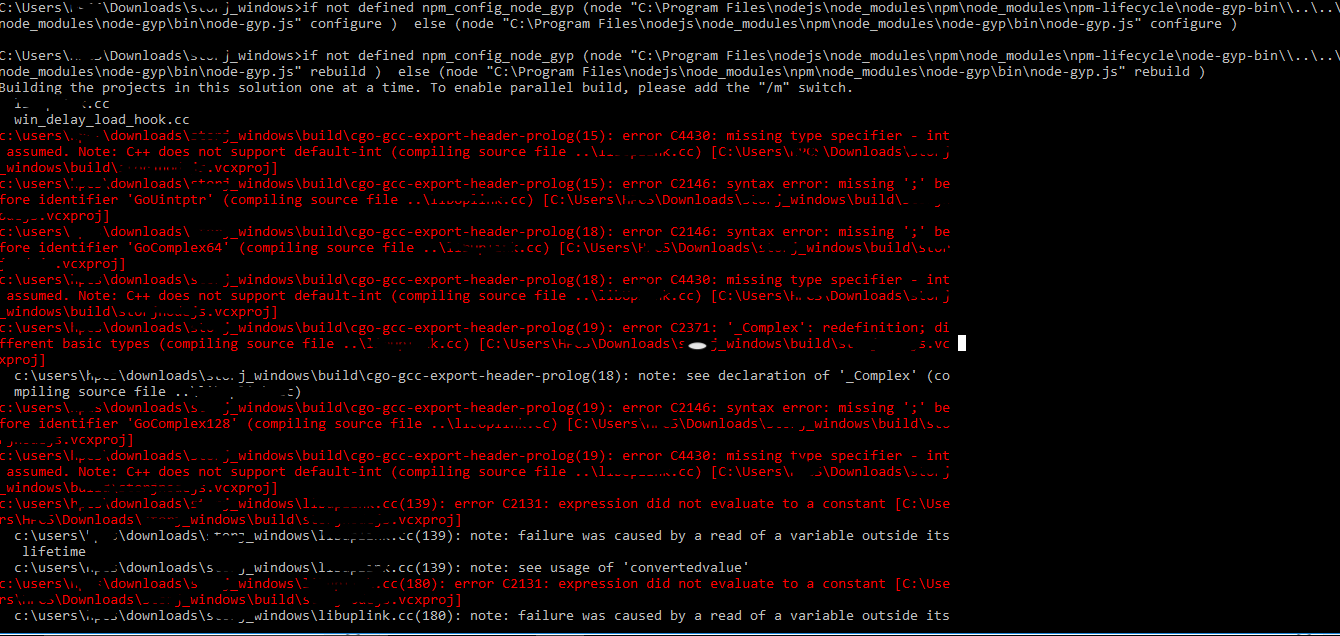
但是当我在Windows上运行相同的代码时,我遇到了以下错误:
Windows编译器版本
gcc (tdm64-1) 5.1.0
Copyright (C) 2015 Free Software Foundation, Inc.
This is free software; see the source for copying conditions.  There is NO
warranty; not even for MERCHANTABILITY or FITNESS FOR A PARTICULAR PURPOSE.


C:\Users\zz\Downloads\storj_windows>g++ --version
g++ (tdm64-1) 5.1.0
Copyright (C) 2015 Free Software Foundation, Inc.
This is free software; see the source for copying conditions.  There is NO
warranty; not even for MERCHANTABILITY or FITNESS FOR A PARTICULAR PURPOSE.
我已经尝试了不同的编译器,但问题仍然存在。
问题 在Windows上我应该使用哪个编译器来编译代码?
更多关于Windows环境下Clang编译错误排查指南(Golang相关)的实战教程也可以访问 https://www.itying.com/category-94-b0.html
1 回复

更多关于Windows环境下Clang编译错误排查指南(Golang相关)的实战系列教程也可以访问 https://www.itying.com/category-94-b0.html
在Windows环境下使用Clang编译Golang生成的C共享库时,需要特别注意编译器兼容性和链接器设置。以下是具体解决方案:
1. 编译器选择
Windows上推荐使用MinGW-w64的Clang,而不是TDM-GCC:
# 安装MinGW-w64 Clang
# 从 https://github.com/msys2/msys2-installer/releases 下载MSYS2
# 然后安装clang和mingw-w64工具链
pacman -S mingw-w64-x86_64-clang mingw-w64-x86_64-toolchain

# 验证安装
clang --version
2. 编译命令调整
使用正确的目标平台和链接器标志:
# 生成Windows DLL
go build -o libuplinkc.dll -buildmode=c-shared

# C++编译示例
clang++ -I. -L. -luplinkc your_code.cpp -o your_program.exe

# 或者使用gcc-mingw-w64
x86_64-w64-mingw32-g++ -I. -L. -luplinkc your_code.cpp -o your_program.exe
3. 处理Windows特定的导出符号
创建.def文件明确导出函数:
// 在Go代码中添加导出注释
//export YourFunctionName
func YourFunctionName() {
    // 函数实现
}

// 生成def文件
go tool cgo -exportheader uplinkc.h
4. 完整编译示例
# 步骤1: 生成DLL和头文件
go build -o libuplinkc.dll -buildmode=c-shared

# 步骤2: C++代码编译
x86_64-w64-mingw32-clang++ \
    -I. \
    -L. \
    -luplinkc \
    -Wl,--export-all-symbols \
    -Wl,--enable-auto-import \
    main.cpp \
    -o program.exe
5. 运行时依赖
确保DLL在可执行文件路径中,或使用绝对路径:
# 设置DLL搜索路径
export PATH=$PATH:$(pwd)
# 或者复制DLL到系统目录
关键点:Windows需要DLL格式的共享库,使用MinGW-w64工具链,并确保正确的函数导出声明。
