




Golang中如何在html/template中使用CSS
Golang中如何在html/template中使用CSS 大家好!
我构建了一个小型Go服务器。
项目结构:
-css ---- style.css
-gohtml ---- index.html ---- about.html
*server.go :
package main

import (

"net/http"

"html/template"

"path/filepath"

"log"

)

func main(){

// 处理客户端对模板系统的请求

http.HandleFunc("/", func(w http.ResponseWriter, r *http.Request){

// 管理模板布局路径

layout_path := filepath.Join("templates","layout.gohtml")

// 管理 *http.request

request_raw_path := filepath.Clean(r.URL.Path)

request_clean_path := filepath.Join("gohtml",request_raw_path)

if request_clean_path == "gohtml"{

request_clean_path = filepath.Join("gohtml","index.gohtml")

}else{

request_clean_path += ".gohtml"

}

// 解析布局文件和客户端请求的文件

template_page, err := template.ParseFiles(layout_path, request_clean_path)

if err != nil{

log.Println("Error : Failed to parse files")

log.Fatal(err)

}

// 在 http.ResponseWriter 上执行模板

template_page.ExecuteTemplate(w, "layout", nil)

})

// 启动服务器

// 错误处理正常

log.Fatal(http.ListenAndServe(":8080", nil))

}
layout.gohtml :
{{define "layout"}}

<!DOCTYPE html>

<html>

    <head>

        <meta charset="utf-8">

        <!--<link href="css/style.css" type="text/css" rel="stylesheet">-->

        <title>{{template "page_title"}}</title>

    </head>

    <body>

        {{template "page_body"}}

    </body>

</html>

{{end}}
我的问题是,如果我去掉 layout.gohtml 中的注释,CSS 文件会被服务器视为一个请求,因此不会被加载……因为代码只会在 “gohtml” 目录中搜索。
如何解决这个问题?
提前感谢。
更多关于Golang中如何在html/template中使用CSS的实战教程也可以访问 https://www.itying.com/category-94-b0.html


Valenciano_8:
@Sibert : 为什么在这种情况下使用 http.StripPrefix?
正如我写的,Go 必须知道你的目录树结构才能使用它。在我的例子中,我使用了我自己的目录树。我发现使用常见的“public”文件夹来收集 css、js、img 和 html 文件夹很方便。

你好,@Valenciano_8,
你所说的这句话是什么意思:
我的问题是,如果我移除 layout.gohtml 文件中的注释,CSS 就会被服务器视为一个请求,因此不会被加载……因为代码只在 “gohtml” 文件中查找。
在我看来这是对的,CSS 是在客户端处理的,所以对该 CSS 文件的请求会发送到服务器。我认为你需要修改你的服务器实现来处理那个 CSS 请求。

我的问题是,如果移除 layout.gohtml 中的注释,CSS 会被服务器视为一个请求,因此不会被加载……因为代码只在 “gohtml” 文件中搜索。
它没有被加载,是因为你必须“指向”目录树中的所有文件夹。
func main() {
   http.HandleFunc("/", index)
   http.Handle("/css/", http.StripPrefix("/css/", http.FileServer(http.Dir("./public/css"))))  <-----
   http.ListenAndServe....
}
大家好!感谢你们的回答。
嗯,这是我的更新后的代码:
package main

import (

    "net/http"

    "html/template"

    "path/filepath"

    "log"

)

func main(){

    // 处理客户端对模板系统的请求

    http.HandleFunc("/", func(w http.ResponseWriter, r *http.Request){

        // 管理模板布局路径

        layout_path := filepath.Join("templates","layout.gohtml")

        // 管理 *http.request

        request_raw_path := filepath.Clean(r.URL.Path)

        request_clean_path := filepath.Join("gohtml",request_raw_path)


        log.Println("REQUEST = ", request_clean_path)

        if request_clean_path == "gohtml"{

            request_clean_path = filepath.Join("gohtml","index.gohtml")

            log.Println("REQUEST = ", request_clean_path)

        }else{

            request_clean_path += ".gohtml"

        }

        // 解析布局和客户端请求文件

        template_page, err := template.ParseFiles(layout_path, request_clean_path)

        if err != nil{

            log.Println("Error : Failed to parse files")

            log.Fatal(err)

        }


        // 在 http.ResponseWriter 上执行模板

        template_page.ExecuteTemplate(w, "layout", nil)

    })

    // 处理客户端对 CSS 的请求

    http.Handle("/css/", http.FileServer(http.Dir("./css/")))

    // 启动服务器

    // 错误处理正常

    log.Fatal(http.ListenAndServe(":8080", nil))

}
如你所见,我添加了:
// 处理客户端对 CSS 的请求
http.Handle("/css/", http.FileServer(http.Dir("./css/")))
:为什么在这种情况下要使用 http.StripPrefix?
我的项目结构很简单:
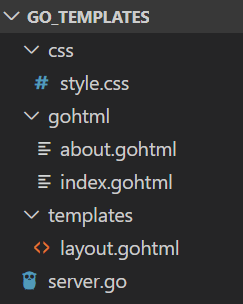
当我运行服务器时,gohtml 文件加载没有任何问题,但 CSS 仍然找不到……
确实,如果我在网页上右键点击 > 查看源代码 > 然后点击 CSS 文件,它会返回“404 页面未找到”。
有什么想法吗?

在Go的html/template中使用CSS,你需要通过HTTP服务器提供静态文件服务。你的代码目前只处理了模板文件,但没有处理CSS等静态资源。以下是解决方案:
1. 添加静态文件处理器
修改你的main函数,添加静态文件服务:
package main

import (
    "net/http"
    "html/template"
    "path/filepath"
    "log"
)

func main() {
    // 添加静态文件服务
    fs := http.FileServer(http.Dir("css"))
    http.Handle("/css/", http.StripPrefix("/css/", fs))

    // 处理模板请求
    http.HandleFunc("/", func(w http.ResponseWriter, r *http.Request) {
        // 检查是否是根路径或HTML页面请求
        if r.URL.Path != "/" && filepath.Ext(r.URL.Path) != "" {
            // 如果不是根路径且有扩展名,返回404
            http.NotFound(w, r)
            return
        }

        // 管理模板布局路径
        layout_path := filepath.Join("templates", "layout.gohtml")

        // 确定请求的模板文件
        var templateFile string
        if r.URL.Path == "/" || r.URL.Path == "/index" {
            templateFile = filepath.Join("gohtml", "index.gohtml")
        } else {
            // 移除开头的斜杠
            path := r.URL.Path[1:]
            templateFile = filepath.Join("gohtml", path + ".gohtml")
        }

        // 解析模板
        tmpl, err := template.ParseFiles(layout_path, templateFile)
        if err != nil {
            log.Printf("Error parsing template: %v", err)
            http.Error(w, "Internal Server Error", 500)
            return
        }

        // 执行模板
        err = tmpl.ExecuteTemplate(w, "layout", nil)
        if err != nil {
            log.Printf("Error executing template: %v", err)
            http.Error(w, "Internal Server Error", 500)
        }
    })

    log.Println("Server starting on :8080")
    log.Fatal(http.ListenAndServe(":8080", nil))
}
2. 更新HTML模板中的CSS引用
在layout.gohtml中,确保CSS路径正确:
{{define "layout"}}
<!DOCTYPE html>
<html>
    <head>
        <meta charset="utf-8">
        <link href="/css/style.css" type="text/css" rel="stylesheet">
        <title>{{template "page_title"}}</title>
    </head>
    <body>
        {{template "page_body"}}
    </body>
</html>
{{end}}
3. 项目结构调整
确保你的项目结构如下:
project/
├── css/
│   └── style.css
├── gohtml/
│   ├── index.gohtml
│   └── about.gohtml
├── templates/
│   └── layout.gohtml
└── server.go
4. 示例CSS文件
css/style.css示例:
body {
    font-family: Arial, sans-serif;
    margin: 0;
    padding: 20px;
    background-color: #f0f0f0;
}

h1 {
    color: #333;
}
5. 更完整的静态文件处理
如果你有多个静态目录,可以使用更灵活的方式:
// 处理多个静态目录
http.Handle("/css/", http.StripPrefix("/css/",
    http.FileServer(http.Dir("css"))))
http.Handle("/js/", http.StripPrefix("/js/",
    http.FileServer(http.Dir("js"))))
http.Handle("/images/", http.StripPrefix("/images/",
    http.FileServer(http.Dir("images"))))
6. 使用http.Dir的注意事项
确保CSS文件存在且路径正确。如果CSS文件在css/style.css,那么HTML中应该引用/css/style.css。
这个解决方案通过添加静态文件处理器,让Go服务器能够正确提供CSS文件,同时保持模板处理逻辑不变。
