




uni-app 微信小程序 editor 组件 IOS 不能正常页面上推问题
uni-app 微信小程序 editor 组件 IOS 不能正常页面上推问题
| 开发环境 | 版本号 | 项目创建方式 |
|---|---|---|
| Mac | 11.2.2 | CLI |
产品分类:uniapp/小程序/微信

### 示例代码:

```html
<template>
  <view>
    <view class="container" :style="{ height: editorHeight + 'px' }">
      <editor
        id="editor"
        class="ql-container"
        placeholder="请输入内容"
        @ready="onEditorReady"
      >
      </editor>
    </view>

    <view
      class="toolbar"
      :style="{ bottom: isIOS ? keyboardHeight + 'px' : '0' }"
    >
      测试Bottom
    </view>
  </view>
</template>

<script>
export default {
  data() {
    return {
      keyboardHeight: 0,
      editorHeight: 0,
      isIOS: 0,
    };
  },
  onLoad() {
    let self = this;
    const toolbarHeight = 50;
    const { windowHeight, platform } = uni.getSystemInfoSync();
    self.isIOS = platform === "ios";
    self.editorHeight = windowHeight - toolbarHeight;
    uni.onKeyboardHeightChange((res) => {
      if (res.height === self.keyboardHeight) return;
      self.keyboardHeight = res.height;
      self.editorHeight = windowHeight - toolbarHeight - res.height
    });
  },
  methods: {
    onEditorReady() {
      const that = this;
      uni.createSelectorQuery()
        .select("#editor")
        .context(function (res) {
          that.editorCtx = res.context;
        })
        .exec();
    },
  },
};
</script>

<style scoped>
.container {
  position: absolute;
  top: 0;
  left: 0;
  width: 100%;
}

.ql-container {
  box-sizing: border-box;
  width: 100%;
  height: 100%;
  font-size: 16px;
  line-height: 1.5;
  overflow: auto;
  padding: 10px 10px 20px 10px;
  border: 1px solid #ececec;
}

.ql-active {
  color: #22c704;
}

.iconfont {
  display: inline-block;
  width: 30px;
  height: 30px;
  cursor: pointer;
  font-size: 20px;
}

.toolbar {
  box-sizing: border-box;
  padding: 0 10px;
  height: 50px;
  width: 100%;
  position: fixed;
  left: 0;
  right: 100%;
  bottom: 0;
  display: flex;
  align-items: center;
  justify-content: space-between;
  border: 1px solid #ececec;
  border-left: none;
  border-right: none;
}
</style>
操作步骤:
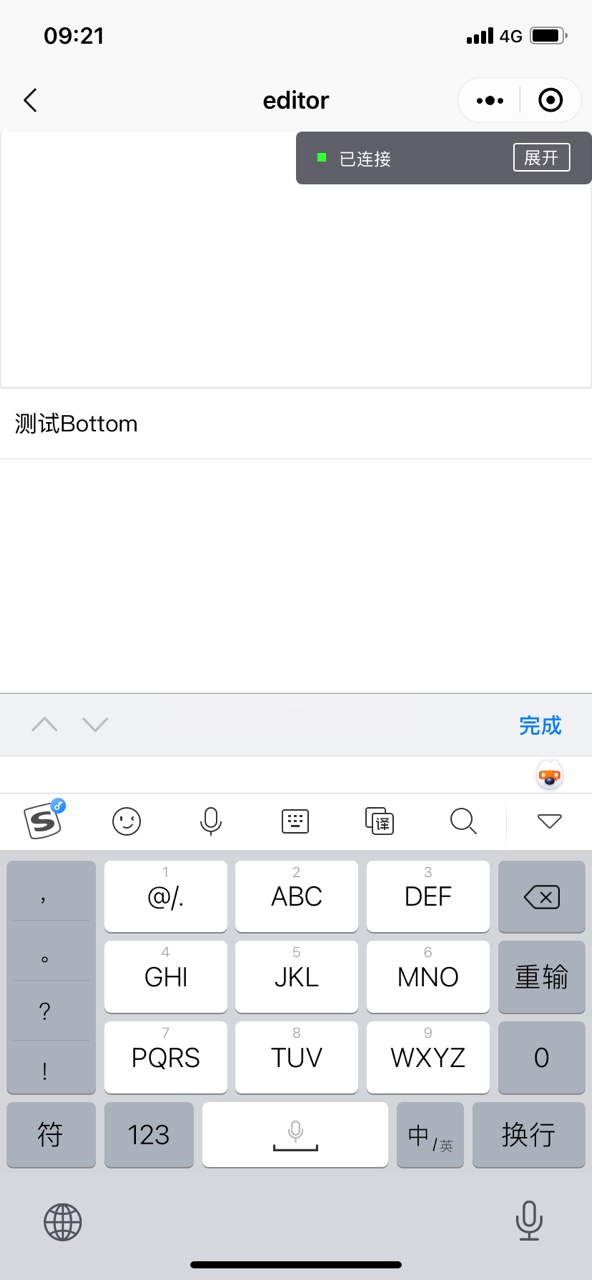
- 使用IOS真机调试,弹出键盘,看测试Bottom与键盘之间是否多出一段高度
预期结果:
- 测试Bottom与键盘之间不会多出一段高度
实际结果:
- 测试Bottom与键盘之间多出了一段高度
bug描述:
根据微信小程序开发文档使用editor测试弹出页面上推功能,官方代码使用IOS真机调试上推正常,使用uniapp编译后IOS真机调试上推异常,表现为底部测试Bottom是否正常上推,官方代码IOS上推不会出现下面多余的长度即底部测试Bottom与键盘之间没有多出一段高度,截图所示是使用uniapp编译后IOS真机调试上推异常,底部测试Bottom与键盘之间不应该多出一段高度。
更多关于uni-app 微信小程序 editor 组件 IOS 不能正常页面上推问题的实战教程也可以访问 https://www.itying.com/category-93-b0.html

更多关于uni-app 微信小程序 editor 组件 IOS 不能正常页面上推问题的实战教程也可以访问 https://www.itying.com/category-93-b0.html
这是一个已知的 iOS 平台下 editor 组件的兼容性问题。问题核心在于 uni-app 编译后,iOS 系统键盘弹出时页面布局的计算方式与原生微信小程序存在差异。
在你的代码中,通过 uni.onKeyboardHeightChange 监听键盘高度变化并动态调整 editorHeight 和 toolbar 的 bottom 值,思路正确。但在 iOS 上,键盘高度变化事件 (res.height) 可能包含了底部安全区域(如 iPhone 的 Home Indicator)等因素,导致计算出的 editorHeight 偏小,从而使 toolbar 定位出现偏差,出现“多出一段高度”的情况。
建议的解决方案:
-
精确获取键盘与安全区域高度:使用
uni.getSystemInfoSync()获取safeAreaInsets.bottom(底部安全区高度)。在计算editorHeight和设置tooloolbar的bottom值时,应考虑减去这个安全区高度,尤其是在键盘未弹出时。 -
优化高度计算逻辑:修改
onKeyboardHeightChange事件中的计算方式。可以尝试在 iOS 上,将键盘高度 (res.height) 直接作为toolbar的bottom值,而editorHeight的计算则使用窗口高度减去工具栏高度,再减去键盘高度和安全区高度(如果键盘弹出)。 -
使用 CSS 适配:确保
toolbar的样式在 iOS 上适配安全区域。可以尝试添加padding-bottom: env(safe-area-inset-bottom);到toolbar的样式中,但这可能对动态调整bottom值有影响,需要结合 JS 逻辑。
修改示例(重点修改 onLoad 方法):
onLoad() {
  let self = this;
  const toolbarHeight = 50;
  const sysInfo = uni.getSystemInfoSync();
  const { windowHeight, platform, safeAreaInsets } = sysInfo;

  self.isIOS = platform === "ios";
  self.safeAreaBottom = safeAreaInsets ? safeAreaInsets.bottom : 0; // 获取安全区高度

  // 初始高度计算:窗口高度 - 工具栏高度 - 安全区底部高度(如果键盘未弹出,安全区可能已被占用)
  self.editorHeight = windowHeight - toolbarHeight - self.safeAreaBottom;

  uni.onKeyboardHeightChange((res) => {
    if (res.height === self.keyboardHeight) return;
    self.keyboardHeight = res.height;

    if (self.isIOS) {
      // iOS: 键盘高度变化时,toolbar 的 bottom 值直接设为键盘高度
      // editorHeight 需要减去键盘高度,并考虑安全区
      self.editorHeight = windowHeight - toolbarHeight - res.height - self.safeAreaBottom;
    } else {
      // 安卓或其他平台按原逻辑
      self.editorHeight = windowHeight - toolbarHeight - res.height;
    }
  });
}