




uni-app unicloud admin 1.6.0 shema中字段写入properties后,前端数据库读取报错,删除properties后恢复正常
uni-app unicloud admin 1.6.0 shema中字段写入properties后,前端数据库读取报错,删除properties后恢复正常
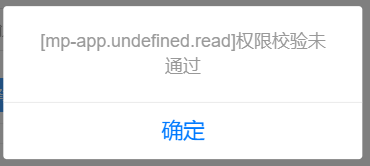
报错图片为附件
mp-app.undefined.read权限未通过
前端调用方式
db.collection(dbCollectionName)
.get({getOne:true})
.then(res => {
console.log(res)
// const data = res.result.data[0];
// if (data) {
//  this.formData = data;
//  this.cert.url = this.cert.path = this.cert.fileID = this.formData.wechat.cert;
//  this.cert.extname = 'pem';
//  this.cert.name = 'apiclient_cert';
// }
})
schema写法
"wechat": {
"bsonType": "object",
"description": "微信小程序配置",
"permission":{
"read":true,
"write":true
},
"properties": {
"appid": {
"bsonType": "string",
"label": "微信小程序id"
},
"appSecret": {
"bsonType": "password",
"label": "微信小程序密钥",
"componentForEdit": {
"name": "uni-easyinput",
"props": {
"type": "password"
}
}
},
"mchid": {
"bsonType": "string",
"label": "商户号"
},
"apiSecret": {
"bsonType": "password",
"label": "API密钥",
"componentForEdit": {
"name": "uni-easyinput",
"props": {
"type": "password"
}
}
},
"cert": {
"bsonType": "file",
"label": "支付证书cert文件",
"componentForEdit": {
"name": "uni-file-picker",
"props": {
":limit": "1",
"return-type": "object"
}
}
},
"key": {
"bsonType": "file",
"label": "支付证书key文件",
"componentForEdit": {
"name": "uni-file-picker",
"props": {
":limit": "1",
"return-type": "object"
}
}
}
}
},
更多关于uni-app unicloud admin 1.6.0 shema中字段写入properties后,前端数据库读取报错,删除properties后恢复正常的实战教程也可以访问 https://www.itying.com/category-93-b0.html
3 回复

你贴出来的文件里面没有mp-app这个字段,确定是这个schema吗?
更多关于uni-app unicloud admin 1.6.0 shema中字段写入properties后,前端数据库读取报错,删除properties后恢复正常的实战教程也可以访问 https://www.itying.com/category-93-b0.html


问题出在schema的权限配置上。当wechat字段定义了properties后,权限检查会细化到子字段级别,而您只在父级wechat对象上配置了read:true,子字段(如appid、appSecret等)没有继承这个权限。
在uniCloud admin 1.6.0中,schema的权限配置需要明确指定。有两种解决方案:
- 在子字段中单独配置权限:
"properties": {
  "appid": {
    "bsonType": "string",
    "label": "微信小程序id",
    "permission": {
      "read": true,
      "write": true
    }
  },
  // 其他子字段也需要同样配置
}
- 使用通配符配置权限(推荐):
在
wechat字段的permission中,使用"*": true来允许所有操作:
"wechat": {
  "bsonType": "object",
  "description": "微信小程序配置",
  "permission": {
    "read": true,
    "write": true,
    "*": true
  },
  "properties": {
    // ... 子字段定义保持不变
  }
}