




Golang处理端点时耗时过长的问题解决方案
Golang处理端点时耗时过长的问题解决方案 我有一些Go语言编写的端点需要处理大量数据,因此可能需要几分钟才能完成。当整个处理过程结束时,响应被正确发送,但客户端却收不到任何内容。我尝试使用Postman测试,得到了相同的结果。这个问题只会在处理过程耗时过长时发生。我甚至尝试了另一个端点,并设置了2分钟的休眠时间,结果依然相同:处理过程正确完成,服务器发送了200状态码,但Postman显示无法收到响应。如果我将休眠时间设置为仅1分钟,则一切正常。我怀疑是超时问题,因此尝试添加了一些配置,例如:
s := &http.Server{
    Addr:           ":8080",
    Handler:        router,
    ReadTimeout:    10 * time.Second,
    WriteTimeout:   10 * time.Second,
    MaxHeaderBytes: 1 << 20,
}
以及:
http.TimeoutHandler(router, time.Second*150, "Timeout!")
我使用的是gin框架。
更多关于Golang处理端点时耗时过长的问题解决方案的实战教程也可以访问 https://www.itying.com/category-94-b0.html

那么你能提供一个用于重现问题的最小化项目吗?
更多关于Golang处理端点时耗时过长的问题解决方案的实战系列教程也可以访问 https://www.itying.com/category-94-b0.html


你是否尝试过按照浏览器截图中最后一点的建议,增加客户端的超时时间?
对于一个请求来说,2分钟是很长的时间。如果线路上确实没有任何数据传输,大多数客户端可能会在大约一分钟左右取消请求。
对于已知需要长时间执行的操作,通常的做法是设置一个后台任务,然后给客户端一个“令牌”。之后,客户端可以不时地使用该令牌来查询任务的状态。

我尝试了以下代码:
router := gin.Default()

s := &http.Server{
	Addr:           ":" + cfg.Port,
	Handler:        router,
	ReadTimeout:    3 * time.Minute,
	WriteTimeout:   3 * time.Minute,
	MaxHeaderBytes: 1 << 20,
}

s.ListenAndServe()
但我得到了相同的结果:
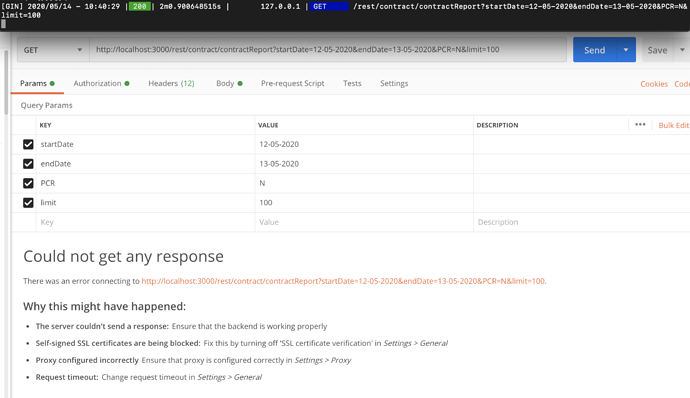

需要注意以下两点: 客户端-服务器连接的生命周期超时设置 服务器处理程序的超时设置
http.Server 的 ReadTimeout 和 WriteTimeout 是针对连接生命周期的。 ReadTimeout 表示从服务器首次收到请求开始,到读取完请求体为止的时间。 WriteTimeout 表示从服务器首次收到请求开始,到完成响应写入为止的时间。
http.TimeoutHandler 用于设置您自己的处理程序的截止时间。例如,如果您不希望任何处理程序的操作时间超过150秒,就可以使用它。
根据您的配置,客户端可能会在10秒后(而不是150秒)遇到超时。如果超时时间少于10秒,请检查 Postman 的超时设置。
func main() {
    fmt.Println("hello world")
}
根据你的描述,这确实是典型的HTTP超时问题。当处理时间超过特定阈值时,客户端连接可能已被关闭。以下是针对Gin框架的解决方案:
1. 调整服务器超时配置
你的配置中WriteTimeout设置过短(10秒),需要根据实际处理时间调整:
package main

import (
    "net/http"
    "time"

    "github.com/gin-gonic/gin"
)

func main() {
    router := gin.Default()

    // 长时间处理端点
    router.POST("/process", func(c *gin.Context) {
        // 模拟长时间处理
        time.Sleep(3 * time.Minute)
        c.JSON(http.StatusOK, gin.H{"status": "completed"})
    })

    // 配置服务器超时时间
    s := &http.Server{
        Addr:           ":8080",
        Handler:        router,
        ReadTimeout:    5 * time.Minute,    // 读取超时
        WriteTimeout:   5 * time.Minute,    // 写入超时 - 关键参数
        IdleTimeout:    10 * time.Minute,   // 空闲连接超时
        MaxHeaderBytes: 1 << 20,
    }

    s.ListenAndServe()
}
2. 使用异步处理模式
对于长时间运行的任务,建议采用异步处理:
package main

import (
    "net/http"
    "time"
    "sync"

    "github.com/gin-gonic/gin"
)

var (
    tasks     = make(map[string]string)
    tasksLock sync.RWMutex
)

func main() {
    router := gin.Default()

    // 提交任务端点
    router.POST("/submit", func(c *gin.Context) {
        taskID := generateTaskID()

        // 立即响应,告知任务已提交
        c.JSON(http.StatusAccepted, gin.H{
            "task_id": taskID,
            "status":  "processing",
            "check_url": "/status/" + taskID,
        })

        // 异步处理任务
        go processTask(taskID)
    })

    // 检查任务状态端点
    router.GET("/status/:taskID", func(c *gin.Context) {
        taskID := c.Param("taskID")

        tasksLock.RLock()
        status, exists := tasks[taskID]
        tasksLock.RUnlock()

        if !exists {
            c.JSON(http.StatusNotFound, gin.H{"error": "task not found"})
            return
        }

        c.JSON(http.StatusOK, gin.H{
            "task_id": taskID,
            "status":  status,
        })
    })

    // 获取结果端点
    router.GET("/result/:taskID", func(c *gin.Context) {
        taskID := c.Param("taskID")

        tasksLock.RLock()
        status, exists := tasks[taskID]
        tasksLock.RUnlock()

        if !exists {
            c.JSON(http.StatusNotFound, gin.H{"error": "task not found"})
            return
        }

        if status != "completed" {
            c.JSON(http.StatusOK, gin.H{
                "task_id": taskID,
                "status":  "still_processing",
            })
            return
        }

        // 返回处理结果
        c.JSON(http.StatusOK, gin.H{
            "task_id": taskID,
            "status":  "completed",
            "result":  "processed_data_here",
        })
    })

    s := &http.Server{
        Addr:         ":8080",
        Handler:      router,
        WriteTimeout: 30 * time.Second,
        ReadTimeout:  30 * time.Second,
    }

    s.ListenAndServe()
}

func processTask(taskID string) {
    // 模拟长时间处理
    time.Sleep(3 * time.Minute)

    tasksLock.Lock()
    tasks[taskID] = "completed"
    tasksLock.Unlock()
}

func generateTaskID() string {
    return "task_" + time.Now().Format("20060102150405")
}
3. 使用Context处理客户端断开连接
package main

import (
    "context"
    "net/http"
    "time"

    "github.com/gin-gonic/gin"
)

func main() {
    router := gin.Default()

    router.POST("/process-with-context", func(c *gin.Context) {
        // 创建带超时的context
        ctx, cancel := context.WithTimeout(c.Request.Context(), 5*time.Minute)
        defer cancel()

        // 创建channel用于处理结果
        resultChan := make(chan string)
        errorChan := make(chan error)

        // 在goroutine中处理任务
        go func() {
            // 模拟长时间处理
            select {
            case <-time.After(3 * time.Minute):
                resultChan <- "processing_completed"
            case <-ctx.Done():
                errorChan <- ctx.Err()
                return
            }
        }()

        // 等待结果或超时
        select {
        case result := <-resultChan:
            c.JSON(http.StatusOK, gin.H{"result": result})
        case err := <-errorChan:
            if err == context.DeadlineExceeded {
                c.JSON(http.StatusRequestTimeout, gin.H{"error": "request timeout"})
            } else if err == context.Canceled {
                // 客户端断开连接
                return
            }
        case <-ctx.Done():
            c.JSON(http.StatusRequestTimeout, gin.H{"error": "context timeout"})
        }
    })

    s := &http.Server{
        Addr:         ":8080",
        Handler:      router,
        WriteTimeout: 5 * time.Minute,
        ReadTimeout:  5 * time.Minute,
    }

    s.ListenAndServe()
}
4. 检查并调整操作系统限制
某些系统可能有TCP连接保持时间的限制。可以检查并调整:
// 在创建服务器后设置TCP保持连接
s := &http.Server{
    Addr:    ":8080",
    Handler: router,
}

// 自定义TCP连接设置
go func() {
    ln, err := net.Listen("tcp", s.Addr)
    if err != nil {
        log.Fatal(err)
    }

    tcpListener := ln.(*net.TCPListener)

    // 设置TCP保持连接
    conn, _ := tcpListener.AcceptTCP()
    conn.SetKeepAlive(true)
    conn.SetKeepAlivePeriod(3 * time.Minute)

    s.Serve(tcpListener)
}()
关键点:
WriteTimeout必须大于你的最长处理时间- 对于超过1分钟的处理,建议使用异步模式
- 考虑使用WebSocket或Server-Sent Events进行长时间连接
- 检查客户端(Postman)的超时设置,Postman默认有超时限制
对于生产环境,如果处理时间经常超过1-2分钟,强烈建议采用异步处理模式,立即返回202 Accepted状态码,然后通过轮询或WebSocket通知客户端处理结果。
