




HarmonyOS鸿蒙Next中resourceDir怎么获取不到数据
HarmonyOS鸿蒙Next中resourceDir怎么获取不到数据 这个resourceDir怎么获取不到数据
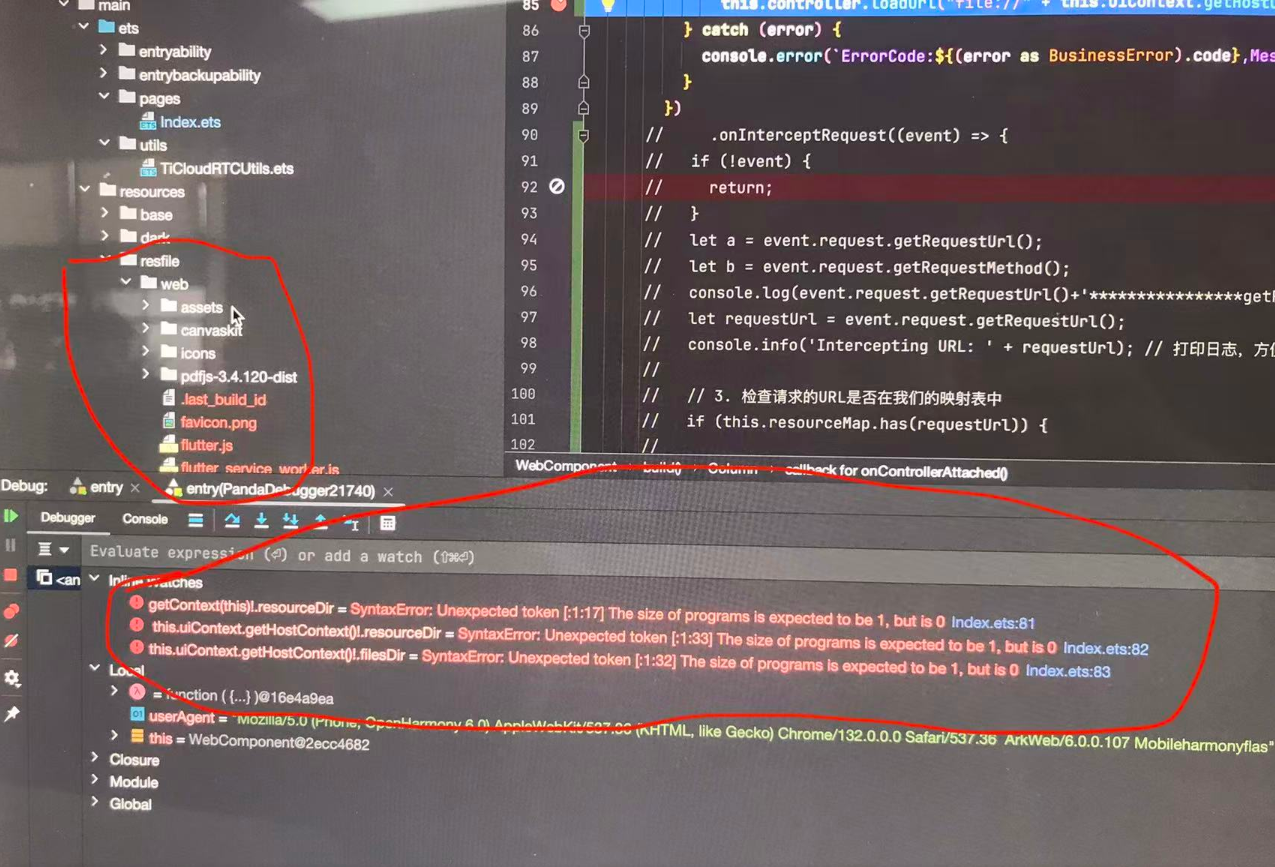
更多关于HarmonyOS鸿蒙Next中resourceDir怎么获取不到数据的实战教程也可以访问 https://www.itying.com/category-93-b0.html

你把断点直接打在这个resourceDir上了,resourceDir是异步获取数据的,你程序运行到这直接停止了,数据还没获取到,程序就结束了,所以才会出现这个问题,不开段带你直接走下去看能不能正常返回结果
更多关于HarmonyOS鸿蒙Next中resourceDir怎么获取不到数据的实战系列教程也可以访问 https://www.itying.com/category-93-b0.html

可以通过[@ohos.resourceManager (资源管理)](https://developer.huawei.com/consumer/cn/doc/harmonyos-references/js-apis-resource-manager)模块中的getRawFileContent接口来获取resources/rawfile目录下对应的rawfile文件内容,且该路径仅能以只读方式访问。参考代码如下:
import { fileIo } from '@kit.CoreFileKit';
@Component
export struct GetRawfile {
  @State message: string = 'Hello World';
  aboutToAppear(): void {
    this.getUIContext().getHostContext()?.resourceManager.getRawFileContent('test.txt', (_err, value) => {
      if (_err) {
        console.error('Failed to get raw file:', _err);
        return;
      }
      let fileBuffer: ArrayBufferLike = value.buffer;
      let context = this.getUIContext()
        .getHostContext(); // Obtain the application sandbox path for storing temporary files, and perform null checking
      let filePath = context!.filesDir + '/test.txt';
      console.info('testTag-filePath:' + filePath);
      let file = fileIo.openSync(filePath, fileIo.OpenMode.READ_WRITE | fileIo.OpenMode.CREATE);
      let writeLen = fileIo.writeSync(file.fd, fileBuffer);
      console.info('testTag-write data to file succeed and size is:' + writeLen);
      fileIo.closeSync(file);
    });
  }
  build() {
    RelativeContainer() {
      Text(this.message)
        .id('RawfileHelloWorld')
        .fontSize(50)
        .fontWeight(FontWeight.Bold)
        .alignRules({
          center: { anchor: '__container__', align: VerticalAlign.Center },
          middle: { anchor: '__container__', align: HorizontalAlign.Center }
        })
    }
    .height('100%')
    .width('100%')
  }
}

在HarmonyOS Next中,resourceDir获取不到数据通常是由于资源目录路径配置或访问方式不正确导致的。请检查项目中的resources目录结构是否符合规范,确保在模块级的build-profile.json5文件中正确配置了资源路径。使用ResourceManager.getResourceManager()获取资源管理器后,需通过其提供的方法如getRawFileContent()来访问具体资源,而非直接操作文件路径。

在HarmonyOS Next中,resourceDir 获取不到数据通常是由于资源目录路径或访问方式不正确导致的。根据您提供的截图信息,以下是可能的原因和解决方案:
-
检查资源目录结构:确保在项目的
resources目录下正确放置了资源文件(如图片、字符串等)。例如,图片应放在resources/base/media/或对应设备类型的子目录中。 -
使用正确的资源管理API:HarmonyOS Next推荐使用
ResourceManager来访问资源,而不是直接通过文件路径。例如:import resourceManager from '[@ohos](/user/ohos).resourceManager'; // 获取资源管理器 let resMgr = resourceManager.getResourceManager(); // 获取图片资源 let imageData = await resMgr.getMediaContent($r('app.media.icon').id); -
资源引用方式:在代码中引用资源时,应使用
$r('app.type.name')格式(如$r('app.media.icon')),系统会自动解析资源路径。 -
模块化资源访问:如果资源位于其他模块,需通过指定模块名来访问,例如
$r('sys.media.icon')或使用ResourceManager的getResourceManager方法传入模块上下文。 -
检查资源索引:编译后资源会被索引到
resources.index文件中,如果资源未正确声明或编译,可能导致无法访问。请确保资源文件在resources目录中,且编译无报错。 -
运行时权限:如果尝试访问非应用私有资源目录(如系统公共资源),可能需要声明相应权限,但应用自身的
resources目录通常无需额外权限。
建议优先使用 ResourceManager API 替代直接操作 resourceDir,这符合HarmonyOS Next的资源管理规范,能避免路径依赖问题。如果问题仍存在,请检查开发环境配置和资源声明是否正确。
