




HarmonyOS鸿蒙Next中@ObservedV2的单例在@Component组件中使用为啥不刷新
HarmonyOS鸿蒙Next中@ObservedV2的单例在@Component组件中使用为啥不刷新
[@ObservedV2](/user/ObservedV2)
export class ChargingUtils {
  private static instance = new ChargingUtils()

  private constructor() {
  }

  static getInstance() {
    return ChargingUtils.instance
  }
  @Trace str: string = '2'
}
@Entry
[@Component](/user/Component)
struct Index {
  utils: ChargingUtils = ChargingUtils.getInstance()
  build() {
    Column(){
      Text(this.utils.str)
        .backgroundColor(Color.Red)
        .fontSize(48)
        .fontWeight(FontWeight.Regular)
        .fontColor('#333333').width('100%').textAlign(TextAlign.Center)
        .height(90)
      Text('更改').onClick(()=>{
        // 随机字符串
        this.utils.str = Math.random().toString(36).substring(2, 15);
      }).fontSize(48).width('100%').textAlign(TextAlign.Center)

      Text(ChargingUtils.getInstance().str)
        .backgroundColor(Color.Red)
        .fontSize(48)
        .fontWeight(FontWeight.Regular)
        .fontColor('#333333').width('100%').textAlign(TextAlign.Center)
        .height(90)

      Text('更改').onClick(()=>{
        // 随机字符串
        ChargingUtils.getInstance().str = Math.random().toString(36).substring(2, 15);
      }).fontSize(48).width('100%').textAlign(TextAlign.Center)

    }.margin({
      top: 100,
      left: 0,
      bottom: 0,
      right: 0
    }).backgroundColor(Color.Gray).width(375)
  }
}
两种方式都不刷新奇怪了
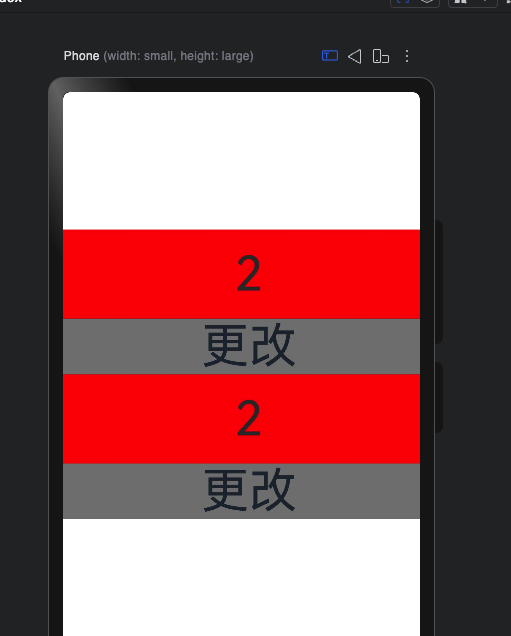
更多关于HarmonyOS鸿蒙Next中@ObservedV2的单例在@Component组件中使用为啥不刷新的实战教程也可以访问 https://www.itying.com/category-93-b0.html

为啥不用 ComponentV2 组件?
更多关于HarmonyOS鸿蒙Next中@ObservedV2的单例在@Component组件中使用为啥不刷新的实战系列教程也可以访问 https://www.itying.com/category-93-b0.html

找HarmonyOS工作还需要会Flutter的哦,有需要Flutter教程的可以学学大地老师的教程,很不错,B站免费学的哦:https://www.bilibili.com/video/BV1S4411E7LY/?p=17
目前尝试出来的解决方案为
@Trace str?: string
但是好奇为啥以下方式都不会刷新
@Trace str?: string = ''
@Trace str: string = ''
找到原因了,单例,按常规写法就可以了
@ObservedV2
export class ChargingUtils {
  private static instance: ChargingUtils

  public static getInstance(): ChargingUtils {
    if (!ChargingUtils.instance) {
      ChargingUtils.instance = new ChargingUtils();
    }
    return ChargingUtils.instance;
  }
  private constructor() {
  }


  @Trace str: string = '初始值'
}

在HarmonyOS鸿蒙Next中,@ObservedV2装饰的类遵循单向数据流,其单例实例在@Component组件内不刷新的原因在于:@ObservedV2的更新机制依赖于属性的直接赋值来触发UI刷新。当单例对象的属性被修改时,如果修改操作(如this.obj.prop = newValue)发生在组件内部,但未通过组件的数据状态(如@State)进行“中转”和绑定,ArkUI框架可能无法检测到这一变更,因此不会驱动组件重新渲染。

在HarmonyOS Next中,@ObservedV2装饰的类需要配合@Trace装饰的属性,并且该类的实例必须被@Component组件的状态变量(使用@State、@Link、@Provide、@Consume等装饰器)引用,其属性变化才能触发UI刷新。
你的代码中,ChargingUtils类本身装饰了@ObservedV2,str属性也装饰了@Trace,这是正确的。但问题在于,Index组件中引用这个单例实例的utils变量没有使用任何状态装饰器(如@State)。
// 当前写法:utils不是状态变量,UI不会监听其内部@Trace属性的变化
utils: ChargingUtils = ChargingUtils.getInstance()

// 正确写法:使用@State装饰,使组件能够响应ChargingUtils实例内部@Trace属性的变化
@State utils: ChargingUtils = ChargingUtils.getInstance()
原因分析:
@ObservedV2+@Trace建立了类内部属性的响应式能力。- 但组件需要明确声明依赖哪个可观察对象。这是通过用状态装饰器(如
@State)修饰组件内持有该实例的变量来实现的。 - 当
utils未被@State装饰时,组件不会订阅ChargingUtils实例中@Trace属性的变化。因此,即使str的值被修改,组件也不会收到更新通知,UI不会刷新。
修改建议:
将Index组件中的utils变量用@State装饰即可。
@Entry
@Component
struct Index {
  @State utils: ChargingUtils = ChargingUtils.getInstance() // 添加 @State
  build() {
    // ... 其余代码不变
  }
}
修改后,无论是通过this.utils.str还是ChargingUtils.getInstance().str修改值(它们指向同一个单例实例),UI都会正常刷新。因为@State utils让组件订阅了该实例,实例内部@Trace属性的变化会通知到所有订阅它的组件。
