




Golang客户端报错:未找到兼容的QUIC版本导致会话终止
Golang客户端报错:未找到兼容的QUIC版本导致会话终止 当我的QUIC客户端尝试与QUIC服务器通信时,我遇到了这种错误:
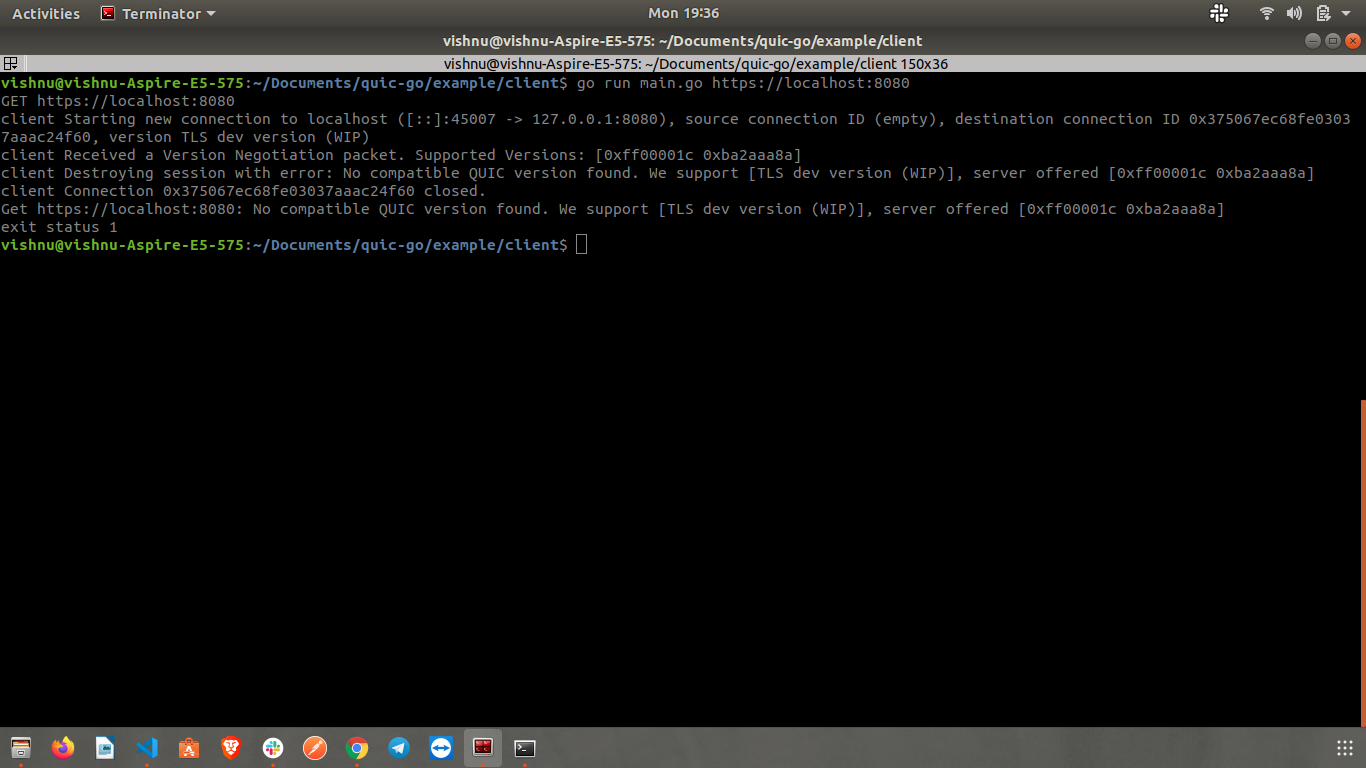
这与go-quic(基于QUIC协议的HTTP)有关。请帮忙。
6 回复


当我尝试构建时,缺少一些包,所以我运行了 go get 命令,然后得到了这些错误:
$ go get
package pack/config: unrecognized import path "pack/config" (import path does not begin with hostname)
package pack/errors: unrecognized import path "pack/errors" (import path does not begin with hostname)
package pack/mutations: unrecognized import path "pack/mutations" (import path does not begin with hostname)
package pack/queries: unrecognized import path "pack/queries" (import path does not begin with hostname)
你的源代码是否托管在 GitHub 或 GitLab 等平台上?

感谢你的回复 在那段代码中,你可以去掉这段代码
schemaConfig := graphql.SchemaConfig{
	Query: graphql.NewObject(graphql.ObjectConfig{
		Name:   "RootQuery",
		Fields: queries.GetRootFields(),
	}),
	Mutation: graphql.NewObject(graphql.ObjectConfig{
		Name:   "RootMutation",
		Fields: mutations.GetRootFields(),
	}),
}
schema, err := graphql.NewSchema(schemaConfig)

if err != nil {
	log.Fatalf("Failed to create new schema, error: %v", err)
}

httpHandler := handler.New(&handler.Config{
	Schema: &schema,
	Pretty: true,
}) and router.Handle("/v1", CorsMiddleware(httpHandler))
if _, err := c.Client.Ping().Result(); err != nil {

		e := Error.Wrap(err, ",Redis server down,", http.StatusBadGateway)

		log.Println(e)
	}
你可以只测试 router.HandleFunc("/", homeLink),这样你就不需要那些包了

嗨,@vishnutm,我移除了你上一篇文章中提到的代码块后,仍然无法构建项目。现在我遇到了这些错误:
# forum.golangbridge.org/client-destroying-session-with-error-no-compatible-quic-version-found_19304
/home/sean/gopath/src/forum.golangbridge.org/client-destroying-session-with-error-no-compatible-quic-version-found_19304/main.go:37:25: cannot convert func literal (type func(http.ResponseWriter, http.Request)) to type http.HandlerFunc
/home/sean/gopath/src/forum.golangbridge.org/client-destroying-session-with-error-no-compatible-quic-version-found_19304/main.go:41:14: cannot use r (type http.Request) as type *http.Request in argument to h.ServeHTTP
/home/sean/gopath/src/forum.golangbridge.org/client-destroying-session-with-error-no-compatible-quic-version-found_19304/main.go:143:39: undefined: httpHandler
/home/sean/gopath/src/forum.golangbridge.org/client-destroying-session-with-error-no-compatible-quic-version-found_19304/main.go:147:16: undefined: c
/home/sean/gopath/src/forum.golangbridge.org/client-destroying-session-with-error-no-compatible-quic-version-found_19304/main.go:149:9: undefined: Error
/home/sean/gopath/src/forum.golangbridge.org/client-destroying-session-with-error-no-compatible-quic-version-found_19304/main.go:173:20: undefined: c
你能尝试提供一个更简化的示例吗?
这个错误表明客户端和服务器之间没有找到共同的QUIC版本。在Go的QUIC实现中,版本协商失败会导致连接终止。
问题分析
错误信息显示"no compatible QUIC version found",这通常发生在:
- 客户端和服务器支持的QUIC版本不匹配
- TLS配置或ALPN协议设置不正确
解决方案
1. 检查并显式设置QUIC版本
package main

import (
    "crypto/tls"
    "fmt"
    "net/http"

    "github.com/quic-go/quic-go"
    "github.com/quic-go/quic-go/http3"
)

func main() {
    // 创建QUIC配置,指定支持的版本
    quicConfig := &quic.Config{
        Versions: []quic.VersionNumber{
            quic.Version1, // QUIC版本1
            quic.Version2, // QUIC版本2(如果支持)
        },
    }

    // 创建TLS配置
    tlsConfig := &tls.Config{
        InsecureSkipVerify: true, // 仅用于测试,生产环境不要使用
        NextProtos:         []string{"h3"}, // ALPN协议
    }

    // 创建HTTP/3客户端
    client := &http.Client{
        Transport: &http3.RoundTripper{
            TLSClientConfig: tlsConfig,
            QuicConfig:      quicConfig,
        },
    }

    // 发送请求
    resp, err := client.Get("https://example.com")
    if err != nil {
        fmt.Printf("请求失败: %v\n", err)
        return
    }
    defer resp.Body.Close()

    fmt.Println("请求成功")
}
2. 服务器端也需要正确配置版本
// 服务器端示例
package main

import (
    "crypto/tls"
    "fmt"
    "log"
    "net/http"

    "github.com/quic-go/quic-go"
    "github.com/quic-go/quic-go/http3"
)

func main() {
    // 加载TLS证书
    cert, err := tls.LoadX509KeyPair("server.crt", "server.key")
    if err != nil {
        log.Fatal(err)
    }

    // 创建QUIC配置
    quicConfig := &quic.Config{
        Versions: []quic.VersionNumber{
            quic.Version1,
            quic.Version2,
        },
    }

    // 创建TLS配置
    tlsConfig := &tls.Config{
        Certificates: []tls.Certificate{cert},
        NextProtos:   []string{"h3"},
    }

    // 创建HTTP/3服务器
    server := &http3.Server{
        Addr:       ":443",
        TLSConfig:  tlsConfig,
        QuicConfig: quicConfig,
        Handler:    http.HandlerFunc(handleRequest),
    }

    fmt.Println("HTTP/3服务器启动在 :443")
    log.Fatal(server.ListenAndServe())
}

func handleRequest(w http.ResponseWriter, r *http.Request) {
    w.Write([]byte("HTTP/3响应"))
}
3. 调试版本协商
package main

import (
    "context"
    "crypto/tls"
    "fmt"
    "time"

    "github.com/quic-go/quic-go"
)

func debugQUICConnection() {
    tlsConf := &tls.Config{
        InsecureSkipVerify: true,
        NextProtos:         []string{"h3"},
    }

    ctx, cancel := context.WithTimeout(context.Background(), 5*time.Second)
    defer cancel()

    // 尝试连接并获取详细信息
    conn, err := quic.DialAddr(ctx, "server.example.com:443", tlsConf, &quic.Config{
        Versions: []quic.VersionNumber{quic.Version1},
    })

    if err != nil {
        fmt.Printf("连接失败: %v\n", err)

        // 尝试其他版本
        conn, err = quic.DialAddr(ctx, "server.example.com:443", tlsConf, &quic.Config{
            Versions: []quic.VersionNumber{quic.Version2},
        })
        if err != nil {
            fmt.Printf("版本2也失败: %v\n", err)
        } else {
            fmt.Println("成功使用QUIC版本2连接")
            conn.CloseWithError(0, "")
        }
    } else {
        fmt.Println("成功使用QUIC版本1连接")
        conn.CloseWithError(0, "")
    }
}
关键检查点
- 版本匹配:确保客户端和服务器都支持相同的QUIC版本
- ALPN协议:TLS配置中的
NextProtos必须包含"h3" - 依赖版本:检查
github.com/quic-go/quic-go库的版本是否兼容 - 网络环境:某些网络环境可能阻止QUIC流量
版本兼容性矩阵
quic-go版本     支持的QUIC版本
v0.40.0+        Version1, Version2
v0.35.0-v0.39.0 Version1
v0.34.0及之前    Draft版本
如果问题仍然存在,可以尝试使用Wireshark或tcpdump捕获网络流量,分析TLS握手和QUIC版本协商过程。
