




如何在Golang中运行应用程序时不显示终端窗口
如何在Golang中运行应用程序时不显示终端窗口 如果我想运行一个使用HTTP服务器的应用程序,例如GO Tour,终端会被打开,并且可以通过按Ctrl+C来终止它。
如何避免打开终端
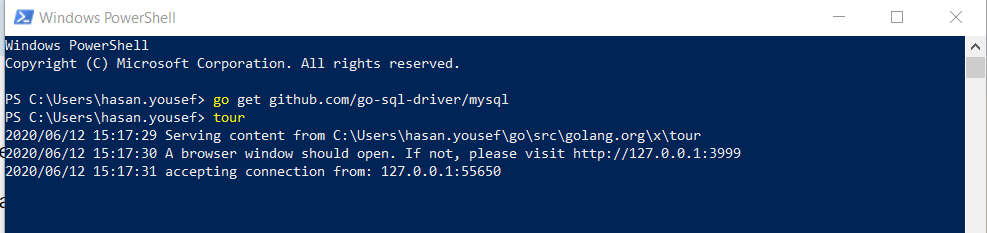
据我了解,这种行为是Windows特有的。无论是Mac还是Linux,都没有在运行程序时自动启动终端的内置设置。我不了解其他*-ix操作系统,但我预计它们与Linux相同。甚至不确定我的理解是否正确。
更多关于如何在Golang中运行应用程序时不显示终端窗口的实战教程也可以访问 https://www.itying.com/category-94-b0.html
5 回复

你如何运行这个Go应用程序?你是打开终端还是双击.go文件?
更多关于如何在Golang中运行应用程序时不显示终端窗口的实战系列教程也可以访问 https://www.itying.com/category-94-b0.html




在Windows上运行Go应用程序时避免显示终端窗口,有以下几种方法:
方法1:编译为Windows服务(推荐)
package main

import (
    "fmt"
    "log"
    "net/http"
    "os"
    "time"

    "golang.org/x/sys/windows/svc"
    "golang.org/x/sys/windows/svc/debug"
    "golang.org/x/sys/windows/svc/eventlog"
)

var elog debug.Log

type myservice struct{}

func (m *myservice) Execute(args []string, r <-chan svc.ChangeRequest, changes chan<- svc.Status) (svcSpecificEC bool, exitCode uint32) {
    changes <- svc.Status{State: svc.StartPending}

    // 启动HTTP服务器
    go func() {
        http.HandleFunc("/", func(w http.ResponseWriter, r *http.Request) {
            fmt.Fprintf(w, "Service is running")
        })
        log.Fatal(http.ListenAndServe(":8080", nil))
    }()

    changes <- svc.Status{State: svc.Running, Accepts: svc.AcceptStop | svc.AcceptShutdown}

    for {
        select {
        case c := <-r:
            switch c.Cmd {
            case svc.Interrogate:
                changes <- c.CurrentStatus
                time.Sleep(100 * time.Millisecond)
                changes <- c.CurrentStatus
            case svc.Stop, svc.Shutdown:
                changes <- svc.Status{State: svc.StopPending}
                return false, 0
            }
        }
    }
}

func runService(name string, isDebug bool) {
    var err error
    if isDebug {
        elog = debug.New(name)
    } else {
        elog, err = eventlog.Open(name)
        if err != nil {
            return
        }
        defer elog.Close()
    }

    elog.Info(1, fmt.Sprintf("starting %s service", name))
    run := svc.Run
    if isDebug {
        run = debug.Run
    }
    err = run(name, &myservice{})
    if err != nil {
        elog.Error(1, fmt.Sprintf("%s service failed: %v", name, err))
        return
    }
    elog.Info(1, fmt.Sprintf("%s service stopped", name))
}

func main() {
    isIntSess, err := svc.IsAnInteractiveSession()
    if err != nil {
        log.Fatalf("failed to determine if we are in an interactive session: %v", err)
    }

    if !isIntSess {
        runService("MyGoService", false)
        return
    }

    // 交互模式下的代码
    http.HandleFunc("/", func(w http.ResponseWriter, r *http.Request) {
        fmt.Fprintf(w, "Running in interactive mode")
    })
    fmt.Println("Server starting on :8080")
    http.ListenAndServe(":8080", nil)
}
安装服务:
go build -o myservice.exe
sc create MyGoService binPath= "C:\path\to\myservice.exe"
sc start MyGoService
方法2:使用-buildmode=c-shared创建DLL
// main.go
package main

import "C"
import (
    "net/http"
    "time"
)

var server *http.Server

//export StartServer
func StartServer() {
    mux := http.NewServeMux()
    mux.HandleFunc("/", func(w http.ResponseWriter, r *http.Request) {
        w.Write([]byte("Server running from DLL"))
    })

    server = &http.Server{
        Addr:    ":8080",
        Handler: mux,
    }

    go server.ListenAndServe()
}

//export StopServer
func StopServer() {
    if server != nil {
        server.Close()
    }
}

func main() {
    // 空main函数,DLL需要
}
编译为DLL:
go build -buildmode=c-shared -o myserver.dll main.go
创建调用DLL的C程序或使用其他语言调用。
方法3:使用第三方工具隐藏控制台
使用github.com/kardianos/service包:
package main

import (
    "fmt"
    "log"
    "net/http"

    "github.com/kardianos/service"
)

var logger service.Logger

type program struct{}

func (p *program) Start(s service.Service) error {
    go p.run()
    return nil
}

func (p *program) run() {
    http.HandleFunc("/", func(w http.ResponseWriter, r *http.Request) {
        fmt.Fprintf(w, "Service is running")
    })
    log.Fatal(http.ListenAndServe(":8080", nil))
}

func (p *program) Stop(s service.Service) error {
    return nil
}

func main() {
    svcConfig := &service.Config{
        Name:        "GoHttpService",
        DisplayName: "Go HTTP Service",
        Description: "This is a Go HTTP server running as a Windows service",
    }

    prg := &program{}
    s, err := service.New(prg, svcConfig)
    if err != nil {
        log.Fatal(err)
    }

    logger, err = s.Logger(nil)
    if err != nil {
        log.Fatal(err)
    }

    if len(os.Args) > 1 {
        err = service.Control(s, os.Args[1])
        if err != nil {
            log.Fatal(err)
        }
        return
    }

    err = s.Run()
    if err != nil {
        logger.Error(err)
    }
}
安装和运行:
go build -o myapp.exe
myapp.exe install
myapp.exe start
方法4:使用编译标志(最简单)
对于GUI应用程序或后台进程,添加-ldflags标志:
package main

import (
    "fmt"
    "net/http"
    "time"
)

func main() {
    http.HandleFunc("/", func(w http.ResponseWriter, r *http.Request) {
        fmt.Fprintf(w, "Server running without console")
    })

    server := &http.Server{
        Addr:         ":8080",
        ReadTimeout:  5 * time.Second,
        WriteTimeout: 10 * time.Second,
    }

    // 在后台运行
    go func() {
        if err := server.ListenAndServe(); err != nil && err != http.ErrServerClosed {
            // 记录日志到文件
            logToFile(err.Error())
        }
    }()

    // 保持程序运行
    select {}
}

func logToFile(msg string) {
    // 实现文件日志记录
}
编译时隐藏控制台(仅Windows):
go build -ldflags="-H windowsgui" main.go
或者在代码中隐藏控制台:
// +build windows

package main

import (
    "syscall"
)

func init() {
    hideConsole()
}

func hideConsole() {
    kernel32 := syscall.NewLazyDLL("kernel32.dll")
    user32 := syscall.NewLazyDLL("user32.dll")

    getConsoleWindow := kernel32.NewProc("GetConsoleWindow")
    showWindow := user32.NewProc("ShowWindow")

    hwnd, _, _ := getConsoleWindow.Call()
    if hwnd != 0 {
        showWindow.Call(hwnd, 0) // 0 = SW_HIDE
    }
}
这些方法中,使用-ldflags="-H windowsgui"是最简单的,而使用service包创建Windows服务是最专业和稳定的解决方案。
