




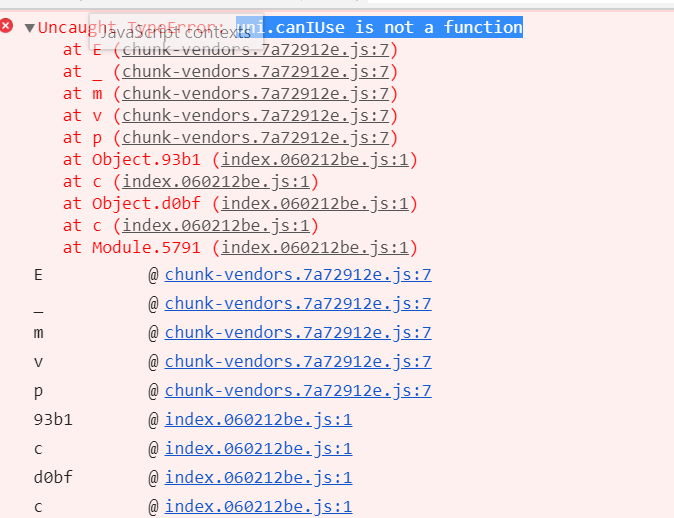
uni-app报Bug uni.canIUse is not function
uni-app报Bug uni.canIUse is not function
示例代码:
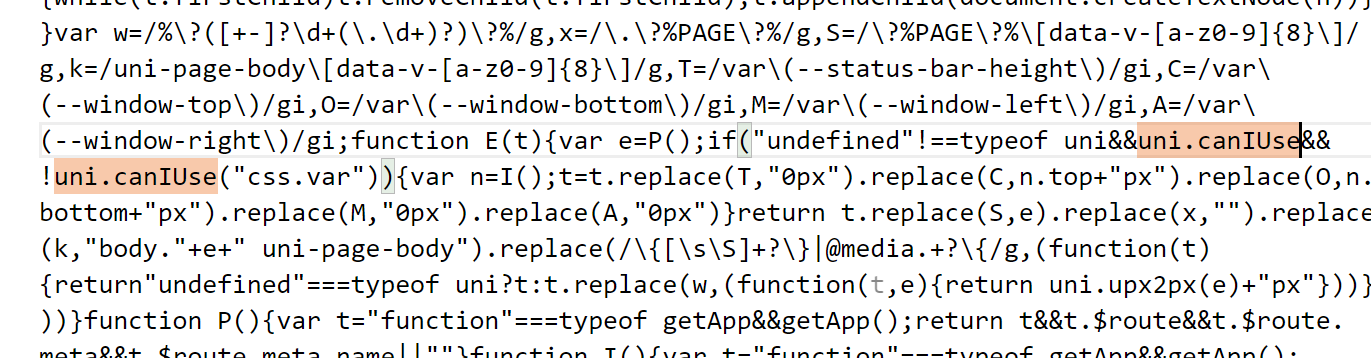
if("undefined"!==typeof uni&!uni.canIUse("css.var"))
操作步骤:
- 使用h5宽屏幕适配,设置了right窗口
- 发布为h5的时候,线上打开——提示uni.canIUse is not function
- 报错位置在————chunk.verdor.js————if(“undefined”!==typeof uni&!uni.canIUse(“css.var”))这里的代码报错
预期结果:
正常加载
实际结果:
页面报错,空白——提示canIUse is not function
bug描述:
- 使用h5宽屏幕适配,设置了right窗口
- 发布为h5的时候,线上打开——提示uni.canIUse is not function
- 报错位置在————chunk.verdor.js————if(“undefined”!==typeof uni&!uni.canIUse(“css.var”))这里的代码报错
正确的是————要判断uni.canIUse是否存在,然后使用方法
if(“undefined”!==typeof uni&uni.canIUse&!uni.canIUse(“css.var”))
更多关于uni-app报Bug uni.canIUse is not function的实战教程也可以访问 https://www.itying.com/category-93-b0.html
1 回复

更多关于uni-app报Bug uni.canIUse is not function的实战教程也可以访问 https://www.itying.com/category-93-b0.html
这个错误通常是因为在 H5 端运行时,uni.canIUse API 在某些情况下可能未被正确初始化或加载顺序问题导致的。从你的代码和报错信息来看,问题出在 chunk.vendor.js 中的条件判断逻辑不够严谨。
原因分析:
- 在 H5 平台,
uni对象可能已存在,但uni.canIUse方法可能因为依赖的 polyfill 或框架代码加载顺序问题而暂时不可用。 - 你的代码
if("undefined"!==typeof uni&!uni.canIUse("css.var"))直接调用了uni.canIUse,但没有先检查该方法是否存在。当uni.canIUse为undefined时,调用它会抛出not a function错误。
解决方案:
修改条件判断,先检查 uni.canIUse 是否存在,再调用该方法。按照你提到的正确写法:
if (typeof uni !== 'undefined' && uni.canIUse && !uni.canIUse('css.var')) {
    // 你的逻辑代码
}
或者使用可选链操作符(如果项目支持 ES2020):
if (typeof uni !== 'undefined' && !uni.canIUse?.('css.var')) {
    // 你的逻辑代码
}