




uni-app 字节跳动小程序 map组件设置中心经纬度无效
uni-app 字节跳动小程序 map组件设置中心经纬度无效
操作步骤:
<map  :longitude="poi.longitude" :latitude="poi.latitude" ></map>
that.poi = {
    latitude: 28.770376,
    longitude: 104.63712
}
预期结果:
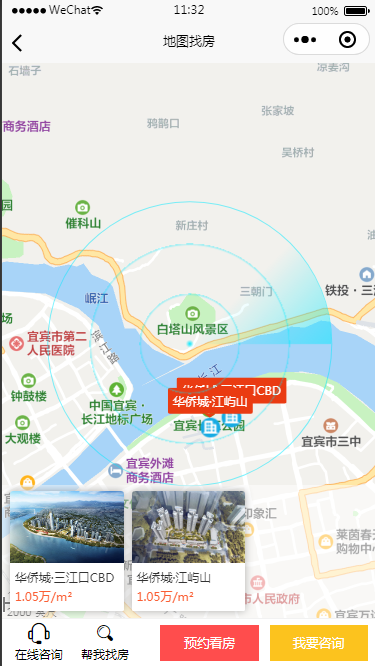
- 位置显示正确中心经纬度
实际结果:
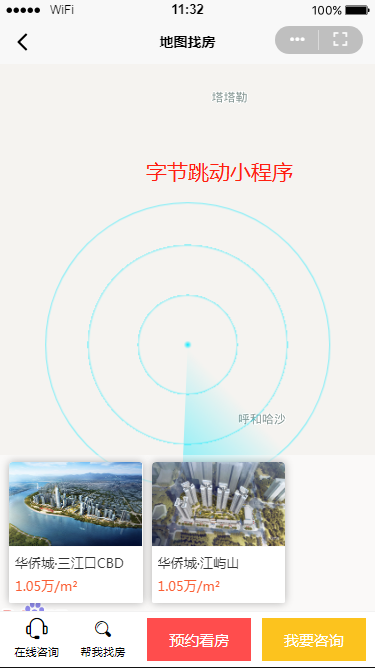
- 一直显示在国外
bug描述:
微信小程序设置中心经纬度正常,在字节跳动小程序中,设置中心经纬度位置不变。
<map  :longitude="poi.longitude" :latitude="poi.latitude" ></map>
that.poi = {
    latitude: 28.770376,
    longitude: 104.63712
}
图片
项目信息表
| 项目信息 | 值 |
|---|---|
| 产品分类 | uniapp/小程序/微信 |
| PC开发环境操作系统 | Windows |
| PC开发环境操作系统版本号 | win7 专业版 |
| HBuilderX类型 | 正式 |
| HBuilderX版本号 | 3.2.2 |
| 第三方开发者工具版本号 | 3.1.4 |
| 基础库版本号 | 2.22 |
| 项目创建方式 | HBuilderX |
更多关于uni-app 字节跳动小程序 map组件设置中心经纬度无效的实战教程也可以访问 https://www.itying.com/category-93-b0.html
3 回复


这个问题是由于字节跳动小程序地图组件对经纬度数据格式的要求不同导致的。字节跳动小程序要求经纬度必须是数值类型,而微信小程序会自动转换。
在你的代码中,poi.longitude和poi.latitude可能是字符串类型。虽然微信小程序能正常处理,但字节跳动小程序需要明确的数值类型。
解决方案:
- 确保数据类型为Number:
that.poi = {
    latitude: parseFloat(28.770376),
    longitude: parseFloat(104.63712)
}
- 或者在模板中强制转换:
<map :longitude="Number(poi.longitude)" :latitude="Number(poi.latitude)" ></map>