




HarmonyOS鸿蒙Next中怎么在ets文件里导入json?
HarmonyOS鸿蒙Next中怎么在ets文件里导入json? 不想用[@ohos.fileio](https://developer.huawei.com/consumer/cn/doc/harmonyos-references/js-apis-fileio)来读取json,是否能直接import json?有没有详细的示例?

首先,在 entry/src/main/resources/rawfile 下创建一个 json 文件,我们这里就叫 test.json。
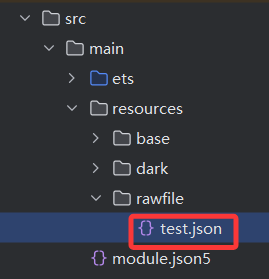
然后,粘贴下面的内容到刚刚创建的 json 里。
{
  "harmony": "Harmony",
  "os": "OS"
}
接着,我们就能来到 entry/src/main/ets/pages/Index.ets,import 刚刚创建的 json 了。
import test from '../../resources/rawfile/test.json'

@Entry
@ComponentV2
struct Index {
  build() {
    Column() {
      Text() {
        Span(test.harmony)
          .fontColor("#1C66E3")
        Span(test.os)
      }
      .fontSize(35)
      .fontWeight(FontWeight.Bold)
    }
    .width('100%')
    .height('100%')
    .justifyContent(FlexAlign.Center)
  }
}
最后,预览器的效果图如下:

更多关于HarmonyOS鸿蒙Next中怎么在ets文件里导入json?的实战系列教程也可以访问 https://www.itying.com/category-93-b0.html

在HarmonyOS鸿蒙Next的ets文件中,使用import语句导入JSON文件。例如:import jsonData from './data.json'。导入后,jsonData变量可直接使用JSON数据。

在HarmonyOS Next(API 11+)中,你可以通过资源系统直接导入JSON文件,无需使用@ohos.fileio进行手动读取。
具体步骤如下:
-
将JSON文件放置在项目资源目录中
将你的JSON文件(例如data.json)放在ets目录下的任意子目录中,例如resources/base/profile/。 -
在ets文件中使用
$r或$rawfile引用JSON资源
你可以通过资源管理器直接获取JSON内容。示例:// 方式1:使用 $r 访问 resources 目录下的JSON const jsonData = $r('app.profile.data'); // 对应 resources/base/profile/data.json console.log(JSON.stringify(jsonData)); // 方式2:使用 $rawfile 访问 rawfile 目录下的JSON(文件保持原始格式) const rawJson = $rawfile('data.json'); // 对应 resources/rawfile/data.json console.log(rawJson); -
直接使用JSON对象
通过$r导入的JSON会被自动解析为JavaScript对象,可以直接使用其属性。
注意事项:
- 确保JSON文件格式正确,否则会导致编译错误或运行时异常。
- 使用
$r时,文件路径相对于resources目录,且不需要写文件扩展名。 - 使用
$rawfile时,文件需放在resources/rawfile目录下,且需要包含扩展名。
这种方法更简洁,且符合HarmonyOS Next的资源管理规范。
