




uni-app H5 + VUE3 请求无返回值,疑似与vite配置有关

uni-app H5 + VUE3 请求无返回值,疑似与vite配置有关

配置代理解决跨域问题

  • 为了解决请求跨域问题,于是配置了代理解决跨域

    "devServer": {
        "port": 8080, //端口号
        "disableHostCheck": true,
        "proxy": {
            "/api": {
                "target": "https://api.book118.com", //目标接口域名
                "changeOrigin": true, //是否跨域
                "secure": true, // 设置支持https协议的代理
                "pathRewrite": {
                    "^/api": ""
                }
            }
        }
    }  
    
  • 使用vue2打包就是正常的,但是使用VUE3打包就提示需要设置server.fs.allow什么的,又不知道具体怎么设置

    18:34:35.998 Unrestricted file system access to "/api/applet/index/getRecommendDocs"
    18:34:35.998 For security concerns, accessing files outside of serving allow list will be restricted by default in the future version of Vite. Refer to https://vitejs.dev/config/#server-fs-allow for more details.
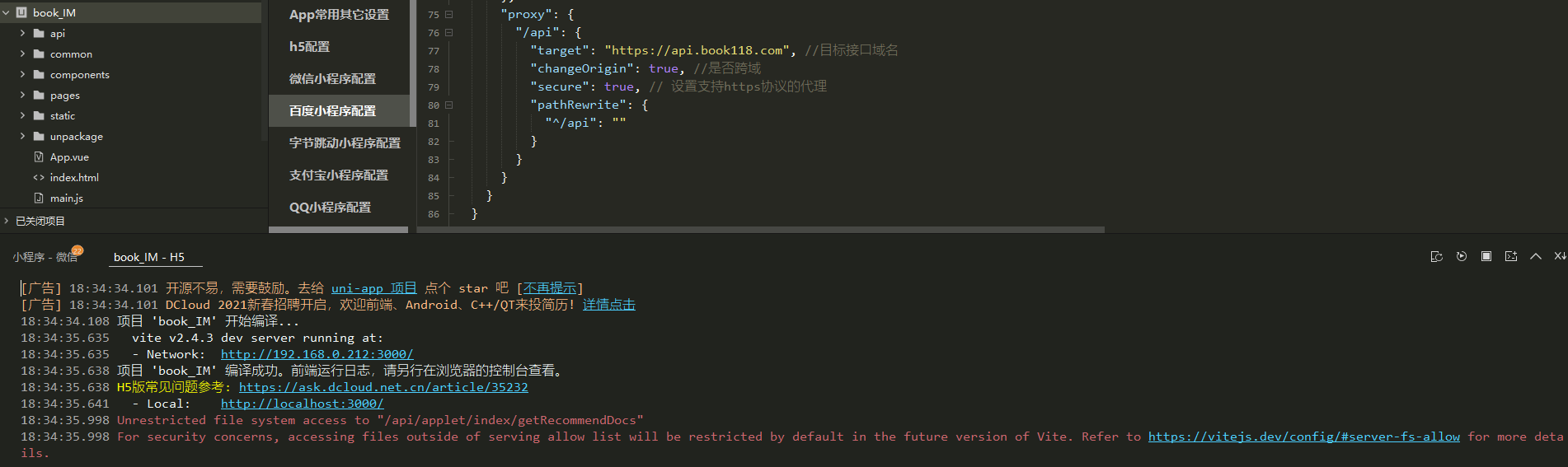
    

图片


更多关于uni-app H5 + VUE3 请求无返回值,疑似与vite配置有关的实战教程也可以访问 https://www.itying.com/category-93-b0.html

8 回复

在 vite.config.js 配置: import { defineConfig } from ‘vite’
import uni from ‘@dcloudio/vite-plugin-uni’

export default defineConfig({
plugins: [
uni(),
],
server: {
port: 3344,
proxy: {
‘/api’: {
target: ‘http://xxxxxx’, // 自己的云服务
changeOrigin: true,
rewrite: path => path.replace(/^/api/, ‘’),
},
},
},
})

更多关于uni-app H5 + VUE3 请求无返回值,疑似与vite配置有关的实战教程也可以访问 https://www.itying.com/category-93-b0.html


好人一生平安

好像运行到浏览器可以,运行到手机不行?

麻烦知道的给个回复嘛

官方的给个回复呗

vue3的话,先使用vite.config.js配置proxy
https://cn.vitejs.dev/config/#server-proxy

好像运行到浏览器可以,运行到手机不行?

根据你的描述,这个问题确实与 Vite 的配置有关。在 Vue 3 + Vite 项目中,Vite 默认对文件系统的访问进行了更严格的限制,以提高安全性。当开发服务器收到一个不以 / 开头的请求(比如你的 /api/applet/index/getRecommendDocs),Vite 会尝试将其解析为文件系统路径,从而触发这个警告,并可能导致请求无法正确代理到后端。

你的 devServer 配置是 Vue CLI 的格式,在 Vite 中需要修改为 vite.config.js(或 .ts)文件中的 server 配置。同时,需要正确设置 proxyfs.allow

解决方案如下:

  1. 创建或修改 vite.config.js:在项目根目录下创建该文件(如果使用 TypeScript,则为 vite.config.ts)。

  2. 配置代理和文件访问规则:将你的代理配置迁移过来,并添加 server.fs.allow 设置。

    import { defineConfig } from 'vite'
    import uni from '@dcloudio/vite-plugin-uni'
    
    export default defineConfig({
      plugins: [uni()],
      server: {
        port: 8080, // 端口号
        proxy: {
          '/api': {
            target: 'https://api.book118.com', // 目标接口域名
            changeOrigin: true, // 是否跨域
            secure: true, // 支持 https
            rewrite: (path) => path.replace(/^\/api/, '') // 路径重写,注意属性名是 rewrite
          }
        },
        fs: {
          // 限制为项目根目录,避免警告。也可以根据需要添加其他目录。
          allow: ['.']
        }
      }
    })
回到顶部