




uni-app subNVues自定义导航栏导致下拉刷新无法显示提示下拉文字提醒
uni-app subNVues自定义导航栏导致下拉刷新无法显示提示下拉文字提醒
| 类别 | 信息 |
|---|---|
| 产品分类 | uniapp/App |
| PC开发环境 | Windows |
| PC版本号 | 10 |
| HBuilderX | 正式 |
| HBuilderX版本号 | 3.2.8 |
| 手机系统 | Android |
| 手机版本号 | Android 9.0 |
| 手机厂商 | 诺基亚 |
| 手机机型 | X7 |
| 页面类型 | vue |
| 打包方式 | 云端 |
| 项目创建方式 | HBuilderX |
示例代码:
{
"path": "pages/tabBar/home", //首頁
"meta": {
"auth": false
},
"style": {
"navigationBarTitleText": "",
"navigationBarTextStyle": "white",
"navigationStyle": "custom",
"app-plus": {
"background": "#171717",
"scrollIndicator": "none",
"titleNView": true,
"pullToRefresh": {
"support": true,
"offset": "60px",
"color": "#FFFFFF",
"style": "default",
"contentdown": {
"caption": "Pull down refresh"
},
"contentover": {
"caption": "Release refreshable"
},
"contentrefresh": {
"caption": "Refreshing"
}
},
"subNVues": [{ //导航栏
"id": "head_home",
"path": "pages/subNvues/head-home", // nvue 路径
"type": "navigationBar",
"style": { //webview style 子集,文档可暂时开放出来位置,大小相关配置
"popGesture": "none", // 组织侧滑返回, none,close
"background": "transparent",
"position": "absolute",
"top": "0px",
"left": "0px",
"width": "100%",
"height": "100%"
}
}]
}
}
}
操作步骤:
{
"path": "pages/tabBar/home", //首頁
"meta": {
"auth": false
},
"style": {
"navigationBarTitleText": "",
"navigationBarTextStyle": "white",
"navigationStyle": "custom",
"app-plus": {
"background": "#171717",
"scrollIndicator": "none",
"titleNView": true,
"pullToRefresh": {
"support": true,
"offset": "60px",
"color": "#FFFFFF",
"style": "default",
"contentdown": {
"caption": "Pull down refresh"
},
"contentover": {
"caption": "Release refreshable"
},
"contentrefresh": {
"caption": "Refreshing"
}
},
"subNVues": [{ //导航栏
"id": "head_home",
"path": "pages/subNvues/head-home", // nvue 路径
"type": "navigationBar",
"style": { //webview style 子集,文档可暂时开放出来位置,大小相关配置
"popGesture": "none", // 组织侧滑返回, none,close
"background": "transparent",
"position": "absolute",
"top": "0px",
"left": "0px",
"width": "100%",
"height": "100%"
}
}]
}
}
预期结果:
下拉刷新出现文字提示
实际结果:
没有显示配置文字,只有灰色下拉背景
bug描述:
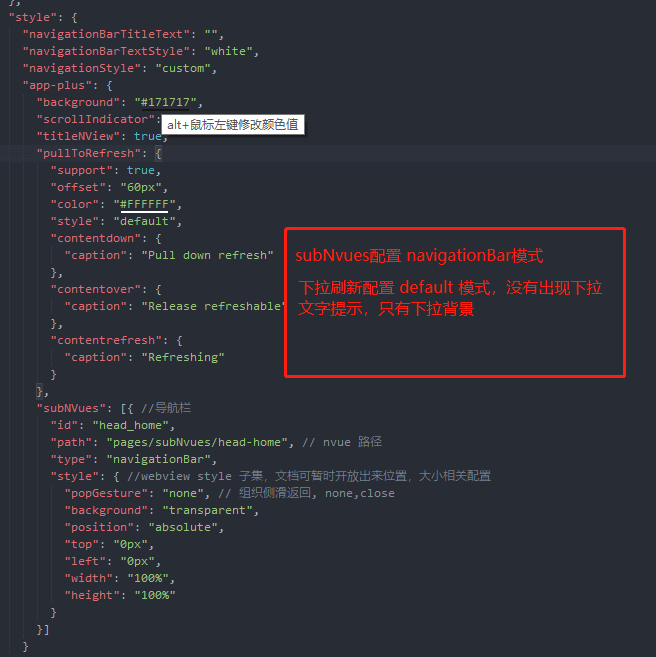
页面配置 subNvues ,navigationsBar导航栏模式,下拉刷新为default模式,出现下拉刷新没有文字显示bug
更多关于uni-app subNVues自定义导航栏导致下拉刷新无法显示提示下拉文字提醒的实战教程也可以访问 https://www.itying.com/category-93-b0.html
1 回复

更多关于uni-app subNVues自定义导航栏导致下拉刷新无法显示提示下拉文字提醒的实战教程也可以访问 https://www.itying.com/category-93-b0.html
问题出在 subNVue 的层级覆盖。当使用 type: "navigationBar" 的 subNVue 时,它会创建一个原生导航栏层,默认位于页面内容(包括下拉刷新控件)之上。
在您的配置中,subNVue 的样式设置为 "height": "100%",这会导致它覆盖整个页面窗口,从而遮挡了下拉刷新时出现的文字提示。虽然下拉刷新的灰色背景(属于原生渲染层)可能可见,但文字提示层被这个全屏的 subNVue 遮挡了。
解决方案是调整 subNVue 的高度,不要设置为 100%,仅设置为导航栏实际需要的高度(例如 44px 或加上状态栏的 88px),为下拉刷新提示留出显示空间。
将 subNVue 的 style 修改如下:
"style": {
    "popGesture": "none",
    "background": "transparent",
    "position": "absolute",
    "top": "0px",
    "left": "0px",
    "width": "100%",
    "height": "44px" // 修改这里,使用固定的导航栏高度
}