




HarmonyOS鸿蒙Next中使用@Watch + setTimeout实现带防抖的搜索建议功能
HarmonyOS鸿蒙Next中使用@Watch + setTimeout实现带防抖的搜索建议功能
如何使用 [@Watch](/user/Watch) + setTimeout 实现带防抖的搜索建议功能?
3 回复

使用场景
针对于任何联想搜索相关的地方,比如商品搜索、通讯录联系人查找、文章标题检索、地点搜索等等
实现思路
一、防抖控制:用户停止输入多少秒后才出发搜索,防止抖动。
this.debounceTimer = setTimeout(() => {
  this.fetchSuggestions(this.searchText.trim());
}, 300); // 300ms 防抖
二、缓存管理:使用 Map<string, string[]> 缓存相关数据列表。
  private cache: Map<string, string[]> = new Map(); // 本地缓存
   if (this.cache.has(keyword)) {
      this.suggestions = this.cache.get(keyword)!;
      return;
    }
三、使用 @State 管理状态且通过 @Watch('searchText') 来监听输入变化。
 @Watch('onSearchTextChanged')
  @State searchText: string = '';
  @State suggestions: string[] = [];
  @State isLoading: boolean = false;
完整可运行代码
@Entry
@Component
struct SearchPage {
  @Watch('onSearchTextChanged')
  @State searchText: string = '';
  @State suggestions: string[] = [];
  @State isLoading: boolean = false;

  private debounceTimer: number = 0;
  private cache: Map<string, string[]> = new Map(); // 本地缓存

  // 监听搜索框输入

  private onSearchTextChanged(newVal: string) {
    console.log(this.searchText)
    if (this.searchText.trim() === '') {
      this.suggestions = [];
      return;
    }

    // 清除上一次定时器
    clearTimeout(this.debounceTimer);

    // 设置新防抖
    this.debounceTimer = setTimeout(() => {
      this.fetchSuggestions(this.searchText.trim());
    }, 300); // 300ms 防抖
  }

  // 模拟网络请求(实际项目替换为 fetch 或 ohos.request)
  private async mockApiRequest(keyword: string): Promise<string[]> {
    // 模拟网络延迟
    // await new Promise(resolve => setTimeout(resolve, 500));

    // 返回模拟建议(实际应调用后端接口)
    const base = ['shouji', 'diannao', 'erji', 'pingban', 'shoubiao'];
    return base.filter(item => item.includes(keyword)).slice(0, 5);
  }

  private async fetchSuggestions(keyword: string) {
    // 1. 先查缓存
    if (this.cache.has(keyword)) {
      this.suggestions = this.cache.get(keyword)!;
      return;
    }

    // 2. 缓存未命中,发起请求
    this.isLoading = true;
    try {
      const result = await this.mockApiRequest(keyword);
      this.suggestions = result;

      // 3. 写入缓存
      this.cache.set(keyword, result);
    } catch (e) {
      console.error('[Search] 请求失败:', e);
      this.suggestions = ['网络错误,请重试'];
    } finally {
      this.isLoading = false;
    }
  }

  build() {
    Column({ space: 15 }) {
      Text('商品搜索')
        .fontSize(20)
        .fontWeight(FontWeight.Bold)

      // 搜索框
      TextInput({ placeholder: '请输入商品名称' })
        .onChange((value: string) => {
          this.searchText = value; // 触发 @Watch
        })
        .width('100%')
        .height(50)
        .borderRadius(8)
        .backgroundColor('#F5F5F5')

      // 加载状态
      if (this.isLoading && this.searchText.trim() !== '') {
        Text('搜索中...')
          .fontColor('#999')
          .fontSize(14)
      }

      // 建议列表
      if (this.suggestions.length > 0) {
        List({ space: 5 }) {
          ForEach(
            this.suggestions,
            (item: string, index: number) => {
              ListItem() {
                Row() {
                  Image($r('app.media.startIcon'))
                    .width(16)
                    .height(16)
                    .margin({ right: 10 })
                  Text(item)
                    .fontSize(16)
                }
                .padding(12)
                .width('100%')
                .borderRadius(6)
                .backgroundColor('#FAFAFA')
              }
            }
          )
        }
        .width('100%')
        .height(200)
      }
    }
    .padding(25)
    .width('100%')
  }
}
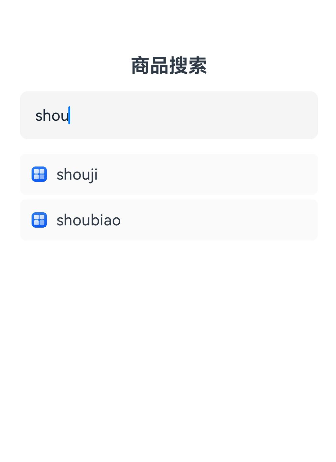
实现效果图
通过搜索shouji可联想带出相关的数据。

更多关于HarmonyOS鸿蒙Next中使用@Watch + setTimeout实现带防抖的搜索建议功能的实战系列教程也可以访问 https://www.itying.com/category-93-b0.html


在HarmonyOS Next中,使用@Watch装饰器监听搜索关键词变化,结合setTimeout实现防抖的搜索建议功能,是一种高效且常见的做法。以下是核心实现步骤和代码示例:
1. 基本思路
- 使用
@State装饰器管理搜索关键词。 - 使用
@Watch装饰器监听关键词变化。 - 在
@Watch回调中,利用setTimeout实现防抖逻辑,延迟触发搜索建议请求。
2. 代码示例
import { SearchService } from '../services/SearchService'; // 假设的搜索服务

@Entry
@Component
struct SearchWithDebounce {
  @State keyword: string = ''; // 搜索关键词
  @State suggestions: string[] = []; // 搜索建议列表
  private timer: number | null = null; // 防抖计时器

  // 监听keyword变化
  @Watch('keyword')
  onKeywordChange() {
    // 清除之前的计时器
    if (this.timer) {
      clearTimeout(this.timer);
    }

    // 设置新的防抖计时器(延迟500毫秒)
    this.timer = setTimeout(() => {
      if (this.keyword.trim() !== '') {
        this.fetchSuggestions(this.keyword);
      } else {
        this.suggestions = []; // 关键词为空时清空建议
      }
    }, 500);
  }

  // 获取搜索建议
  async fetchSuggestions(keyword: string) {
    try {
      const result = await SearchService.getSuggestions(keyword);
      this.suggestions = result;
    } catch (error) {
      console.error('获取搜索建议失败:', error);
      this.suggestions = [];
    }
  }

  build() {
    Column() {
      // 搜索输入框
      TextInput({ placeholder: '请输入关键词' })
        .width('90%')
        .height(40)
        .onChange((value: string) => {
          this.keyword = value; // 触发@Watch监听
        })

      // 搜索建议列表
      List({ space: 10 }) {
        ForEach(this.suggestions, (item: string) => {
          ListItem() {
            Text(item)
              .fontSize(16)
              .padding(10)
          }
        })
      }
      .width('90%')
      .layoutWeight(1)
    }
    .padding(20)
    .width('100%')
    .height('100%')
  }
}
3. 关键点说明
- 防抖逻辑:通过
setTimeout延迟执行搜索请求,并在每次关键词变化时重置计时器,确保仅在用户停止输入后触发请求。 - 资源清理:在组件销毁时(如使用
aboutToDisappear生命周期)应清理计时器,避免内存泄漏。 - 性能优化:对于频繁输入的场景,防抖能有效减少不必要的网络请求或计算开销。
4. 注意事项
- 确保
@Watch装饰器仅监听必要的状态变量,避免过度触发。 - 根据实际需求调整防抖延迟时间(如300-800毫秒)。
- 考虑网络请求的取消逻辑,避免旧请求覆盖新结果。
此方案结合了响应式状态管理和防抖技术,适用于实时搜索、表单验证等场景,能有效平衡用户体验与性能。
