




HarmonyOS 鸿蒙Next中app跳转微信公众号文章
HarmonyOS 鸿蒙Next中app跳转微信公众号文章 【问题描述】:鸿蒙app通过webview内嵌了微信公众号,怎么点击点赞这些怎么跳到微信对应的公众号文章
【问题现象】:查找了官方文档和微信那边文档没有找到,怎么从鸿蒙app跳转到公众号文章的办法,希望可以给个方案。
【版本信息】:未涉及
【复现代码】:未涉及
【尝试解决方案】:未涉及

可以直接在webview的H5页面中进行处理即可;
-
公众号页面跳转机制: 公众号主页可通过微信原生协议实现跳转,格式为:
weixin://profile/{公众号微信号或原始ID}。例如weixin://profile/gh_123456789 -
H5页面实现方式: 通过window.location跳转协议地址:
window.location.href = 'weixin://profile/gh_123456789'
**注意:**微信存在协议白名单机制,未在白名单的域名调用可能被拦截。
更多关于HarmonyOS 鸿蒙Next中app跳转微信公众号文章的实战系列教程也可以访问 https://www.itying.com/category-93-b0.html

webview的onLoadIntercept方法里面进拦截
例如:
.onLoadIntercept((event) => {
  let data = event.data
  let url = data.getRequestUrl();
  if (url.startsWith("weixin") || url.startsWith("alipays")) {
     this.openThirdApp(url)
  }
  return true
})

  //打开三方app
  private openThirdApp(link:string){
    let openLinkOptions: OpenLinkOptions = {
      appLinkingOnly: false
    };
    try {
      let context: common.UIAbilityContext = getContext(this) as common.UIAbilityContext;
      context.openLink(link, openLinkOptions)
        .then(() => {
        }).catch((err: BusinessError) => {
        Logger.debug("openThirdApp Error"+JSON.stringify(err))
      });
    } catch (paramError) {
      Logger.debug("openThirdApp param Error"+JSON.stringify(paramError))
    }
    return true
  }
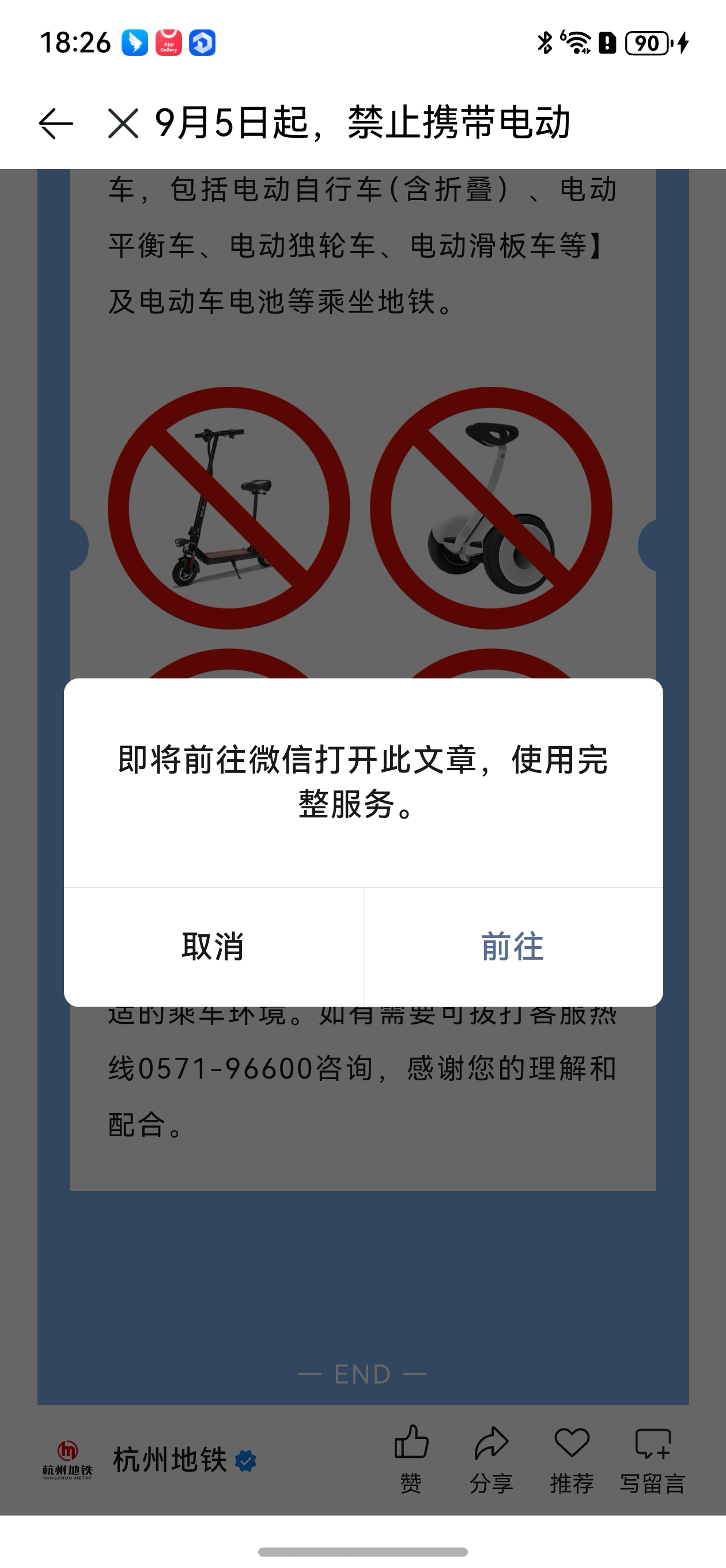
如图所示,点击公众号文章的赞、分享、推荐等按钮时,会有弹窗提示,点击前往,会触发Webview的onLoadIntercept方法,打印是 weixin://dl/business/?ticket=tbf11cc52464ac645907841eeaf6cd3ee 然后根据前缀打开第三方App的形式就行了

在HarmonyOS Next中,App跳转微信公众号文章可通过URL Scheme或Deep Link实现。使用ohos.ability.wantAgent模块创建Want对象,指定目标URL为微信文章链接。调用startAbility()方法触发跳转。需确保设备已安装微信并支持相关协议。具体实现依赖微信提供的URL格式。

在HarmonyOS Next中,App通过WebView内嵌微信公众号页面后,要实现点击“点赞”等按钮跳转到微信App内对应的公众号文章,核心在于识别并拦截特定的URL Scheme或Intent,然后通过系统能力启动微信。
由于微信官方并未提供专门的HarmonyOS Next API,因此这属于一个跨应用跳转与URL Scheme处理的通用技术问题。以下是基于当前HarmonyOS Next能力给出的实现方案:
核心思路
- 监听WebView内的特定链接:微信公众号文章页面的“点赞”、“在看”等按钮,其链接通常包含特定的URL Scheme(如
weixin://)或路径模式。 - 拦截并解析该链接:在WebView中捕获这些链接的点击事件,阻止其在WebView内直接打开。
- 构造并发送Intent:解析出目标文章的唯一标识(如URL),使用HarmonyOS的
Want(意图)启动微信App,并携带文章标识信息。
关键步骤与代码示例
1. 配置WebView并设置路由拦截
在ArkUI中,通过Web组件加载微信公众号页面,并设置onUrlLoadIntercept回调来拦截页面内的URL跳转请求。
import webview from '@ohos.web.webview';
import { BusinessError } from '@ohos.base';
import Want from '@ohos.app.ability.Want';
import abilityAccessCtrl from '@ohos.abilityAccessCtrl';
import common from '@ohos.app.ability.common';

@Entry
@Component
struct Index {
  controller: webview.WebviewController = new webview.WebviewController();

  build() {
    Column() {
      // 加载微信公众号页面
      Web({ src: 'https://mp.weixin.qq.com/s/xxx', controller: this.controller })
        .onUrlLoadIntercept((event) => {
          // 在此处拦截并处理URL
          return this.handleUrlIntercept(event);
        })
    }
  }

  // URL拦截处理函数
  private handleUrlIntercept(event: webview.UrlLoadInterceptResult): boolean {
    let url: string = event.data.toString();
    // 判断是否为微信文章跳转链接(示例模式,需根据实际链接调整)
    if (url.startsWith('https://mp.weixin.qq.com/s/') || url.includes('weixin://')) {
      // 拦截此请求,不在WebView中打开
      this.jumpToWechatArticle(url);
      return true; // 返回true表示已拦截,WebView不处理此URL
    }
    // 其他链接允许在WebView中继续加载
    return false;
  }
}
2. 解析URL并启动微信
在jumpToWechatArticle方法中,解析出文章的唯一路径或ID,并通过Want启动微信。微信支持通过特定URL Scheme打开公众号文章,常见格式为 weixin://dl/business/?ticket=xxx 或直接使用文章URL。注意:微信官方并未公开承诺此Scheme的稳定性,实际参数需自行抓取分析。
import { BusinessError } from '@ohos.base';
import Want from '@ohos.app.ability.Want';
import abilityAccessCtrl from '@ohos.abilityAccessCtrl';
import common from '@ohos.app.ability.common';

private jumpToWechatArticle(originalUrl: string) {
  let targetUri: string = '';
  // 示例:解析出文章ID或直接使用原始URL(需根据实际拦截到的链接结构调整)
  if (originalUrl.startsWith('https://mp.weixin.qq.com/s/')) {
    // 假设直接使用文章网页URL,微信App可能支持直接打开
    targetUri = originalUrl;
  } else if (originalUrl.includes('weixin://')) {
    // 如果是微信Scheme,直接使用
    targetUri = originalUrl;
  }

  if (!targetUri) {
    console.error('无法解析出有效的目标URI');
    return;
  }

  let want: Want = {
    // 微信的BundleName,通常为 'com.tencent.mm'
    bundleName: 'com.tencent.mm',
    // 微信的主Ability,通常为 'com.tencent.mm.ui.LauncherUI'
    abilityName: 'com.tencent.mm.ui.LauncherUI',
    uri: targetUri, // 携带文章标识信息
    action: 'ohos.want.action.viewData' // 通用查看数据动作
  };

  let context: common.UIAbilityContext = getContext(this) as common.UIAbilityContext;
  context.startAbility(want).then(() => {
    console.info('启动微信成功');
  }).catch((err: BusinessError) => {
    console.error(`启动微信失败,错误码: ${err.code}, 信息: ${err.message}`);
    // 可以在此处添加降级处理,例如在WebView内打开一个提示页
  });
}
重要注意事项
- URL Scheme不确定性:微信用于打开公众号文章的内部Scheme并非公开API,可能会变更。最可靠的方式是直接使用文章的https://mp.weixin.qq.com/s/xxx 网页URL作为
Want的uri参数。微信App在接收到此URI时,通常会尝试在其内部打开。 - 微信App安装与权限:确保用户设备已安装微信App。
startAbility会失败如果未安装。HarmonyOS Next应用需要声明相应的权限(如ohos.permission.START_ABILITIES_FROM_BACKGROUND,具体取决于启动方式),并在module.json5中配置。 - 降级策略:如果启动微信失败,应提供友好的用户提示,或考虑在WebView内继续打开原始链接(尽管体验可能不完整)。
- 测试与适配:不同版本的微信App对URI的处理方式可能有细微差别,需进行充分测试。
总结
该方案利用HarmonyOS Next的WebView URL拦截和Want跨应用启动能力,实现了从鸿蒙App内嵌微信公众号页面到微信App文章页面的跳转。其实现不依赖于微信官方提供的特殊SDK,而是基于通用的系统级交互原理。开发者需要重点关注所拦截URL的准确性和Want参数的构造。
