




HarmonyOS 鸿蒙Next中使用 Tabs + NavDestination 实现底部导航栏与页面栈管理
HarmonyOS 鸿蒙Next中使用 Tabs + NavDestination 实现底部导航栏与页面栈管理
如何通过 Tabs + NavDestination 来实现应用底部导航栏与页面栈的管理呢?

应用场景
我们几乎99.99%的应用都需要创建底部菜单,比如一个包含 **3个标签页(首页、分类、我的)** 这种底部菜单的应用,用户点击底部标签可切换页面,每个页面显示不同的内容(如首页显示轮播图,分类页显示列表,我的页显示用户信息)
实现思路
核心使用鸿蒙os为我们提供的 2大组件Tabs组件和Navigator组件。通过Tabs组件来实现 底部标签栏导航,用户通过点击不同标签切换页面。通过Navigator组件来实现 页面路由跳转及 页面间参数传递 与 返回逻辑。
我们创建分类、首页、我的几个页面来实现。
完整代码
主要的入口文件,通过 Tabs实现底部标签 菜单栏目。引入首页、分类和 我的几个页面进行路由跳转。
// MainPage.ets
import { HomePage } from "./HomePage"
import { CategoryPage } from "./CategoryPage"
import {ProfilePage} from  "./ProfilePage"

@Entry
@Component
struct MainPage {
  build() {
    Tabs({ barPosition: BarPosition.End }) {
      // Tab 1: 首页(支持内部跳转)
      TabContent() {
        Navigation() {
          HomePage()
        }
      }
      .tabBar('首页')

      // Tab 2: 分类(简单页面)
      TabContent() {
        CategoryPage()
      }
      .tabBar('分类')

      // Tab 3: 我的
      TabContent() {
        ProfilePage()
      }
      .tabBar('我的')
    }
    .width('100%')
    .height('100%')
  }
}
主页
import { router } from '@kit.ArkUI';

// pages/HomePage.ets
@Entry
@Component
struct HomePage {
  @State scrollOffset: number = 0;
  @State searchText: string = '';
  private scroller: Scroller = new Scroller();
  @State cartItems: string[] = ["1","2","3","4","5"];

  build() {
    Scroll(this.scroller) {
      Column({ space: 20 }) {
        // 搜索框(验证输入状态保留)
        TextInput({ placeholder: '在首页搜索商品...' })
          .onChange((value: string) => {
            this.searchText = value;
          })
          .width('90%')
          .height(45)
          .borderRadius(20)
          .padding({ left: 16 })
          .backgroundColor('#F5F5F5')

        Text(`当前搜索: "${this.searchText}"`)
          .fontColor('#666')
          .fontSize(14)

        Text('首页 - 滚动测试')
          .fontSize(20)
          .fontWeight(FontWeight.Bold)

        // 长列表模拟
        ForEach(
          Array.from(this.cartItems, (_, i) => i),
          (item: number) => {
            Row() {
              Text(`首页内容 ${item + 1}`)
                .width('100%')
                .height(60)
                .backgroundColor('#E6F7FF')
                .textAlign(TextAlign.Center)
                .borderRadius(8)
            }
          }
        )

        Button('查看商品详情')
          .width(200)
          .height(45)
          .backgroundColor('#007DFF')
          .onClick(() => {
            router.pushUrl({ url: "pages/1211/DetailPage" });
          })
      }
      .padding(20)
      .width('100%')
    }
    .scrollable(ScrollDirection.Vertical)
  }
}

export { HomePage };
我的页面
// pages/ProfilePage.ets
@Entry
@Component
struct ProfilePage {
  @State userName: string = '鸿蒙用户';
  @State isVip: boolean = false;

  build() {
    Scroll() {
      Column({ space: 25 }) {
        // 用户头像区
        Column() {
          Image($r('app.media.startIcon'))
            .width(80)
            .height(80)
            .borderRadius(40)
            .backgroundColor('#E0E0E0')
            .margin({ top: 40 })
          Text(this.userName)
            .fontSize(18)
            .margin({ top: 10 })
          if (this.isVip) {
            Text('VIP会员')
              .fontColor('#FFA500')
              .fontSize(14)
          }
        }

        // 功能入口
        GridRow() {
          this.createGridItem('订单中心')
          this.createGridItem('收货地址')
          this.createGridItem('客服帮助')
          this.createGridItem('系统设置')
        }
        .width('100%')
        .margin({ top: 30 })

        // 切换 VIP 按钮(验证交互状态保留)
        Button(this.isVip ? '取消VIP' : '开通VIP')
          .width(200)
          .height(45)
          .backgroundColor(this.isVip ? '#ccc' : '#007DFF')
          .onClick(() => {
            this.isVip = !this.isVip;
          })
          .margin({ top: 20, bottom: 60 })
      }
      .width('100%')
    }
  }

  @Builder
  createGridItem(title: string) {
    GridCol({ span: { xs: 6, sm: 6, md: 6 } }) {
      Column({ space: 8 }) {
        Image($r('app.media.startIcon')) // 占位图标
          .width(24)
          .height(24)
          .backgroundColor('#E0E0E0')
          .borderRadius(4)
        Text(title)
          .fontSize(14)
          .fontColor('#333')
      }
      .width('100%')
      .height(80)
      .backgroundColor('#F8F9FA')
      .borderRadius(10)
      .justifyContent(FlexAlign.Center)
    }
  }
}

export {ProfilePage}
分类页面
// pages/CategoryPage.ets
@Entry
@Component
struct CategoryPage {
  @State selectedCategory: string = '全部';
  private categories: string[] = ['全部', '手机', '电脑', '家电', '服饰'];
  @State cartItems: string[] = ["1","2","3","4","5"];

  build() {
    Column({ space: 15 }) {
      Text('商品分类')
        .fontSize(22)
        .fontWeight(FontWeight.Bold)
        .margin({ top: 20 })

      // 分类标签栏
      Row() {
        ForEach(
          this.categories,
          (item: string) => {
            Button(item)
              .width(80)
              .height(36)
              .fontSize(14)
              .backgroundColor(this.selectedCategory === item ? '#007DFF' : '#E0E0E0')
              .fontColor(this.selectedCategory === item ? Color.White : Color.Black)
              .onClick(() => {
                this.selectedCategory = item;
              })
          }
        )
      }
      .width('100%')
      .justifyContent(FlexAlign.SpaceAround)

      // 分类内容区
      Text(`当前选中: ${this.selectedCategory}`)
        .fontSize(16)
        .margin({ top: 20 })

      List({ space: 10 }) {
        ForEach(
          Array.from(this.cartItems, (_, i) => i),
          (item: number) => {
            ListItem() {
              Text(`${this.selectedCategory}商品 ${item + 1}`)
                .padding(15)
                .width('100%')
                .borderRadius(8)
                .backgroundColor('#FFF8E1')
            }
          }
        )
      }
      .width('100%')
      .layoutWeight(1)
    }
    .width('100%')
  }
}

export { CategoryPage };
详情页面
import { router } from '@kit.ArkUI'

@Entry
@Component
struct DetailPage {
  build() {
    Column({ space: 20 }) {
      Text('商品详情页')
        .fontSize(22)
        .fontWeight(FontWeight.Bold)
        .margin({ top: 50 })

      Text('这是从首页跳转过来的详情页')
        .fontSize(16)
        .textAlign(TextAlign.Center)
        .width('80%')

      Button('返回')
        .width(150)
        .height(45)
        .margin({ top: 30 })
        .onClick(() => {
          router.back();
        })
    }
    .width('100%')
    .justifyContent(FlexAlign.Center)
  }
}
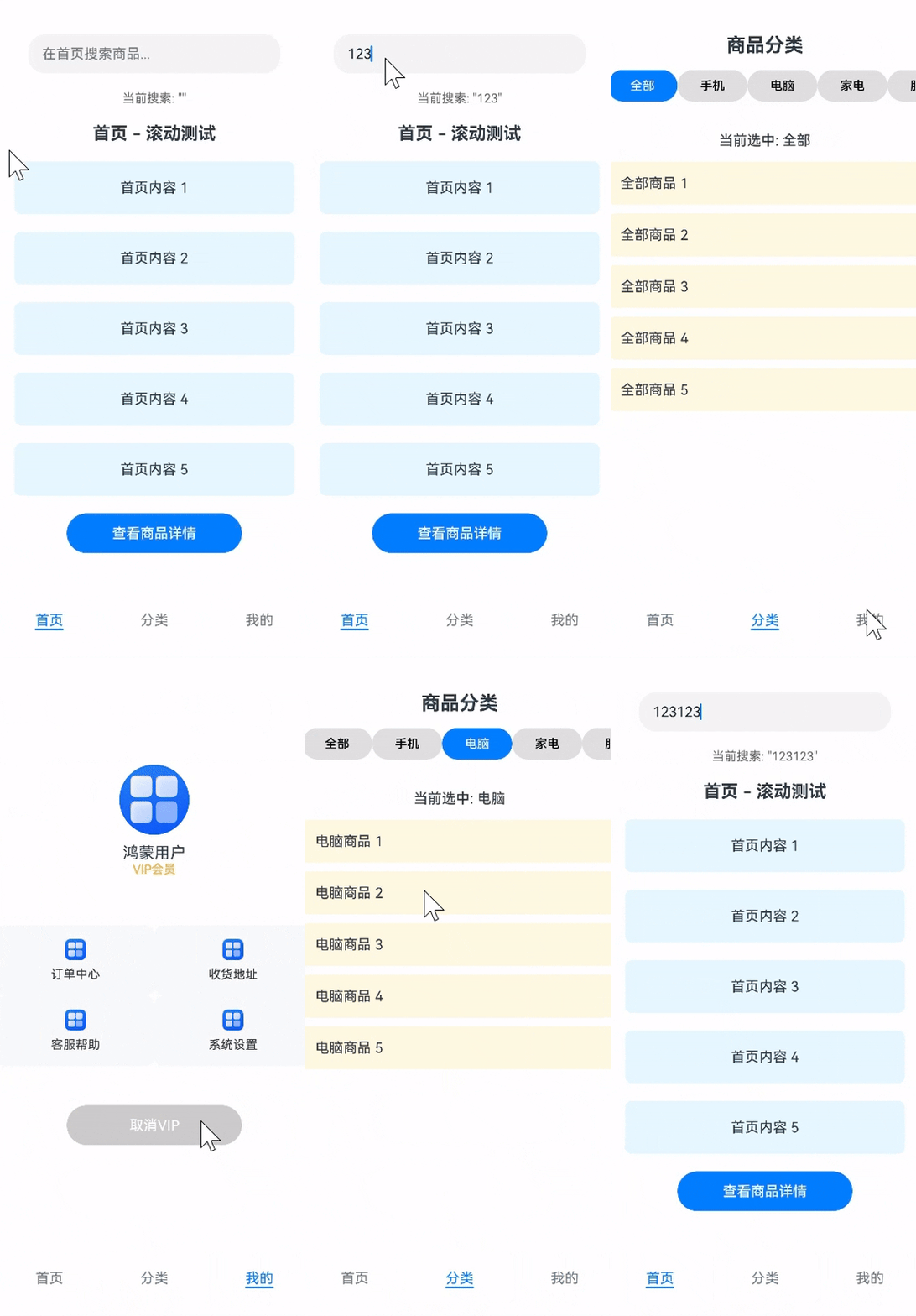
整体效果如下
更多关于HarmonyOS 鸿蒙Next中使用 Tabs + NavDestination 实现底部导航栏与页面栈管理的实战系列教程也可以访问 https://www.itying.com/category-93-b0.html

实现 Tabs + NavDestination 的底部导航与页面栈管理
通过 Tabs 组件实现底部导航栏,结合 Navigation 和 NavDestination 管理页面栈,可实现主流应用的多级导航架构。以下是具体实现方案:
核心架构设计
graph TD
A[Navigation根容器] --> B[NavPathStack页面栈]
A --> C[Tabs组件]
C --> D[TabContent-首页]
C --> E[TabContent-功能页]
D --> F[NavDestination子页]
E --> G[NavDestination子页]
实现步骤
创建Navigation根容器
@Entry
@Component
struct Index {
  private pathStack: NavPathStack = new NavPathStack()

  build() {
    Navigation(this.pathStack) {
      // Tabs将作为首页内容
    }
    .hideTitleBar(true) // 隐藏默认标题栏
    .onStateChange((isHidden) => {
      // 监听导航栏状态变化
    })
  }
}
添加Tabs底部导航
Tabs({ barPosition: BarPosition.End }) {
  // 首页Tab
  TabContent() {
    HomePage() // 首页组件
  }.tabBar('首页', $r('app.media.home'))
  // 功能页Tab
  TabContent() {
    FeaturePage() // 功能页组件
  }.tabBar('功能', $r('app.media.feature'))
}
.barMode(BarMode.Fixed)
实现页面跳转管理
// HomePage.ets
@Component
struct HomePage {
  @Consume pathStack: NavPathStack // 共享页面栈

  build() {
    Column() {
      Button('跳转详情')
        .onClick(() => {
          // 跳转到NavDestination子页
          this.pathStack.pushPathByName('DetailPage', { id: 123 })
        })
    }
  }
}
配置子页面路由表
在 src/main/resources/base/profile/router_map.json:
{
  "routerMap": [
    {
      "name": "DetailPage",
      "pageSourceFile": "DetailPage.ets",
      "buildFunction": "DetailPageBuilder"
    }
  ]
}
创建NavDestination子页
// DetailPage.ets
@Builder
export function DetailPageBuilder() {
  NavDestination() {
    DetailContent() // 子页内容组件
  }
}

@Component
struct DetailContent {
  @State param: any = {}
  aboutToAppear() {
    this.param = router.getParams() // 获取跳转参数
  }
}
🔍 关键实现技巧
TabBar显示控制
- 当
pathStack.length > 0(存在子页)时自动隐藏底部TabBar - 返回首页时通过
pathStack.pop()触发TabBar重新显示
页面栈共享
使用 @Provide/@Consume在Tabs子页和NavDestination间共享页面栈
// 父组件
@Provide('pathStack') pathStack: NavPathStack = new NavPathStack()
// 子组件
@Consume('pathStack') pathStack: NavPathStack
参数传递
- 使用
pushPathByName(name: string, params: object)传递参数 - 子页通过
router.getParams()接收参数
⚠️ 注意事项
路由配置
必须在 module.json5中启用路由表:
"module": {
  "routerMap": "$profile:router_map"
}
组件层级
- Tabs必须作为Navigation的直接子组件
- NavDestination只能通过页面栈操作显示
状态同步
使用 pathStack.onChange监听页面栈变化:
this.pathStack.onChange(() => {
  this.hideTabBar = this.pathStack.length > 0
})
这种架构实现了:
✅ 底部TabBar导航 ✅ 子页面全屏跳转(自动隐藏TabBar) ✅ 页面参数传递 ✅ 完整的页面栈管理
符合微信、淘宝等主流应用的导航体验,同时遵循鸿蒙的组件化设计规范。

在鸿蒙Next中,Tabs组件用于创建底部导航栏,NavDestination用于定义导航目标页面。通过NavController管理页面栈,实现Tabs切换时对应NavDestination的加载与导航历史管理。每个Tab关联一个NavDestination,确保页面状态独立。

在HarmonyOS Next中,使用 Tabs 组件结合 NavDestination 实现底部导航栏与页面栈管理,是构建多页面应用的核心模式。其关键在于利用 Navigation 的导航栈能力,配合 Tabs 的切换来管理不同模块的独立页面栈。
核心实现步骤:
-
构建导航结构:在
EntryAbility的主页(例如MainPage)中,使用Navigation作为根容器。Navigation的初始路由应指向一个包含Tabs的页面(例如HomePage)。 -
配置
NavDestination:为每一个底部导航标签页对应的“首页”创建一个NavDestination。例如,“首页”、“发现”、“我的”三个标签,应分别对应HomeNavDestination、DiscoverNavDestination、ProfileNavDestination。这些NavDestination作为各自模块页面栈的根入口。 -
集成
Tabs:在HomePage中,使用Tabs组件。每个TabContent内部不直接放置页面内容,而是放置一个Navigator组件。Navigator的target属性指向对应的NavDestination的name。 -
实现独立页面栈:当用户点击不同的
Tabs标签时,Navigator会导航到对应的NavDestination。每个NavDestination及其后续通过NavPathStack压入的页面,构成了该模块独立的页面栈。切换Tabs时,各模块的页面栈状态会被自动保存和恢复。
示例代码结构:
// MainPage.ets
@Entry
@Component
struct MainPage {
  build() {
    Navigation() {
      // 初始路由指向包含Tabs的页面
      HomePage()
    }
  }
}

// HomePage.ets (包含Tabs)
@Component
struct HomePage {
  @State currentIndex: number = 0;

  build() {
    Column() {
      // 内容区:由当前激活的Tab对应的Navigator管理
      Navigator({ target: this.getTargetByIndex(this.currentIndex) }) {
        // 内容由Navigator根据路由自动渲染
      }

      // 底部Tabs栏
      Tabs({ barPosition: BarPosition.End, index: this.currentIndex }) {
        TabContent() {
          // 首页模块
        }
        .tabBar('首页')

        TabContent() {
          // 发现模块
        }
        .tabBar('发现')

        TabContent() {
          // 我的模块
        }
        .tabBar('我的')
      }
      .onChange((index: number) => {
        this.currentIndex = index;
      })
    }
  }

  private getTargetByIndex(index: number): string {
    const targets = ['pages/HomeNav', 'pages/DiscoverNav', 'pages/ProfileNav'];
    return targets[index];
  }
}

// HomeNavDestination.ets (首页模块的根NavDestination)
@NavDestination({
  title: '首页',
  name: 'pages/HomeNav'
})
@Component
struct HomeNavDestination {
  build() {
    // 首页模块的真正首页内容
    Column() {
      Text('首页内容')
      // 可以在此页面内使用NavPathStack.push()推入更多子页面
    }
  }
}
// DiscoverNavDestination, ProfileNavDestination 结构类似
页面栈管理机制:
- 模块内导航:在每个
NavDestination内部,可以使用NavPathStack.push()推入新的子页面,形成该模块内的页面栈。例如,在“首页”点击一个项目,进入详情页。 - Tab 切换保活:当从“首页”Tab切换到“发现”Tab时,“首页”模块的整个页面栈(例如停留在某个详情页)会被自动保存。切换回来时,页面栈状态完全恢复。
- 整体返回:在任意模块的子页面中,调用
NavPathStack.pop()会返回该模块内的上一个页面。如果需要返回到Tabs切换层,需处理全局导航逻辑。
此模式清晰分离了模块,并提供了符合用户预期的导航体验。
