




uni-app iOS平台重大bug,list列表滑动时渲染出现问题
uni-app iOS平台重大bug,list列表滑动时渲染出现问题
示例代码:
<template>
<list >
<cell v-for="(item,index) in 5" >
<view style="height: 100rpx;background-color: #7B7B7B;"><text>a{{index}}</text></view>
</cell>
<header>
<view style="height:80rpx;flex: 1;background-color: #4CD964;"><text>header</text></view>
</header>
<cell v-for="(item,index) in 20)">
<view style="height: 120rpx;background-color: #BFD9FF;"><text>b{{index}}</text></view>
</cell>
</list>
</template>
操作步骤:
直接运行
预期结果:
正常显示
实际结果:
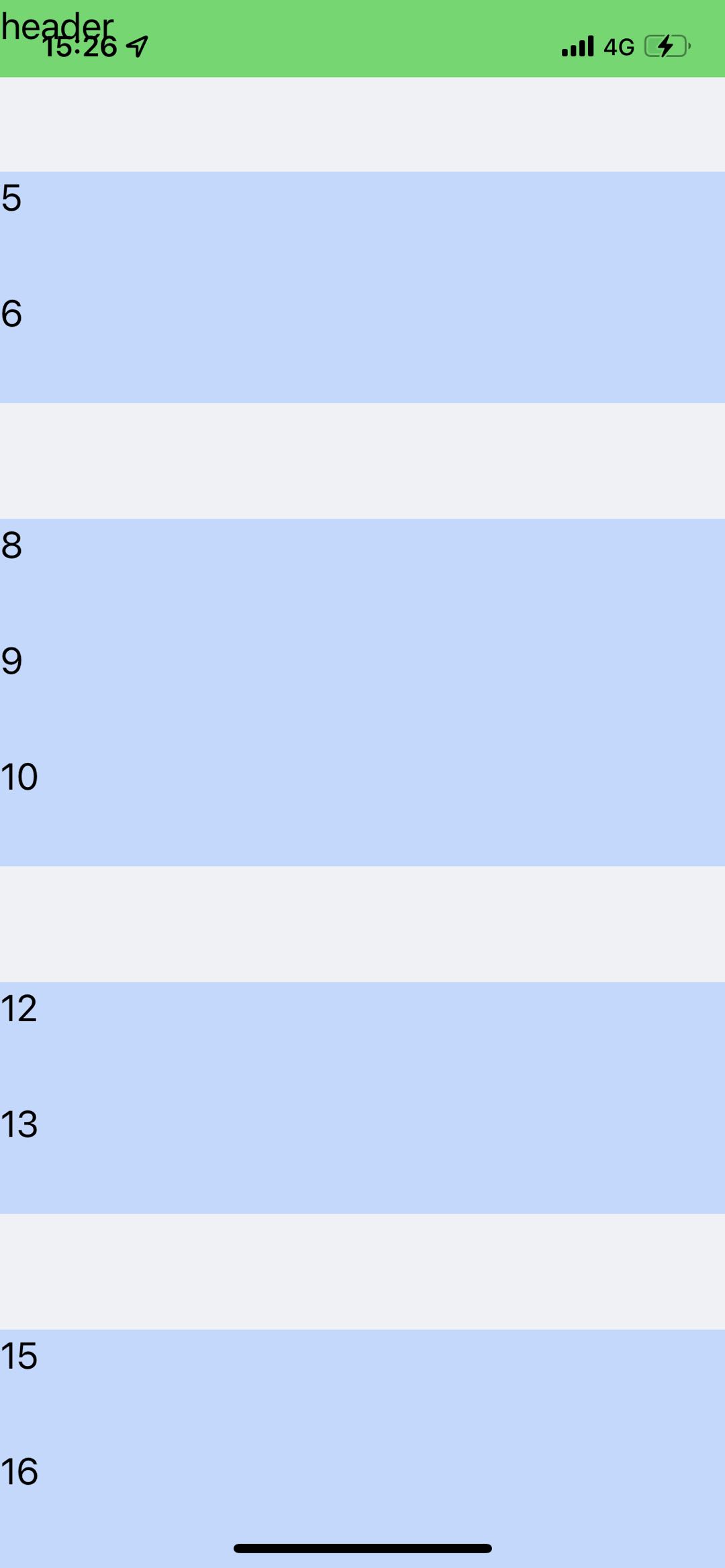
列表中会有莫名其妙没有规律的空白地方出现
bug描述:
重大bug,list列表滑动出现空白的地方,而且使用了header组件,顶部会有一点留白的位置,怎么也去不掉,非常影响使用,android没问题。
| 信息类别 | 信息内容 |
|---|---|
| 产品分类 | uniapp/App |
| PC开发环境 | Windows |
| 手机系统 | iOS |
| 手机厂商 | 苹果 |
| 手机机型 | iphone12,iphone13 |
| 页面类型 | nvue |
| 打包方式 | 云端 |
| 项目创建方式 | HBuilderX |
相关链接:
更多关于uni-app iOS平台重大bug,list列表滑动时渲染出现问题的实战教程也可以访问 https://www.itying.com/category-93-b0.html
3 回复


感谢您的反馈,已加分!
HBuilderX 3.2.10 alpha 已修复;
list 中 header 上面有空白的问题下个版本会修复
相关问题帖子:https://ask.dcloud.net.cn/question/132309
这是一个已知的iOS平台nvue中list组件的渲染问题,主要涉及cell和header的混合使用。从你提供的代码和截图来看,问题确实存在。
问题分析:
- 在iOS平台,当list中同时包含
<header>和多个<cell>时,容易出现渲染异常,表现为空白区域或留白。 - 特别是当header后面紧跟cell时,滑动过程中可能出现布局错乱。
- 这个问题在Android平台正常,属于iOS平台特定bug。
临时解决方案:
- 避免混合使用header和cell:将header内容也放入一个cell中,作为列表的第一个元素。
- 使用统一的cell结构:修改代码如下:
<template>
<list>
<cell v-for="(item,index) in listData" :key="index">
<view v-if="index === 0" style="height:80rpx;background-color: #4CD964;">
<text>header</text>
</view>
<view v-else-if="index <= 5" style="height: 100rpx;background-color: #7B7B7B;">
<text>a{{index-1}}</text>
</view>
<view v-else style="height: 120rpx;background-color: #BFD9FF;">
<text>b{{index-6}}</text>
</view>
</cell>
</list>
</template>

<script>
export default {
data() {
return {
listData: 26 // header + 5个a + 20个b
}
}
}
</script>