




在Golang中使用Terratest调用Terragrunt HCL位置文件时遇到错误
在Golang中使用Terratest调用Terragrunt HCL位置文件时遇到错误
我有一个Terragrunt脚本,在运行terragrunt apply-all命令行时工作正常,但我无法从Go脚本中执行/调用相同的操作,使用的是TgApplyAll函数。
以下是我的Go脚本。可正常工作的Terragrunt脚本存放在D:\vertica-terragrunt-US-286094-Modules\with-infra位置,并且使用手动的terragrunt apply-all命令可以正常工作,但从Go脚本中运行时我遇到了错误。
package test

import (

    "testing"

    "github.com/gruntwork-io/terratest/modules/terraform"

)

func TestTerraformAwsHelloWorldExample(t *testing.T) {

    t.Parallel()

    terraformOptions := &terraform.Options{

        // The path to where our Terraform code is located

        TerraformDir: "D:/vertica-terragrunt-US-286094-Modules/with-infra",

    }

    // At the end of the test, run `terraform destroy` to clean up any resources that were created.

    //defer terraform.TgDestroyAll(t, terraformOptions)

    // Run `terraform init` and `terraform apply`. Fail the test if there are any errors.

    terraform.TgApplyAll(t, terraformOptions)

}
遇到的错误如下:
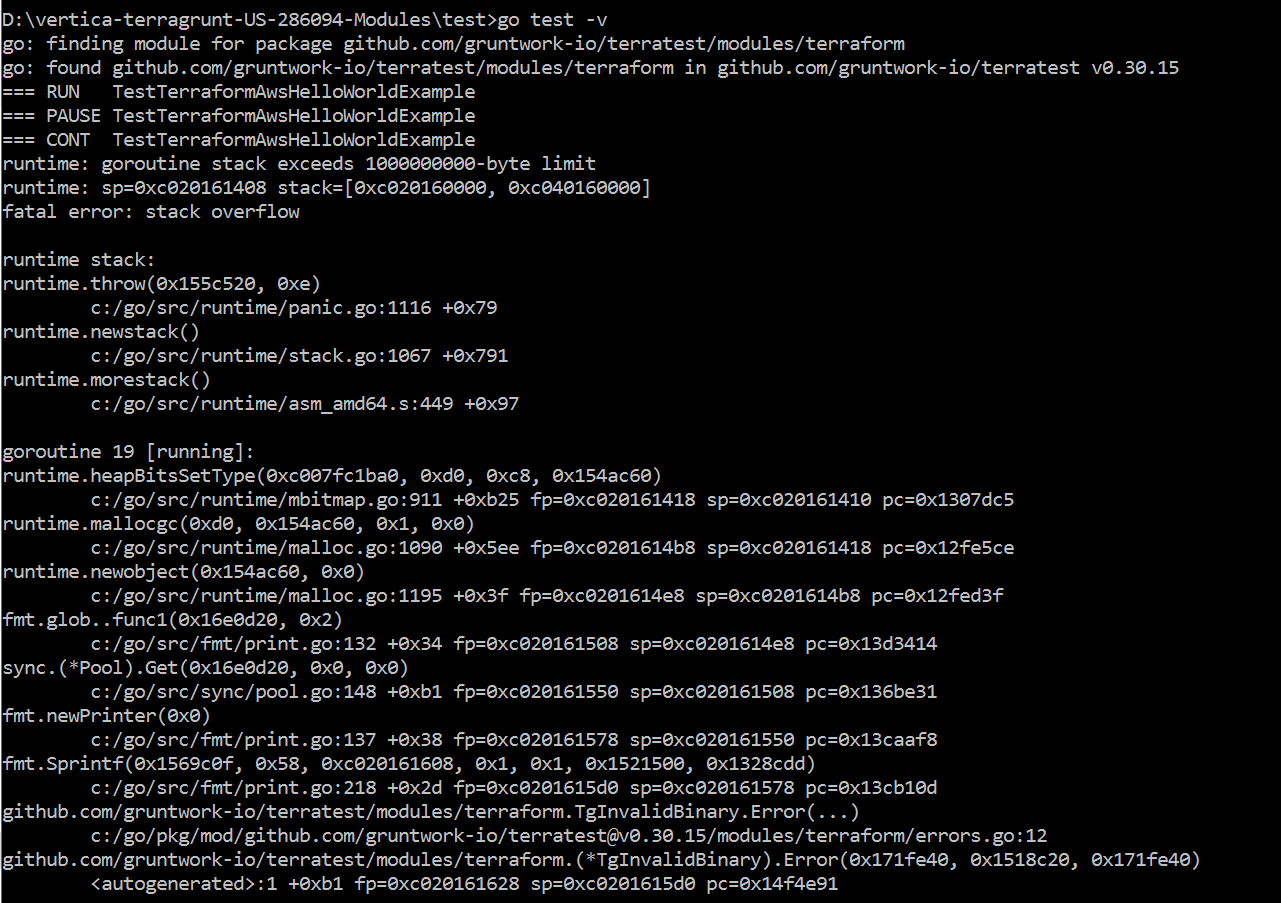
更多关于在Golang中使用Terratest调用Terragrunt HCL位置文件时遇到错误的实战教程也可以访问 https://www.itying.com/category-94-b0.html
1 回复

更多关于在Golang中使用Terratest调用Terragrunt HCL位置文件时遇到错误的实战系列教程也可以访问 https://www.itying.com/category-94-b0.html
在Golang中使用Terratest调用Terragrunt时,需要正确配置Terragrunt的二进制路径和命令行参数。以下是修复后的示例代码:
package test

import (
    "testing"
    "github.com/gruntwork-io/terratest/modules/terraform"
    "github.com/gruntwork-io/terratest/modules/terragrunt"
)

func TestTerraformAwsHelloWorldExample(t *testing.T) {
    t.Parallel()

    // 设置Terragrunt选项
    terragruntOptions := &terragrunt.Options{
        // Terragrunt工作目录
        TerragruntDir: "D:/vertica-terragrunt-US-286094-Modules/with-infra",
        // 指定Terragrunt二进制文件路径(如果需要)
        TerragruntBinary: "terragrunt",
        // 设置环境变量
        Env: map[string]string{
            "TF_INPUT": "false",
        },
    }

    // 清理资源
    defer terragrunt.DestroyAll(t, terragruntOptions)

    // 运行terragrunt apply-all
    terragrunt.RunTerragrunt(t, terragruntOptions)
}
如果需要使用特定的Terragrunt命令参数,可以使用以下方式:
package test

import (
    "testing"
    "github.com/gruntwork-io/terratest/modules/terragrunt"
)

func TestTerraformAwsHelloWorldExample(t *testing.T) {
    t.Parallel()

    terragruntOptions := &terragrunt.Options{
        TerragruntDir: "D:/vertica-terragrunt-US-286094-Modules/with-infra",
        TerragruntBinary: "terragrunt",
    }

    // 执行terragrunt apply-all
    terragrunt.RunTerragrunt(t, terragruntOptions, "apply-all")

    // 或者使用ApplyAll函数
    terragrunt.ApplyAll(t, terragruntOptions)
}
如果遇到Terragrunt二进制文件找不到的问题,可以显式指定路径:
package test

import (
    "testing"
    "os/exec"
    "github.com/gruntwork-io/terratest/modules/terragrunt"
)

func TestTerraformAwsHelloWorldExample(t *testing.T) {
    t.Parallel()

    // 检查terragrunt是否在PATH中
    if _, err := exec.LookPath("terragrunt"); err != nil {
        t.Fatal("terragrunt not found in PATH")
    }

    terragruntOptions := &terragrunt.Options{
        TerragruntDir: "D:/vertica-terragrunt-US-286094-Modules/with-infra",
        TerragruntBinary: "terragrunt",
        // 设置非交互模式
        Env: map[string]string{
            "TF_INPUT": "false",
            "TF_CLI_ARGS": "-auto-approve",
        },
    }

    terragrunt.ApplyAll(t, terragruntOptions)
}
确保已正确导入Terragrunt模块并安装了所需依赖:
go get github.com/gruntwork-io/terratest/modules/terragrunt
