




uni-app集成vue3后 重大问题 wx.createComponent编译不出来
uni-app集成vue3后 重大问题 wx.createComponent编译不出来
操作步骤:
添加带自定义插槽的组件:
TodoList.vue
<template>
<ul>
  <li v-for="( item, index ) in items">
    <slot :item="item" :index="index"></slot>
  </li>
</ul>
</template>

<script>
export default {
  props: {
    items: {
      type: Array,
      required: true
    },
  }
}
</script>

<style scoped>
a {
  color: #42b983;
}
</style>
在页面中引入:
<template>
<TodoList>
  <template v-slot:default="{ item }">
    <span class="green">{{ item?.name }}</span>
  </template>
</TodoList>
</template>

<script>
import TodoList from './TodoList.vue'
export default {
  components: {
    TodoList
  },
  data() {
    return {
      list: [
        {
          id: 1,
          name: 'vue',
          age: 18
        },
        {
          id: 2,
          name: 'react',
          age: 20
        },
        {
          id: 3,
          name: 'angular',
          age: 22
        }
      ]
    }
  },
}
</script>

<style>
</style>
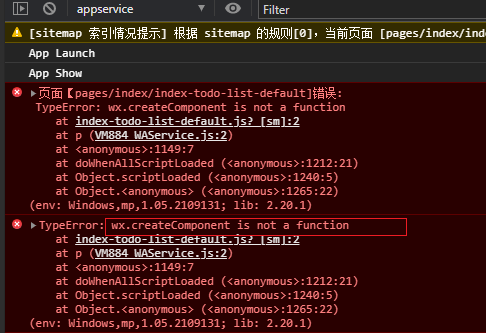
运行 yarn dev:mp-weixin , 生成 index-todo-list-default , 里面包含 wx.createComponent 方法,控制台报错:
TypeError: wx.createComponent is not a function
预期结果:
`wx.createComponent` 方法生成成功,控制台不报错
实际结果:
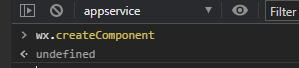
控制台报错,且 `vendor.js` 无法生成 `wx.createComponent` 方法
bug描述:
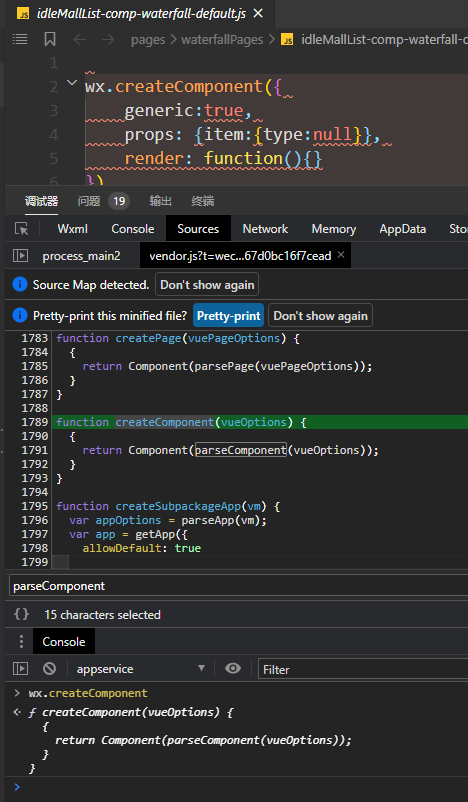
uniapp集成vue3后,wx.createComponent编译不出来(图一、图二)。以前集成vue2是可以的(图三)。
| 信息类别 | 信息内容 |
|---|---|
| 产品分类 | uniapp/小程序/微信 |
| PC开发环境 | Windows |
| PC开发环境版本 | Windows11 21H2 |
| 工具版本号 | 微信开发者工具 1.05.2110110 |
| 基础库版本号 | 2.19.1 |
| 项目创建方式 | CLI |
| CLI版本号 | @vue/cli 4.5.12 |
更多关于uni-app集成vue3后 重大问题 wx.createComponent编译不出来的实战教程也可以访问 https://www.itying.com/category-93-b0.html
3 回复

看看你开发者工具的基础库版本
更多关于uni-app集成vue3后 重大问题 wx.createComponent编译不出来的实战教程也可以访问 https://www.itying.com/category-93-b0.html

这个问题是由于uni-app在Vue 3模式下,对小程序自定义组件编译方式的调整导致的。
在Vue 3中,uni-app使用了不同的编译策略来处理作用域插槽。当使用带作用域插槽的自定义组件时,编译器会生成wx.createComponent调用,但在某些情况下这个方法可能没有被正确注入到运行环境中。
解决方案:
-
检查uni-app版本:确保使用的是支持Vue 3的最新版本uni-app。建议升级到最新稳定版。
-
修改组件使用方式:尝试将作用域插槽的写法改为更简洁的语法:
<TodoList :items="list">
  <template #default="{ item }">
    <span class="green">{{ item?.name }}</span>
  </template>
</TodoList>
- 检查编译配置:在
vue.config.js或项目配置中,确保Vue 3相关配置正确:
// vue.config.js
module.exports = {
  transpileDependencies: ['@dcloudio/uni-ui', 'your-other-deps']
}
- 清理并重新构建:
# 清理node_modules和dist
rm -rf node_modules dist
yarn install
yarn dev:mp-weixin