




HarmonyOS鸿蒙Next中SoundPool使用问题:1,短音频 rate 无变化效果。2,只能播放5秒内的短音频,15秒音频,播到5秒就停止了。
HarmonyOS鸿蒙Next中SoundPool使用问题:1,短音频 rate 无变化效果。2,只能播放5秒内的短音频,15秒音频,播到5秒就停止了。 【问题描述】:SoundPool使用问题:
1,短音频 rate 无变化效果。
2,只能播放5秒内的短音频,15秒音频,播到5秒就停止了。
【版本信息】:
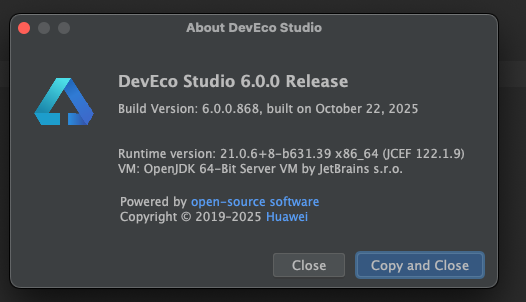
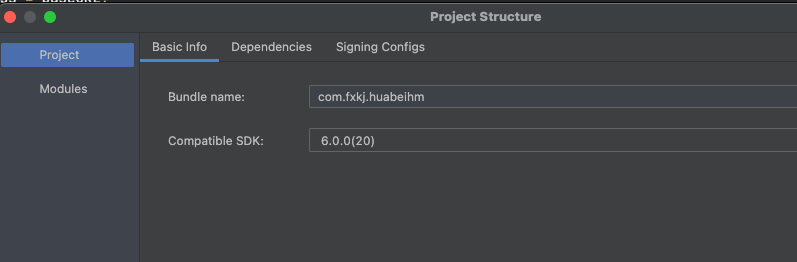
【复现代码】:
//Index文件
import { TrailSound } from '../other/TrailSound';

@Entry
@Component
struct Index {
  @State message: string = 'Hello World';

  build() {
    RelativeContainer() {
      Text(this.message)
        .id('HelloWorld')
        .fontSize($r('app.float.page_text_font_size'))
        .fontWeight(FontWeight.Bold)
        .alignRules({
          center: { anchor: '__container__', align: VerticalAlign.Center },
          middle: { anchor: '__container__', align: HorizontalAlign.Center }
        })
        .onClick(() => {
          this.message = 'Welcome';
        })

      Column(){
        Text("短音频")
          .fontSize(25)
          .padding(20)
          .onClick(()=>{
            TrailSound.getInstance().startRecord()
          })

        Text("长音频")
          .fontSize(25)
          .padding(20)
          .onClick(()=>{
            TrailSound.getInstance().startTaoBaoRecord()
          })
      }
    }
    .height('100%')
    .width('100%')
  }

  aboutToAppear(): void {
    TrailSound.getInstance().init()
  }
}
//TrailSound文件
import { media } from "@kit.MediaKit";
import { common, ErrorCode } from "@kit.AbilityKit";
import fileIo from "@ohos.file.fs";
import { BusinessError } from "@kit.BasicServicesKit";
import { audio } from "@kit.AudioKit";

/**
 * 轨迹播放声音
 * 单例
 */
export class TrailSound{

  private static instance: TrailSound;

  private playMode:string = ""

  public static getInstance(): TrailSound {
    if (!TrailSound.instance) {
      TrailSound.instance = new TrailSound()
    }
    return TrailSound.instance
  }

  // 设置方法为私有
  private constructor() {
    // this.init()
  }

  async init() {
    this.initializePlayer();
  }

  async initializePlayer(){
    // audioRenderInfo中的参数usage取值为STREAM_USAGE_UNKNOWN,STREAM_USAGE_MUSIC,STREAM_USAGE_MOVIE。
    // STREAM_USAGE_AUDIOBOOK时,SoundPool播放短音时为混音模式,不会打断其他音频播放。
    let audioRendererInfo: audio.AudioRendererInfo = {
      usage: audio.StreamUsage.STREAM_USAGE_MUSIC, // 音频流使用类型:音乐。根据业务场景配置,参考StreamUsage。
      rendererFlags: 1 // 音频渲染器标志。
      ,volumeMode : audio.AudioVolumeMode.APP_INDIVIDUAL
    }
    //创建soundPool实例。
    this.soundPool = await media.createSoundPool(32,audioRendererInfo);
    this.soundPool.setVolume(32,5,5)
    //注册监听。
    this.loadCallback();
    this.finishPlayCallback();
    this.setErrorCallback();
  }

  async loadCallback() {
    // 加载完成回调。
    this.soundPool!.on('loadComplete', (soundId_: number) => {
      this.soundId = soundId_;
      console.info('loadComplete soundId: ' + soundId_);
      this.play()
    })
  }

  //设置播放完成监听。
  async finishPlayCallback() {
    this.soundPool!.on('playFinished', () => {
      console.info('receive play finished message');
      // 可进行下次播放。
      //播放下一个。
      //当前播放列表。
      this.playIndex ++

      if (this.playMode === "playSD") {
        this.playMediaList()
      } else if (this.playMode === "playRaw") {
        this.playRawMediaList()
      }
    })
  }
  //设置错误类型监听。
  async setErrorCallback() {
    this.soundPool!.on('error', (error: BusinessError) => {
      console.error('error happened,message is :' + error.code);
      console.error('error happened,message is :' + error.message);
    })
  }

  /**
   * 开始记录
   */
  startRecord() {
    this.playVoice("start.m4a")
  }
  startTaoBaoRecord() {
    this.playVoice("start_taobao.m4a")
  }
  /**
   * 轨迹记录暂停
   */
  pauseRecord() {
    this.playVoice("paused.m4a")
  }
  /**
   * 离开雪场 返回雪场
   * @param isInResort
   */
  aboutResort(isInResort:boolean) {
    let aRPath = "";
    if (isInResort) {
      //返回雪场
      aRPath = "ReturnToResort.m4a";
    } else {
      //已离开雪场
      aRPath = "LeaveResort.m4a";
    }
    this.playVoice(aRPath);
  }
  //切换雪场
  changeResort() {
    this.playVoice("ChangeSkiResort.m4a")
  }

  async playVoice(path:string) {
    this.playMode = ""
    try {
      this.playAssetsVoice(path);
    } catch (err) {
      console.error('播放失败:', err);
    }
  }
  private soundPool: media.SoundPool | undefined = undefined;
  private soundId: number = 0;
  private streamId: number = 0;

  private play() {
    let playParameters: media.PlayParameters = {
      loop: 0,
      rate: 0,
      leftVolume: 0.5,
      rightVolume: 0.5,
      priority: 1000,
    };
    // 开始播放,这边play也可带播放播放的参数PlayParameters,请在音频资源加载完毕,即收到loadComplete回调之后再执行play操作。
    this.soundPool!.play(this.soundId, playParameters, async (error, streamID: number) => {

      if (error) {
        if (error.code != 5400103) {
          //除去没有文件
          this.soundPool?.release()
          this.initializePlayer()
        }
        console.error(`play sound Error: errCode is ${error.code}, errMessage is ${error.message}`);
      } else {
        this.streamId = streamID;
        console.info('play success soundid:' + this.streamId);
      }
    });
  }

  async playAssetsVoice(fileName:string) {

    try {
      if (this.soundId != 0) {
        await this.soundPool!.unload(this.soundId)
      }
      // 加载音频资源。
      let context = getContext(this) as common.UIAbilityContext;
      let fileDescriptor = await context!.resourceManager.getRawFd(`huabei_${fileName.toLowerCase()}`)
      this.soundId = await this.soundPool!.load(fileDescriptor.fd, fileDescriptor.offset, fileDescriptor.length);
      console.info(`load soundPool soundId: ${this.soundId}`)

    } catch (e) {
      console.error('createSoundPool error: ' + e);
    }
  }


  private mediaList: string[] = [];
  private playIndex = 0;
  /**
   * 播放sdcard 文件
   */
  private async playMediaList() {

    if (this.playIndex >= this.mediaList.length) {
      //播放完成结束
      this.playMode = ""
      return
    }
    let path = this.mediaList[this.playIndex]

    if (this.soundId != 0) {
      await this.soundPool!.unload(this.soundId)
    }

    //todo 播放上面列表
    const file = await fileIo.open(path,fileIo.OpenMode.READ_ONLY)
    // 设置文件描述符为音源
    this.soundId = await this.soundPool!.load('fd://' + file.fd.toString());
  }

  /**
   * 播放raw文件
   */
  private async playRawMediaList() {
    if (this.playIndex >= this.mediaList.length) {
      //播放完成结束
      this.playMode = ""
      return
    }
    let path = this.mediaList[this.playIndex]
    if (this.soundId != 0) {
      await this.soundPool!.unload(this.soundId)
    }
    try{
      const context = getContext(this) as common.UIAbilityContext;
      const fileDescriptor = await context.resourceManager.getRawFd(path + ".m4a"); // 文件名需匹配
      this.soundId = await this.soundPool!.load(fileDescriptor.fd, fileDescriptor.offset, fileDescriptor.length);
    } catch (e) {
      console.log(e)
    }

  }


}
更多关于HarmonyOS鸿蒙Next中SoundPool使用问题:1,短音频 rate 无变化效果。2,只能播放5秒内的短音频,15秒音频,播到5秒就停止了。的实战教程也可以访问 https://www.itying.com/category-93-b0.html
2 回复

- SoundPool的rate参数在鸿蒙Next中需通过
setRate()方法动态设置,静态初始化时可能不生效。 - SoundPool默认限制短音频播放时长,可通过
setMaxStreams()调整并发流数量或检查音频编码格式(推荐AAC-LC)。
更多关于HarmonyOS鸿蒙Next中SoundPool使用问题:1,短音频 rate 无变化效果。2,只能播放5秒内的短音频,15秒音频,播到5秒就停止了。的实战系列教程也可以访问 https://www.itying.com/category-93-b0.html

