




uni-app pickerview显示异常,小程序显示正常
uni-app pickerview显示异常,小程序显示正常
| 开发环境 | 版本号 | 项目创建方式 |
|---|---|---|
| Windows | 3.2.12 | HBuilderX |
产品分类:uniapp/H5

浏览器平台:Chrome
浏览器版本:95.0.4638.69

### 示例代码:
```vue
<template>
<view class="container">
    <view class="diygw-form-item diygw-col-24">
        <view class="title">标题</view>
        <view class="input">
            <picker mode="multiSelector" @columnchange="changePickers" :value="pickersIndex" :range="pickersDatas">
                <view class="uni-input">
                    {{ pickersDatas[0][pickersIndex[0]] }},
                </view>
            </picker>
        </view>
    </view>
</view>
</template>

<script>
//create by: 邓志锋 280160522@qq.com http://www.diygw.com
export default {
data() {
return {
input2: '',
date1: '',
pickersInitDatas: [{
"children": [{
"children": [{
"children": [],
"text": "无锡市"
}, {
"children": [],
"text": "深圳市"
}],
"text": "广州市"
}, {
"children": [{
"children": [],
"text": "梅州市"
}],
"text": "中山市"
}],
"text": "广东省"
}, {
"children": [],
"text": "江苏省"
}],
pickersDatas: [
['广东省', '江苏省'],
['广州市', '中山市'],
['无锡市', '深圳市']
],
pickersIndex: [0, 0, 0]
}
},
onShareAppMessage: function() {},
onLoad(option) {
if (option) {
this.setData({
globalOption: option
})
}
},
mounted() {
this.init();
},
methods: {
async init() {

},
getPickerChildren1(data,chindInex1,childIndex2){
     if(chindInex1!=null && data[chindInex1] && data[chindInex1].children && data[chindInex1].children){
         let children = data[chindInex1].children
         //只判断一级
         if(childIndex2==null){
             if(children!=null && children.length>0){
                return children.map(item=>item.text)
             }else{
                 return []
             }
         }else{
             //判断二级
             //有可能并设置下级结点
             if(children[childIndex2]==null){
                 return []
             }
             let children2 = children[childIndex2].children
             if(children2!=null && children2.length>0){
                return children2.map(item=>item.text)
             }else{
                return []
             }
         }
     }else{
         return []
     }

},
changePickers(evt) {
this.pickersIndex[evt.detail.column] = evt.detail.value
if (evt.detail.column == 0) {
    this.pickersIndex.splice(1, 1, 0)
    this.pickersIndex.splice(2, 1, 0)
    this.pickersDatas[1] = this.getPickerChildren1(this.pickersInitDatas,this.pickersIndex[0],null)
    this.pickersDatas[2] = this.getPickerChildren1(this.pickersInitDatas,this.pickersIndex[0],0)

}else if (evt.detail.column == 1) {
    this.pickersDatas[2] = this.getPickerChildren1(this.pickersInitDatas,this.pickersIndex[0],this.pickersIndex[1])
    this.pickersIndex.splice(2, 1, 0)
}
this.$forceUpdate()
}
}
</script>

<style lang="scss"></style>
操作步骤:
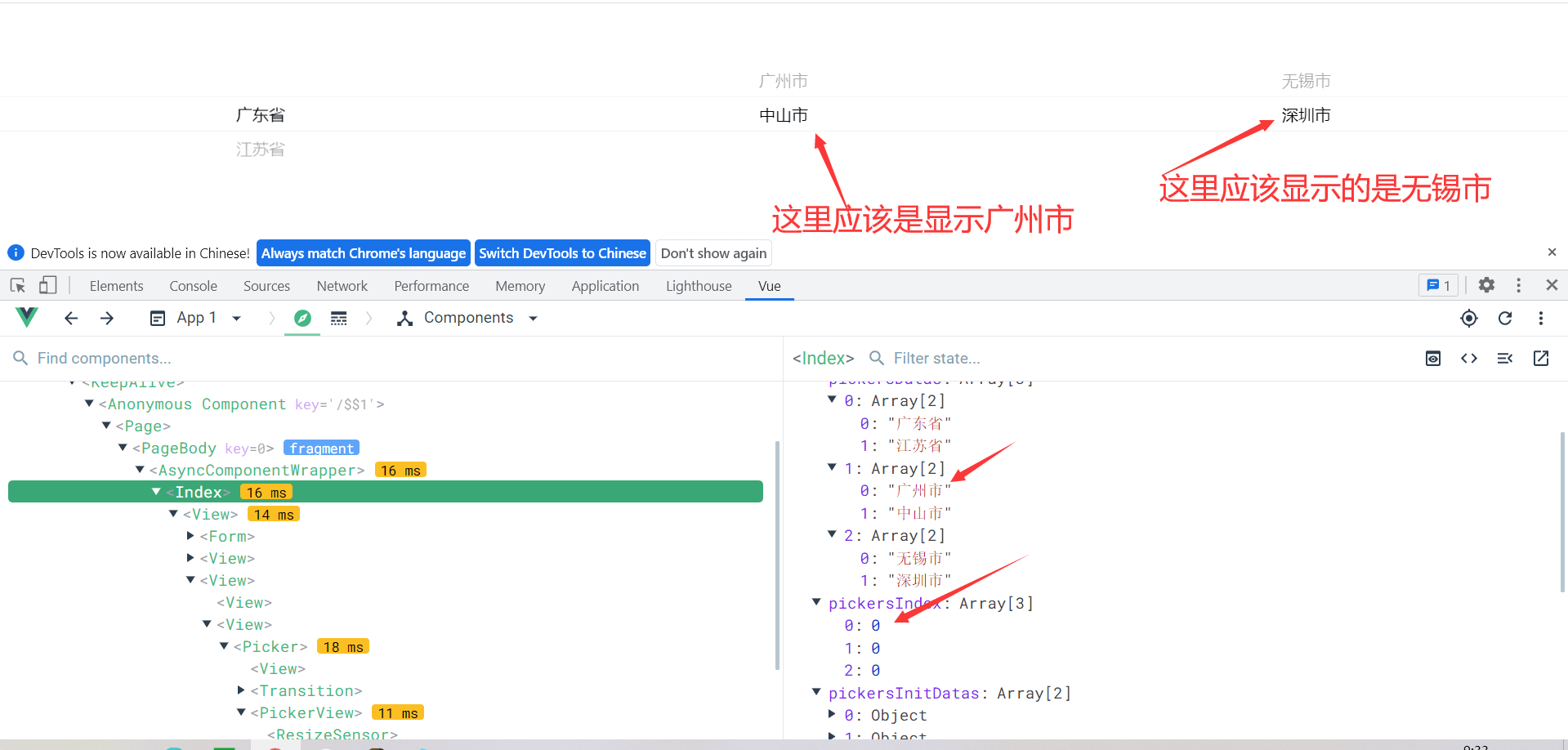
就是拖动省份至江苏省,显示空是正常的,再拖回广东省时显示异常。
预期结果:
就是拖动省份至江苏省,显示空是正常的,再拖回广东省时显示异常,数据本身都是已经0 0 0。
实际结果:
显示上异常,显示上都自动至底部显示,不正确
bug描述:
pickerview因为可能某些子节点缺失的情况下,滑动后有些节点不会变化
更多关于uni-app pickerview显示异常,小程序显示正常的实战教程也可以访问 https://www.itying.com/category-93-b0.html
3 回复

请升级至HBuilder X - 3.2.14-alpha版本试下
更多关于uni-app pickerview显示异常,小程序显示正常的实战教程也可以访问 https://www.itying.com/category-93-b0.html


这是一个典型的picker组件在H5端的数据更新问题。主要原因是picker组件在H5端的渲染机制与小程序端存在差异。
问题分析:
-
数据更新时机问题:在
changePickers方法中,你修改了pickersDatas数组后调用了this.$forceUpdate()强制更新。但在H5端,picker组件可能没有正确响应数据变化。 -
数组引用问题:当你修改
pickersDatas[1]和pickersDatas[2]时,直接赋值了新数组,但pickersDatas数组本身的引用没有改变。
解决方案:
修改changePickers方法,确保数据更新方式能被H5端正确识别:
changePickers(evt) {
    this.pickersIndex[evt.detail.column] = evt.detail.value

    if (evt.detail.column == 0) {
        this.pickersIndex = [this.pickersIndex[0], 0, 0]

        // 使用Vue.set或创建新数组确保响应式更新
        const newPickersDatas = [...this.pickersDatas]
        newPickersDatas[1] = this.getPickerChildren1(this.pickersInitDatas, this.pickersIndex[0], null)
        newPickersDatas[2] = this.getPickerChildren1(this.pickersInitDatas, this.pickersIndex[0], 0)
        this.pickersDatas = newPickersDatas

    } else if (evt.detail.column == 1) {
        const newPickersDatas = [...this.pickersDatas]
        newPickersDatas[2] = this.getPickerChildren1(this.pickersInitDatas, this.pickersIndex[0], this.pickersIndex[1])
        this.pickersDatas = newPickersDatas
        this.pickersIndex = [this.pickersIndex[0], this.pickersIndex[1], 0]
    }

    // 在H5端可能需要延迟更新
    this.$nextTick(() => {
        this.$forceUpdate()
    })
}