




HarmonyOS鸿蒙Next中怎么生成随机十六进制颜色?
HarmonyOS鸿蒙Next中怎么生成随机十六进制颜色? 做原型构建阶段,经常要给界面元素或可视化数据列表配颜色,让它们容易区分。
这时,随机的十六进制颜色就派上用场了。
4 回复

效果图:
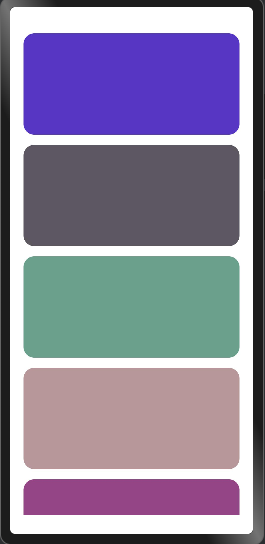
生成随机十六进制颜色的函数:
function randomColor(): string {
  // 生成RGB分量,避免过浅(接近白色)或过深(接近黑色)
  const r = Math.floor(Math.random() * 156) + 50; // 50-205
  const g = Math.floor(Math.random() * 156) + 50;
  const b = Math.floor(Math.random() * 156) + 50;

  return `#${r.toString(16).padStart(2, '0')}${g.toString(16).padStart(2, '0')}${b.toString(16).padStart(2, '0')}`;
}
完整代码:
function randomColor(): string {
  // 生成RGB分量,避免过浅(接近白色)或过深(接近黑色)
  const r = Math.floor(Math.random() * 156) + 50; // 50-205
  const g = Math.floor(Math.random() * 156) + 50;
  const b = Math.floor(Math.random() * 156) + 50;

  return `#${r.toString(16).padStart(2, '0')}${g.toString(16).padStart(2, '0')}${b.toString(16).padStart(2, '0')}`;
}

@Entry
@ComponentV2
struct Index {
  build() {
    List({ space: 15 }) {
      Repeat(Array.from<string, string>({ length: 10 }, () => randomColor()))
        .each((ri: RepeatItem<string>) => {
          ListItem() {

          }
          .width('100%')
          .height(150)
          .padding(20)
          .backgroundColor(ri.item)
          .borderRadius(16)
        })
    }
    .width('100%')
    .height('100%')
    .padding({ left: 20, right: 20 })
  }
}
更多关于HarmonyOS鸿蒙Next中怎么生成随机十六进制颜色?的实战系列教程也可以访问 https://www.itying.com/category-93-b0.html


在HarmonyOS Next中,可通过@ohos.util模块的Random类生成随机十六进制颜色。示例代码:
import { Random } from '@ohos.util';

let random = new Random();
let color = '#' + random.nextInt(0xFFFFFF + 1).toString(16).padStart(6, '0');
此方法生成#000000到#FFFFFF范围内的随机颜色值。

在HarmonyOS Next中,生成随机十六进制颜色可以通过ArkTS实现,核心是使用Math.random()函数生成随机数并转换为十六进制格式。
以下是两种常用方法:
方法一:基础随机生成
function getRandomHexColor(): string {
  // 生成0到16777215之间的随机整数(对应#000000到#FFFFFF)
  const randomColor = Math.floor(Math.random() * 16777215)
  // 转换为6位十六进制字符串,不足位补零
  return '#' + randomColor.toString(16).padStart(6, '0')
}
方法二:分通道生成(更灵活)
function getRandomHexColorByChannel(): string {
  const r = Math.floor(Math.random() * 256)  // 红色通道 0-255
  const g = Math.floor(Math.random() * 256)  // 绿色通道 0-255
  const b = Math.floor(Math.random() * 256)  // 蓝色通道 0-255

  // 将每个通道值转换为两位十六进制
  const hexR = r.toString(16).padStart(2, '0')
  const hexG = g.toString(16).padStart(2, '0')
  const hexB = b.toString(16).padStart(2, '0')

  return `#${hexR}${hexG}${hexB}`
}
使用示例:
// 生成随机颜色并应用到Text组件
@Entry
@Component
struct RandomColorExample {
  @State color: string = '#FFFFFF'

  build() {
    Column() {
      Text('随机颜色示例')
        .fontSize(30)
        .fontColor(this.color)

      Button('生成新颜色')
        .onClick(() => {
          this.color = getRandomHexColor() // 或 getRandomHexColorByChannel()
        })
    }
  }
}
注意事项:
- 生成的十六进制字符串格式为
#RRGGBB,可直接用于ArkUI的颜色属性 padStart(6, '0')确保始终输出6位字符,避免因高位为零导致长度不足- 如需透明度,可扩展为8位
#AARRGGBB格式,增加Alpha通道随机值
这种方法适用于原型设计、图表着色等需要动态颜色的场景,能有效区分界面元素。
