




Golang模板中使用表格的实践指南
Golang模板中使用表格的实践指南
在我的Go代码中,我可以按以下方式将表单数据Post到服务器:
- 创建
struct来表示表单数据 - 将数据编码为JSON
- 将JSON数据发送到服务器
- 获取服务器响应
- 将服务器响应体转换为字节
ioutil.ReadAll(resp.Body) - 解码服务器响应体(如果是JSON格式)
- 处理响应
// go build -ldflags "-H=windowsgui"
package main

import (
	"bytes"
	"encoding/json"
	"fmt"
	"io/ioutil"
	"log"
	"net/http"
	"text/template"
)

// ContactDetails ...
type ContactDetails struct {
	Email   string
	Subject string
	Message string
}

// ReturnedResult ...
type ReturnedResult struct {
	Result  bool   `json:"result"`
	Message string `json:"message"`
}

func index(w http.ResponseWriter, r *http.Request) {
	tmpl := template.Must(template.ParseFiles("forms.html"))
	if r.Method != http.MethodPost {
		tmpl.Execute(w, nil)
		return
	}

	details := ContactDetails{
		Email:   r.FormValue("email"),
		Subject: r.FormValue("subject"),
		Message: r.FormValue("message"),
	}

	// do something with details
	sheetID := "AKfycbxfMucXOzX15tfU4errRSAa9IzuTRbHzvUdRxzzeYnNA8Ynz8LJuBuaMA/exec"
	url := "https://script.google.com/macros/s/" + sheetID + "/exec"
	bytesRepresentation, err := json.Marshal(details)
	if err != nil {
		log.Fatalln(err)
	}
	resp, err := http.Post(url, "application/json", bytes.NewBuffer(bytesRepresentation))
	if err != nil {
		log.Fatalln(err)
	}
	// read all response body
	data, _ := ioutil.ReadAll(resp.Body)

	// close response body
	resp.Body.Close()

	webReturn := ReturnedResult{}
	if err := json.Unmarshal([]byte(data), &webReturn); err != nil {
		panic(err)
	}
	fmt.Println(webReturn.Message)

	//tmpl.Execute(w, struct{ Success bool }{webReturn.Result})
	tmpl.Execute(w, webReturn)
}

func main() {
	// Start Host goroutine
	go func() {
		http.HandleFunc("/", index)
		http.ListenAndServe(":8090", nil)
	}()
}
我使用的表单模板如下,并且运行正常:
<title>Form Submittal</title>
<h1>Contact</h1>
<form method="POST">
    <label>Email:</label><br />
    <input type="text" name="email"><br />
    <label>Subject:</label><br />
    <input type="text" name="subject"><br />
    <label>Message:</label><br />
    <textarea name="message"></textarea><br />

    <input type="submit">
</form>
{{if .Result}}
    <div id='foo'>
        <a href={{.Message}}>Download PDF file</a>
    </div>
    <h1></h1>
    <script>
        // setTimeout(function () {document.querySelector('#foo').style.display='none'}, 5000);
    </script>
{{end}}
现在我有另一个需求,需要在模板中添加html5的table,使其变成:
<title>Form Submittal</title>
<h1>Contact</h1>
<form method="POST">
    <label>Email:</label><br />
    <input type="text" name="email"><br />
    <label>Subject:</label><br />
    <input type="text" name="subject"><br />
    <label>Message:</label><br />
    <textarea name="message"></textarea><br />

    <table class="table table-striped">
        <tr>
            <td><h2>In</h2></td>
            <td><h2>Out</h2></td>
            <td><h2>Total</h2></td>
        </tr>
        <tr>
            <td>InData</td>
            <td>OutData</td>
            <td>TotalData</td>
        </tr>
</table>

    <input type="submit">
</form>
{{if .Result}}
    <div id='foo'>
        <a href={{.Message}}>Download PDF file</a>
    </div>
    <h1></h1>
    <script>
        // setTimeout(function () {document.querySelector('#foo').style.display='none'}, 5000);
    </script>
{{end}}
我的问题是,应该创建什么样的struct来处理这个表单,我是否需要修改:
type ContactDetails struct {
	Email   string
	Subject string
	Message string
}
或者处理这个表格的最佳方式是什么?
以下是所需数据的示例:
type Payments struct {
    BU                  string
    PONo                string
    PO/PIValue          Number
    Currency            string
    VATrequired?        bool
    POcopyAttachment    attachement
}
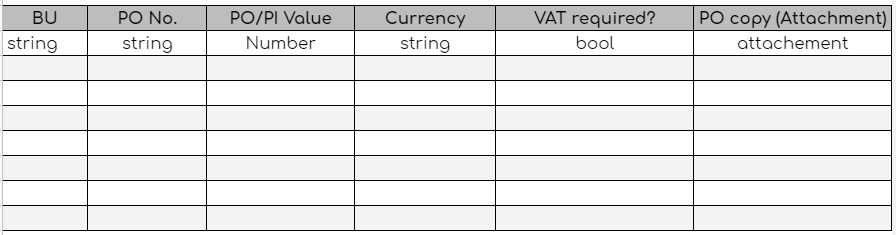
更多关于Golang模板中使用表格的实践指南的实战教程也可以访问 https://www.itying.com/category-94-b0.html
2 回复


在Go模板中使用表格时,需要根据表格数据结构定义相应的struct。对于包含表格数据的表单,可以扩展现有的ContactDetails结构体或创建嵌套结构体。
以下是处理包含表格数据的表单的示例实现:
package main

import (
    "bytes"
    "encoding/json"
    "fmt"
    "io/ioutil"
    "log"
    "net/http"
    "text/template"
)

// PaymentItem 表示表格中的每一行数据
type PaymentItem struct {
    BU               string `json:"bu"`
    PONo             string `json:"po_no"`
    POPIValue        string `json:"po_pi_value"`
    Currency         string `json:"currency"`
    VATRequired      bool   `json:"vat_required"`
    POcopyAttachment string `json:"po_copy_attachment"`
}

// ContactDetails 扩展原有结构体以包含表格数据
type ContactDetails struct {
    Email   string       `json:"email"`
    Subject string       `json:"subject"`
    Message string       `json:"message"`
    Payments []PaymentItem `json:"payments"`
}

// ReturnedResult 保持不变
type ReturnedResult struct {
    Result  bool   `json:"result"`
    Message string `json:"message"`
}

func index(w http.ResponseWriter, r *http.Request) {
    tmpl := template.Must(template.ParseFiles("forms.html"))

    if r.Method != http.MethodPost {
        tmpl.Execute(w, nil)
        return
    }

    // 解析表单数据
    err := r.ParseForm()
    if err != nil {
        http.Error(w, "无法解析表单", http.StatusBadRequest)
        return
    }

    // 创建ContactDetails实例
    details := ContactDetails{
        Email:   r.FormValue("email"),
        Subject: r.FormValue("subject"),
        Message: r.FormValue("message"),
    }

    // 处理表格数据 - 假设表格行数据通过数组形式提交
    // 例如: payments[0][bu], payments[0][po_no], 等
    payments := []PaymentItem{}

    // 获取表格行数(假设通过隐藏字段传递)
    rowCount := 0
    fmt.Sscanf(r.FormValue("row_count"), "%d", &rowCount)

    for i := 0; i < rowCount; i++ {
        payment := PaymentItem{
            BU:               r.FormValue(fmt.Sprintf("payments[%d][bu]", i)),
            PONo:             r.FormValue(fmt.Sprintf("payments[%d][po_no]", i)),
            POPIValue:        r.FormValue(fmt.Sprintf("payments[%d][po_pi_value]", i)),
            Currency:         r.FormValue(fmt.Sprintf("payments[%d][currency]", i)),
            VATRequired:      r.FormValue(fmt.Sprintf("payments[%d][vat_required]", i)) == "true",
            POcopyAttachment: r.FormValue(fmt.Sprintf("payments[%d][po_copy_attachment]", i)),
        }
        payments = append(payments, payment)
    }

    details.Payments = payments

    // 发送数据到服务器
    sheetID := "AKfycbxfMucXOzX15tfU4errRSAa9IzuTRbHzvUdRxzzeYnNA8Ynz8LJuBuaMA/exec"
    url := "https://script.google.com/macros/s/" + sheetID + "/exec"

    bytesRepresentation, err := json.Marshal(details)
    if err != nil {
        log.Printf("JSON编码错误: %v", err)
        http.Error(w, "内部服务器错误", http.StatusInternalServerError)
        return
    }

    resp, err := http.Post(url, "application/json", bytes.NewBuffer(bytesRepresentation))
    if err != nil {
        log.Printf("HTTP请求错误: %v", err)
        http.Error(w, "无法连接到服务器", http.StatusBadGateway)
        return
    }

    defer resp.Body.Close()

    data, err := ioutil.ReadAll(resp.Body)
    if err != nil {
        log.Printf("读取响应错误: %v", err)
        http.Error(w, "无法读取服务器响应", http.StatusInternalServerError)
        return
    }

    webReturn := ReturnedResult{}
    if err := json.Unmarshal(data, &webReturn); err != nil {
        log.Printf("JSON解码错误: %v", err)
        http.Error(w, "无效的服务器响应", http.StatusInternalServerError)
        return
    }

    tmpl.Execute(w, webReturn)
}

func main() {
    http.HandleFunc("/", index)
    http.ListenAndServe(":8090", nil)
}
对应的HTML模板需要修改以支持动态表格:
<title>Form Submittal</title>
<h1>Contact</h1>
<form method="POST" id="contactForm">
    <label>Email:</label><br />
    <input type="text" name="email"><br />
    <label>Subject:</label><br />
    <input type="text" name="subject"><br />
    <label>Message:</label><br />
    <textarea name="message"></textarea><br />

    <h2>Payment Details</h2>
    <table class="table table-striped" id="paymentsTable">
        <thead>
            <tr>
                <th>BU</th>
                <th>PO No</th>
                <th>PO/PI Value</th>
                <th>Currency</th>
                <th>VAT Required?</th>
                <th>PO Copy Attachment</th>
            </tr>
        </thead>
        <tbody id="paymentsBody">
            <!-- 初始行 -->
            <tr>
                <td><input type="text" name="payments[0][bu]" class="form-control"></td>
                <td><input type="text" name="payments[0][po_no]" class="form-control"></td>
                <td><input type="text" name="payments[0][po_pi_value]" class="form-control"></td>
                <td><input type="text" name="payments[0][currency]" class="form-control"></td>
                <td>
                    <select name="payments[0][vat_required]" class="form-control">
                        <option value="false">No</option>
                        <option value="true">Yes</option>
                    </select>
                </td>
                <td><input type="text" name="payments[0][po_copy_attachment]" class="form-control"></td>
            </tr>
        </tbody>
    </table>

    <button type="button" onclick="addRow()">Add Row</button>
    <input type="hidden" name="row_count" id="rowCount" value="1">

    <br><br>
    <input type="submit">
</form>

{{if .Result}}
    <div id='foo'>
        <a href={{.Message}}>Download PDF file</a>
    </div>
    <script>
        // 添加表格行的JavaScript函数
        let rowCounter = 1;

        function addRow() {
            rowCounter++;
            const tbody = document.getElementById('paymentsBody');
            const newRow = document.createElement('tr');

            newRow.innerHTML = `
                <td><input type="text" name="payments[${rowCounter-1}][bu]" class="form-control"></td>
                <td><input type="text" name="payments[${rowCounter-1}][po_no]" class="form-control"></td>
                <td><input type="text" name="payments[${rowCounter-1}][po_pi_value]" class="form-control"></td>
                <td><input type="text" name="payments[${rowCounter-1}][currency]" class="form-control"></td>
                <td>
                    <select name="payments[${rowCounter-1}][vat_required]" class="form-control">
                        <option value="false">No</option>
                        <option value="true">Yes</option>
                    </select>
                </td>
                <td><input type="text" name="payments[${rowCounter-1}][po_copy_attachment]" class="form-control"></td>
            `;

            tbody.appendChild(newRow);
            document.getElementById('rowCount').value = rowCounter;
        }

        // setTimeout(function () {document.querySelector('#foo').style.display='none'}, 5000);
    </script>
{{end}}
如果需要在前端显示表格数据,可以在模板中使用range循环:
<!-- 在模板中显示表格数据的示例 -->
{{if .Payments}}
<table class="table table-striped">
    <thead>
        <tr>
            <th>BU</th>
            <th>PO No</th>
            <th>PO/PI Value</th>
            <th>Currency</th>
            <th>VAT Required?</th>
            <th>PO Copy Attachment</th>
        </tr>
    </thead>
    <tbody>
        {{range .Payments}}
        <tr>
            <td>{{.BU}}</td>
            <td>{{.PONo}}</td>
            <td>{{.POPIValue}}</td>
            <td>{{.Currency}}</td>
            <td>{{if .VATRequired}}Yes{{else}}No{{end}}</td>
            <td>{{.POcopyAttachment}}</td>
        </tr>
        {{end}}
    </tbody>
</table>
{{end}}
这种实现方式允许动态添加表格行,并将所有数据作为一个完整的结构体发送到服务器。JSON编码会自动处理嵌套的切片结构,确保表格数据正确传输。
