




Golang中如何将HTML模板用作"innerHTML"
Golang中如何将HTML模板用作"innerHTML" 我正在尝试获取更详细的数据,并在同一窗口中临时显示这些信息。在较大的屏幕上。在较小的屏幕上,我想隐藏列表,并在双击时显示详细信息。
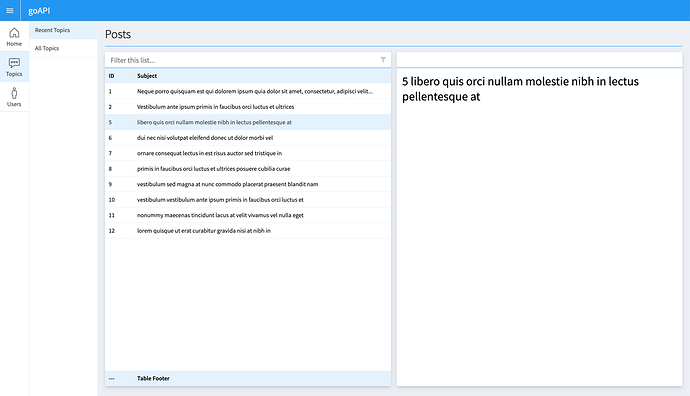
为了说明我的目标,我写了一个非常简单的写入 innerHTML 的示例。
http://94.237.92.101:6060/newposts (屏幕宽度超过 1800px 会同时显示列表和卡片)
const selected = table.getElementsByClassName('selected')
table.onclick = sel;
function sel(row) {
  if (selected[0]) selected[0].className = '';
  row.target.parentNode.className = 'selected';
  table.className = '';
  add2card(row.target.parentNode.innerHTML)
}

function add2card(text){
	document.getElementById("add2card").innerHTML = text;
}
我找到了三种方法来实现这个功能。
- 通过 AJAX 获取数据(不知道如何解析和格式化 JSON)
- 以常规方式获取并在 iFrame 中显示
- 将所有内容存储在列表中(部分数据隐藏),然后基本上像上面那样操作。
在我的想象中,有一种方法可以让 Go 的 html 模板充当 innerHTML。
或者有一种方法可以解析 JSON 并生成一个 HTML 作为值插入到 innerHTML 中。
或者类似这样的方式:
data := tpl.ExecuteTemplate(w, page, data)
任何关于如何避免使用 AJAX 的建议都欢迎!
更多关于Golang中如何将HTML模板用作"innerHTML"的实战教程也可以访问 https://www.itying.com/category-94-b0.html
1 回复

更多关于Golang中如何将HTML模板用作"innerHTML"的实战系列教程也可以访问 https://www.itying.com/category-94-b0.html
在Golang中,可以通过模板渲染生成HTML片段,然后通过HTTP响应返回给前端作为innerHTML的内容。以下是几种实现方式:
1. 使用模板生成HTML片段
创建专门用于生成HTML片段的模板:
// detail_template.html
<div class="detail-card">
    <h2>{{.Title}}</h2>
    <p>{{.Description}}</p>
    <div class="meta">
        <span>作者: {{.Author}}</span>
        <span>日期: {{.Date}}</span>
    </div>
    <div class="content">
        {{.Content}}
    </div>
</div>
2. 创建处理函数返回HTML片段
package main

import (
    "html/template"
    "net/http"
    "encoding/json"
)

var detailTmpl = template.Must(template.ParseFiles("detail_template.html"))

type DetailData struct {
    Title       string `json:"title"`
    Description string `json:"description"`
    Author      string `json:"author"`
    Date        string `json:"date"`
    Content     string `json:"content"`
}

// 处理AJAX请求,返回HTML片段
func getDetailHandler(w http.ResponseWriter, r *http.Request) {
    id := r.URL.Query().Get("id")

    // 从数据库或其他数据源获取数据
    data := DetailData{
        Title:       "示例标题",
        Description: "这是详细描述",
        Author:      "作者名",
        Date:        "2024-01-15",
        Content:     "这里是详细内容...",
    }

    // 设置响应头为HTML
    w.Header().Set("Content-Type", "text/html; charset=utf-8")

    // 执行模板,直接写入响应
    detailTmpl.Execute(w, data)
}

// 或者从JSON生成
func getDetailFromJSONHandler(w http.ResponseWriter, r *http.Request) {
    jsonData := `{
        "title": "JSON示例",
        "description": "从JSON生成",
        "author": "JSON作者",
        "date": "2024-01-15",
        "content": "JSON内容..."
    }`

    var data DetailData
    json.Unmarshal([]byte(jsonData), &data)

    w.Header().Set("Content-Type", "text/html; charset=utf-8")
    detailTmpl.Execute(w, data)
}
3. 前端JavaScript调用
async function loadDetail(id) {
    try {
        const response = await fetch(`/api/detail?id=${id}`);
        const html = await response.text();

        // 直接插入到innerHTML
        document.getElementById('detail-container').innerHTML = html;

        // 或者使用更安全的方式
        const container = document.getElementById('detail-container');
        container.innerHTML = '';
        const tempDiv = document.createElement('div');
        tempDiv.innerHTML = html;
        container.appendChild(tempDiv.firstElementChild);
    } catch (error) {
        console.error('加载详情失败:', error);
    }
}

// 点击事件处理
function onRowClick(rowId) {
    // 移除其他选中状态
    document.querySelectorAll('.selected').forEach(el => {
        el.classList.remove('selected');
    });

    // 添加当前选中状态
    event.currentTarget.classList.add('selected');

    // 加载详情
    loadDetail(rowId);
}
4. 使用模板函数生成动态内容
// 注册模板函数
funcMap := template.FuncMap{
    "safeHTML": func(s string) template.HTML {
        return template.HTML(s)
    },
}

var tmpl = template.Must(template.New("").Funcs(funcMap).Parse(`
<div class="card">
    <h2>{{.Title}}</h2>
    <div class="body">
        {{safeHTML .Body}}
    </div>
</div>
`))

// 处理函数
func renderCard(w http.ResponseWriter, r *http.Request) {
    data := struct {
        Title string
        Body  string
    }{
        Title: "动态内容",
        Body:  "<p>这是HTML内容</p><ul><li>项目1</li><li>项目2</li></ul>",
    }

    w.Header().Set("Content-Type", "text/html")
    tmpl.Execute(w, data)
}
5. 完整的示例
// main.go
package main

import (
    "html/template"
    "net/http"
    "strconv"
)

var (
    indexTmpl = template.Must(template.ParseFiles("index.html"))
    cardTmpl  = template.Must(template.ParseFiles("card.html"))
)

type Item struct {
    ID    int
    Title string
    Body  string
}

var items = []Item{
    {1, "项目1", "这是项目1的内容"},
    {2, "项目2", "这是项目2的内容"},
    {3, "项目3", "这是项目3的内容"},
}

func main() {
    http.HandleFunc("/", indexHandler)
    http.HandleFunc("/card/", cardHandler)
    http.ListenAndServe(":8080", nil)
}

func indexHandler(w http.ResponseWriter, r *http.Request) {
    indexTmpl.Execute(w, items)
}

func cardHandler(w http.ResponseWriter, r *http.Request) {
    idStr := r.URL.Path[len("/card/"):]
    id, _ := strconv.Atoi(idStr)

    var found Item
    for _, item := range items {
        if item.ID == id {
            found = item
            break
        }
    }

    w.Header().Set("Content-Type", "text/html")
    cardTmpl.Execute(w, found)
}
<!-- index.html -->
<!DOCTYPE html>
<html>
<head>
    <title>示例</title>
    <style>
        .container { display: flex; }
        .list { width: 30%; }
        .detail { width: 70%; padding: 20px; }
        .item { padding: 10px; cursor: pointer; }
        .item.selected { background: #e0e0e0; }
        @media (max-width: 768px) {
            .list { display: none; }
            .detail { width: 100%; }
        }
    </style>
</head>
<body>
    <div class="container">
        <div class="list">
            {{range .}}
            <div class="item" onclick="loadDetail({{.ID}})">
                {{.Title}}
            </div>
            {{end}}
        </div>
        <div class="detail" id="detail-container">
            <!-- 详情将在这里显示 -->
        </div>
    </div>

    <script>
    async function loadDetail(id) {
        // 更新选中状态
        document.querySelectorAll('.item').forEach(el => {
            el.classList.remove('selected');
        });
        event.currentTarget.classList.add('selected');

        // 加载详情
        const response = await fetch(`/card/${id}`);
        const html = await response.text();
        document.getElementById('detail-container').innerHTML = html;
    }
    </script>
</body>
</html>
<!-- card.html -->
<div class="card">
    <h2>{{.Title}}</h2>
    <div class="content">
        {{.Body}}
    </div>
    <div class="meta">
        编号: {{.ID}}
    </div>
</div>
这种方法避免了复杂的AJAX JSON解析,直接使用Go模板生成HTML片段,前端通过innerHTML插入。对于响应式设计,可以通过CSS媒体查询控制列表和详情的显示。
