




Golang中无法执行HTTP请求的问题如何解决
Golang中无法执行HTTP请求的问题如何解决 我正在尝试执行一个简单的HTTP请求,以获取一些稍后需要解析的数据。
package main

import (
	"bytes"
	"fmt"
	"io/ioutil"
	"log"
	"net/http"
	"time"
)

type apiClient struct {
	transport *http.Client
}

var cli apiClient

func initalize() {
	client := apiClient{
		transport: &http.Client{
			Timeout: time.Second * 5,
		},
	}

	cli = client
}

func main() {
	initalize()

	data := []byte{}
	req, err := http.NewRequest(http.MethodGet, "https://www.allareacodes.com/area_code_listings_by_state.htm", bytes.NewBuffer(data))
	if err != nil {
		log.Fatal(err)
	}

	resp, err := cli.transport.Do(req)
	if err != nil {
		log.Fatal(err)
	}
	defer resp.Body.Close()

	bs, err := ioutil.ReadAll(resp.Body)
	if err != nil {
		log.Fatal(err)
	}

	fmt.Println(string(bs))
}
这个网站基本上有一些我想获取的电话区号。
我收到的响应是:
<!DOCTYPE HTML PUBLIC "-//W3C//DTD HTML 4.01 Transitional//EN" "http://www.w3.org/TR/html4/loose.dtd">
<HTML><HEAD><META HTTP-EQUIV="Content-Type" CONTENT="text/html; charset=iso-8859-1">
<TITLE>ERROR: The request could not be satisfied</TITLE>
</HEAD><BODY>
<H1>403 ERROR</H1>
<H2>The request could not be satisfied.</H2>
<HR noshade size="1px">
Request blocked.
We can't connect to the server for this app or website at this time. There might be too much traffic or a configuration error. Try again later, or contact the app or website owner.
<BR clear="all">
If you provide content to customers through CloudFront, you can find steps to troubleshoot and help prevent this error by reviewing the CloudFront documentation.
<BR clear="all">
<HR noshade size="1px">
<PRE>
Generated by cloudfront (CloudFront)
Request ID: uUg5BOBTKvC0WZzRJQRYcy-zdCPc82qEbWs87vut9qzFKG27UFzwFw==
</PRE>
<ADDRESS>
</ADDRESS>
</BODY></HTML>
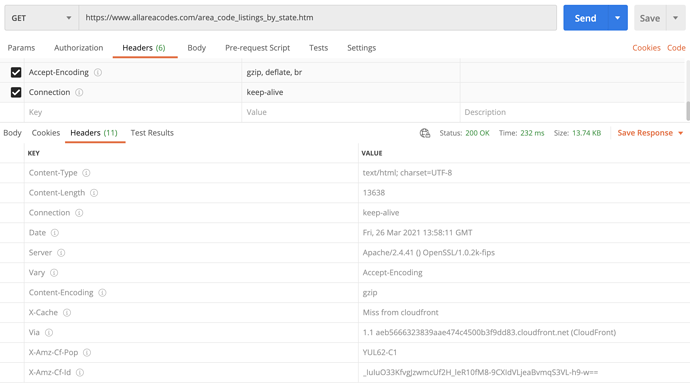
我可以通过浏览器和Postman访问该网站。我还通过Postman进行了一些调查,似乎生成了一些请求头。
更多关于Golang中无法执行HTTP请求的问题如何解决的实战教程也可以访问 https://www.itying.com/category-94-b0.html

如果这能帮上忙,它就是一个解决方案。但请记住,据我理解,服务条款禁止这种用法。请注意,这可能导致被该服务永久封禁。
更多关于Golang中无法执行HTTP请求的问题如何解决的实战系列教程也可以访问 https://www.itying.com/category-94-b0.html


这很可能是因为你的用户代理(User-Agent)导致的。
如果我使用 curl https://the-url-from-screenshot 命令,我会得到和你Go代码中一样的403 HTML错误页面。但是,如果我使用浏览器的用户代理,像这样 curl --user-agent "Mozilla/5.0 …" https://the-url-from-screenshot,我就能得到一个似乎包含了你所需所有数据的响应。
不过,这个网站似乎通过其服务条款(TOS)禁止了自动化访问。
func main() {
    fmt.Println("hello world")
}

我正在尝试执行一个简单的HTTP请求,以获取一些稍后需要解析的数据。
你是否从我的代码中得到了一些思路?将URL传递给这个函数…
func json2map(url string) interface{} {
  // call the API and get body
  resp, err := http.Get(url)
  if err != nil {
    logg(err.Error())
  }
  defer resp.Body.Close()

  // json to map
  var result interface{}
  err = json.NewDecoder(resp.Body).Decode(&result)
  if err != nil {
    logg(err.Error())
  }

  return (result)
}


问题出在请求缺少必要的请求头,导致被CloudFront防护拦截。需要添加User-Agent等标准请求头来模拟浏览器访问。以下是修正后的代码:
package main

import (
	"bytes"
	"fmt"
	"io/ioutil"
	"log"
	"net/http"
	"time"
)

type apiClient struct {
	transport *http.Client
}

var cli apiClient

func initialize() {
	client := apiClient{
		transport: &http.Client{
			Timeout: time.Second * 5,
		},
	}

	cli = client
}

func main() {
	initialize()

	data := []byte{}
	req, err := http.NewRequest(http.MethodGet, "https://www.allareacodes.com/area_code_listings_by_state.htm", bytes.NewBuffer(data))
	if err != nil {
		log.Fatal(err)
	}

	// 添加必要的请求头
	req.Header.Set("User-Agent", "Mozilla/5.0 (Windows NT 10.0; Win64; x64) AppleWebKit/537.36 (KHTML, like Gecko) Chrome/91.0.4472.124 Safari/537.36")
	req.Header.Set("Accept", "text/html,application/xhtml+xml,application/xml;q=0.9,image/webp,*/*;q=0.8")
	req.Header.Set("Accept-Language", "en-US,en;q=0.5")
	req.Header.Set("Accept-Encoding", "gzip, deflate, br")
	req.Header.Set("Connection", "keep-alive")
	req.Header.Set("Upgrade-Insecure-Requests", "1")

	resp, err := cli.transport.Do(req)
	if err != nil {
		log.Fatal(err)
	}
	defer resp.Body.Close()

	bs, err := ioutil.ReadAll(resp.Body)
	if err != nil {
		log.Fatal(err)
	}

	fmt.Println(string(bs))
}
关键修改是添加了完整的请求头,特别是User-Agent头,这使请求看起来像是来自浏览器而不是Go程序。网站的反爬虫机制会检查这些头信息,缺少它们会导致403错误。
