




Golang中意外的目录结构问题解析
Golang中意外的目录结构问题解析 大家好,我是Go语言的新手。
我尝试运行一个service_test,但出现了一个错误。
意外的目录布局: 导入路径:/C/Users/51979/go/src/Test01/models 根目录:C:\Users\51979\go\src 目录:C:\Users\51979\go\src\Test01\models 展开根目录:C:\Users\51979\go 展开目录:C:\Users\51979\go\src\Test01\models 分隔符:\
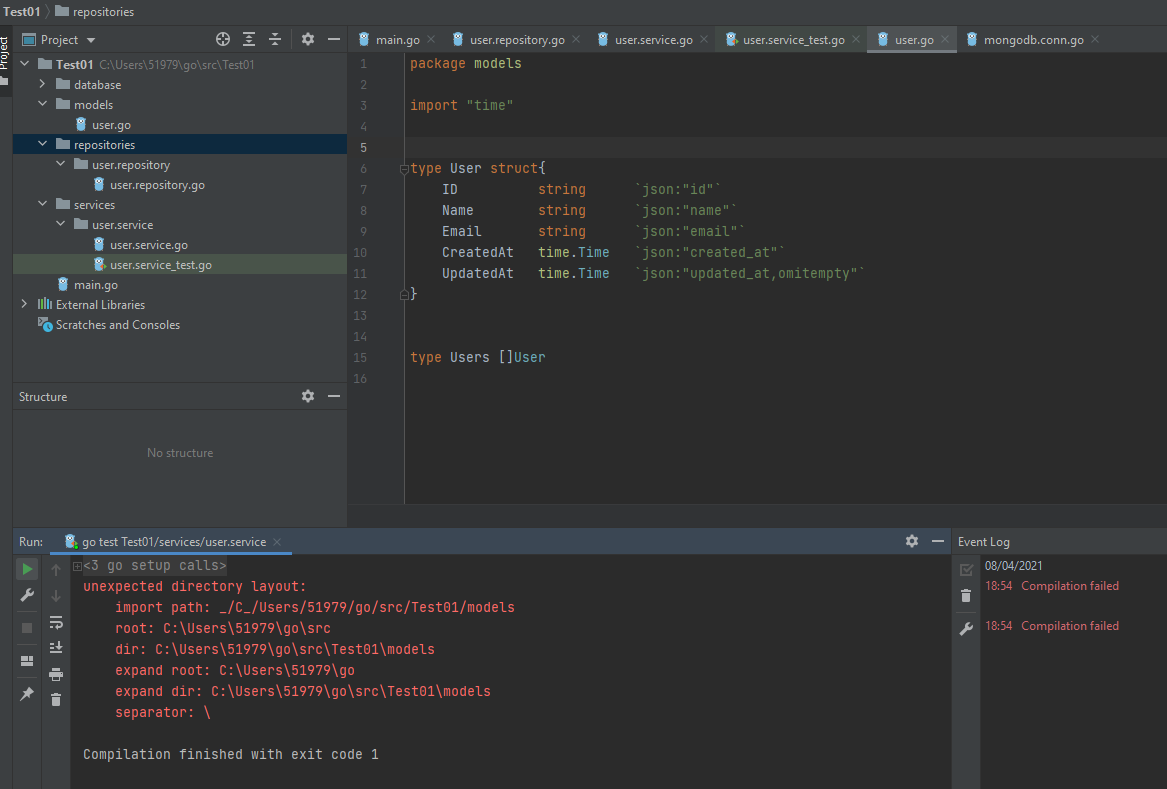
更多关于Golang中意外的目录结构问题解析的实战教程也可以访问 https://www.itying.com/category-94-b0.html
1 回复

更多关于Golang中意外的目录结构问题解析的实战系列教程也可以访问 https://www.itying.com/category-94-b0.html
这个错误通常是因为Go模块路径配置不正确导致的。根据你的目录结构,我建议检查并修复go.mod文件。
首先,确保在项目根目录(Test01)有正确的go.mod文件:
cd C:\Users\51979\go\src\Test01
go mod init Test01
如果已经存在go.mod文件,检查模块名称是否与导入路径匹配。你的go.mod文件应该类似这样:
module Test01

go 1.21
在models包中的文件应该这样导入:
package models

// 其他代码...
在service_test.go中,导入models包的正确方式:
package service_test

import (
    "Test01/models"
    "testing"
)

func TestSomething(t *testing.T) {
    // 使用models包
    _ = models.SomeFunction()
}
如果问题仍然存在,尝试清理Go模块缓存:
go clean -modcache
然后重新下载依赖:
go mod tidy
确保你的项目结构是这样的:
C:\Users\51979\go\src\Test01\
├── go.mod
├── go.sum
├── models\
│   └── models.go
└── service_test.go
如果使用Go 1.16或更高版本,确保不在GOPATH下工作,或者设置GO111MODULE=on:
set GO111MODULE=on
