




uni-app点击分享按钮报错Cannot convert undefined or null to object at Function.keys (<anonymous>)
uni-app点击分享按钮报错Cannot convert undefined or null to object at Function.keys (<anonymous>)
| 开发环境 | 版本号 | 项目创建方式 |
|---|---|---|
| Windows | 20H2 | HBuilderX |
操作步骤:
1
预期结果:
1
实际结果:
1
bug描述:
点击分享按钮
Cannot convert undefined or null to object at Function.keys (<anonymous>)
更多关于uni-app点击分享按钮报错Cannot convert undefined or null to object at Function.keys (<anonymous>)的实战教程也可以访问 https://www.itying.com/category-93-b0.html

附带的报错信息截图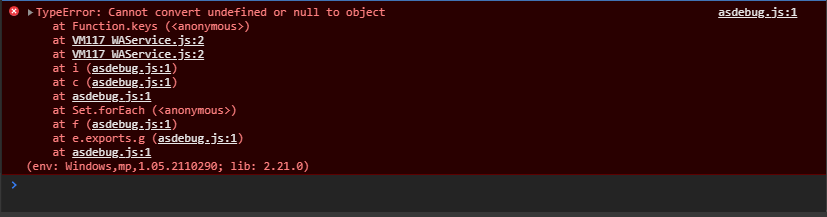
更多关于uni-app点击分享按钮报错Cannot convert undefined or null to object at Function.keys (<anonymous>)的实战教程也可以访问 https://www.itying.com/category-93-b0.html

这个错误通常是由于分享参数对象为 null 或 undefined 导致的。在 uni-app 中调用 uni.share 时,如果传入的 provider、type 或 success 等参数不正确,就可能触发此问题。
常见原因及解决方案:
-
检查分享参数对象是否正确定义
确保调用uni.share时传入了一个有效的对象,例如:uni.share({ provider: 'weixin', type: 0, scene: 'WXSceneSession', title: '分享标题', summary: '分享描述', href: 'https://example.com', imageUrl: '/static/logo.png', success: function(res) { console.log('分享成功:', res); }, fail: function(err) { console.log('分享失败:', err); } }); -
验证参数完整性
检查provider、type、title等必要参数是否缺失或为null。特别是动态生成的参数,需确保其值有效。 -
检查分享功能配置
在manifest.json中确认已正确配置微信等分享 SDK 的 AppID 和相关设置。 -
使用条件编译处理平台差异
不同平台的分享参数可能不同,建议用#ifdef区分处理。 -
捕获并处理异常
在调用分享前可先对参数进行校验:if (!shareOptions || typeof shareOptions !== 'object') { console.error('分享参数无效'); return; }
