




uni-app 更新HBuildx版本到3.2.15.20211120后 单位rpx有误差 如单元格设置132rpx和396rpx dom中表现不一致 造成合并表格会错位
uni-app 更新HBuildx版本到3.2.15.20211120后 单位rpx有误差 如单元格设置132rpx和396rpx dom中表现不一致 造成合并表格会错位
| 开发环境 | 版本号 | 项目创建方式 |
|---|---|---|
| Windows | win10企业版 | - |
产品分类:HbuilderX

### 示例代码:
```vue
<template>
    <view>
        <scroller class="data-container row">
            <list :show-scrollbar="false" :bounce="false" :style="{width: '152rpx', height: '2560rpx'}" scrollable="false">
                <cell v-for="(item,index) in list" :key="index">
                    <view class="text-box-column" style="width: 152rpx;">
                        <text style="background-color: #007AFF;">{{index}}</text>
                    </view>
                </cell>
            </list>
            <scroller scroll-direction="horizontal"
                :bounce="false"
                :show-scrollbar="false"
                style="width: 598rpx;"
            >
                <list :show-scrollbar="false" :bounce="false" :style="{width: `${data.length*128}rpx`, height: '2560rpx'}" scrollable="false">
                    <cell v-for="(item,index) in list" :key="index">
                        <view class="row">
                            <view v-for="($item,i) in item" :key="i" class="text-box-column"
                                :style="{width: index==0&&(i==2||i==5)? 128*i+'rpx':'128rpx"}"
                            >
                                <text>{{$item}}</text>
                            </view>
                        </view>
                    </cell>
                </list>
            </scroller>
        </scroller>
    </view>
</template>

<script>
    export default {
        data() {
            return {
                data: [],
                list: [],
                height: 0
            }

        },
        onShow() {
            this.height = uni.getSystemInfoSync().windowHeight
        },
        mounted() {
            uni.hideTabBar()
            for(let i=0; i< 20; i++) {
                this.data.push(i)
                this.list[i] = []
                for(let k=0; k<20;k++) {
                    this.list[i].push(i*k+k+i)
                }
            }
        },
        methods: {

        }
    }
</script>

<style>
    .row{
        flex-direction: row;
    }
    .column{
        flex-direction: column;
    }
    .data-container{
        width: 750rpx;
        left: 0;
        top: 0;
        position: fixed;
        bottom: 0;
        background-color: #FFFFFF;
    }
    .text-box-column{
        height: 128rpx;
        justify-content: center;
        flex-direction: column;
        align-items: center;
        border-right-width: 1rpx;
        border-bottom-width: 1rpx;
        border-top-width: 1rpx;
        border-color: #EEEEEE;
        width: 132rpx;
        color: #FFFFFF;
        background-color: #FFFFFF;
        box-shadow: 1rpx 1rpx 5rpx #C9C9C9;
    }
</style>
操作步骤:
- 合并2格宽度正常,合并5格宽度异常
预期结果:
- 按照设置的倍数解析
实际结果:
- 超过2格的合并宽度解析都不对
bug描述:
更新HBuildx版本到3.2.15.20211120后,单位rpx有误差,如单元格设置132rpx和396rpx,dom中表现不一致,造成合并表格会错位
文件下载
更多关于uni-app 更新HBuildx版本到3.2.15.20211120后 单位rpx有误差 如单元格设置132rpx和396rpx dom中表现不一致 造成合并表格会错位的实战教程也可以访问 https://www.itying.com/category-93-b0.html
16 回复

有对比图吗
更多关于uni-app 更新HBuildx版本到3.2.15.20211120后 单位rpx有误差 如单元格设置132rpx和396rpx dom中表现不一致 造成合并表格会错位的实战教程也可以访问 https://www.itying.com/category-93-b0.html


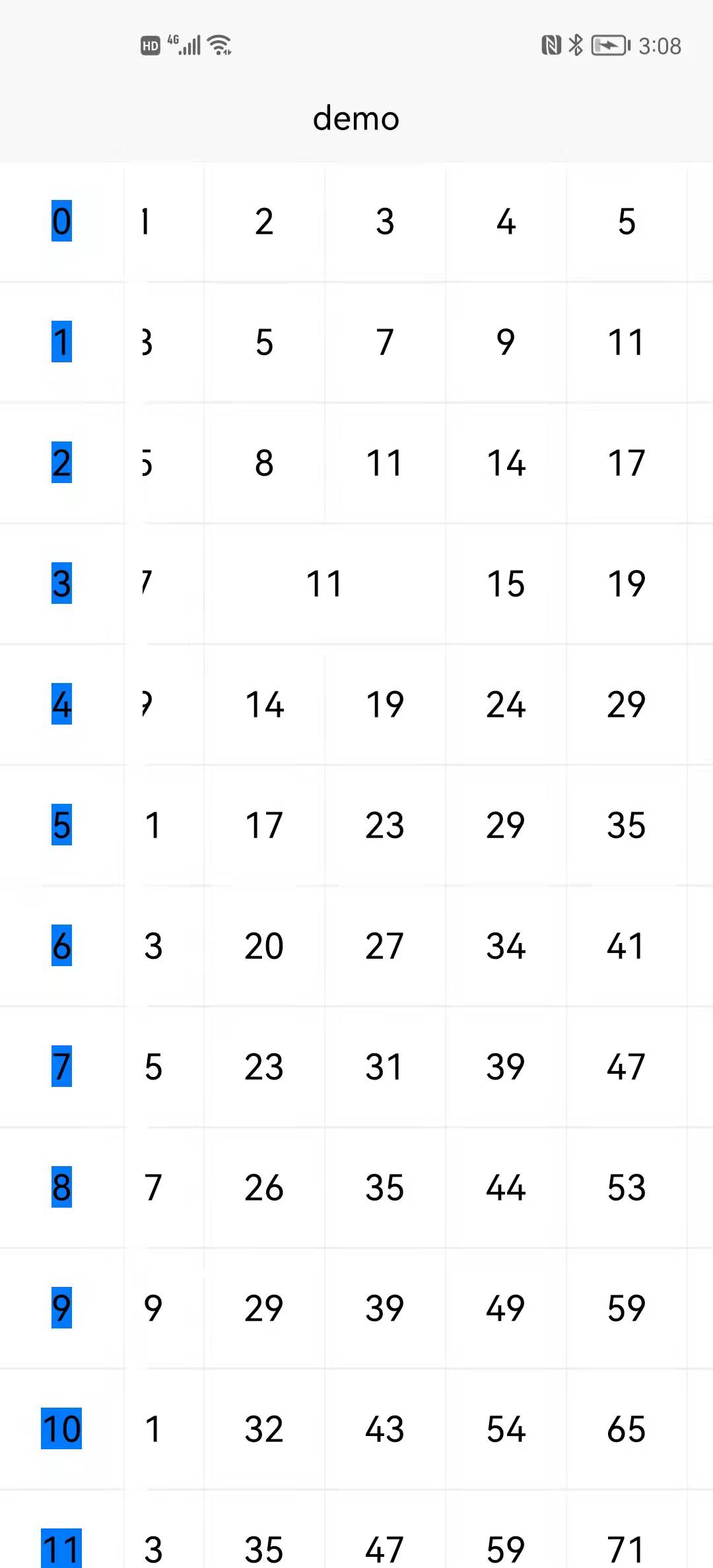
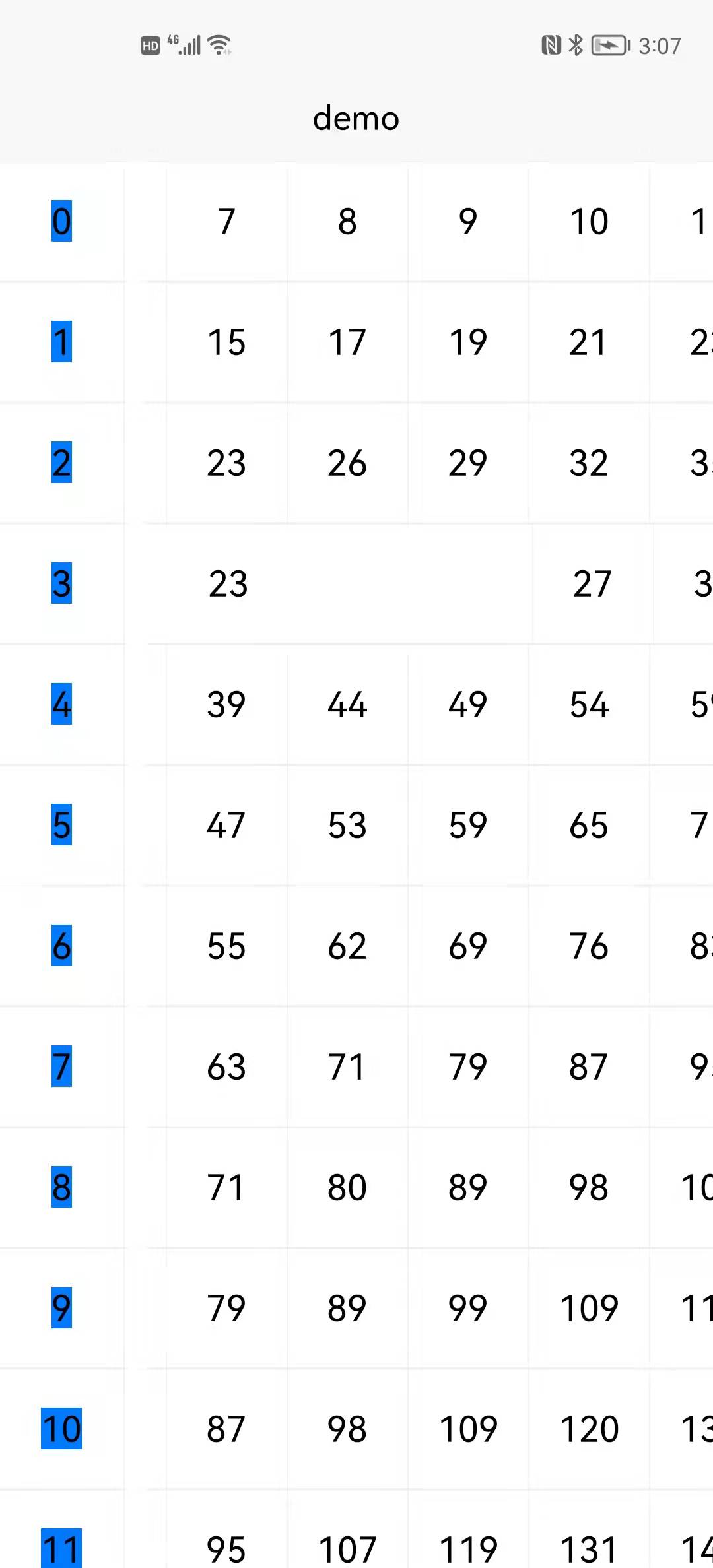

该问题已确认 临时解决方案配置dynamicRpx=true 参考文档 https://uniapp.dcloud.io/collocation/pages?id=globalstyle
大佬,现在纵向又开始错位了,而且横向错位这个也是配置的属性,经过测试,取消这个配置,纵向不错位,横向错位,配置这个属性横向不错位,纵向错位,这个在之前几个版本是没有出现纵向错位的


