




uni-app调用方法uni.scanCode时扫描框未在屏幕中间
uni-app调用方法uni.scanCode时扫描框未在屏幕中间
示例代码:
qrcode() {
uni.getLocation({
success: ({
latitude,
longitude
}) => {
uni.scanCode({
onlyFromCamera: true,
scanType: ['qrCode'],
success: async (res) => {
let jsonQR = JSON.parse(res.result);
if (!jsonQR.placeId) return void 0;
const data = await this.getPlaceById(jsonQR.placeId);
if (!data) return void uni.showToast({
title: "场所信息获取失败",
icon: "none"
});
let distance = this.distance(data.latitude, data.longitude,
latitude, longitude) * 1000;
if (distance > data.bufferRange) {
uni.showToast({
icon: "none",
title: "请在设备附近进行扫码巡查",
})
} else {
this.placeId = data.id;
this.responsibleId = data.responsibleId;

let userId = uni.getStorageSync("USERBEAN").id;
let userType = uni.getStorageSync("USERBEAN").roleType;
if (this.responsibleId.indexOf(userId) != -1 || userType
.indexOf("1") != -1 || userType.indexOf("2") != -1) {
this.$refs.rolePopue.open();
} else {
uni.navigateTo({
url: './place/codePatrol?id=' + this.placeId
})
}
}
},
fail(e){
console.log(e)
},
complete: () => {
console.log("complete")
}
});
},
fail: () => {
uni.showToast({
icon: "none",
title: "请检查定位服务及权限是否开启"
})
}
})
},
操作步骤:
使用此机型,每次都会出现
预期结果:
和其他手机一样正常扫码
实际结果:
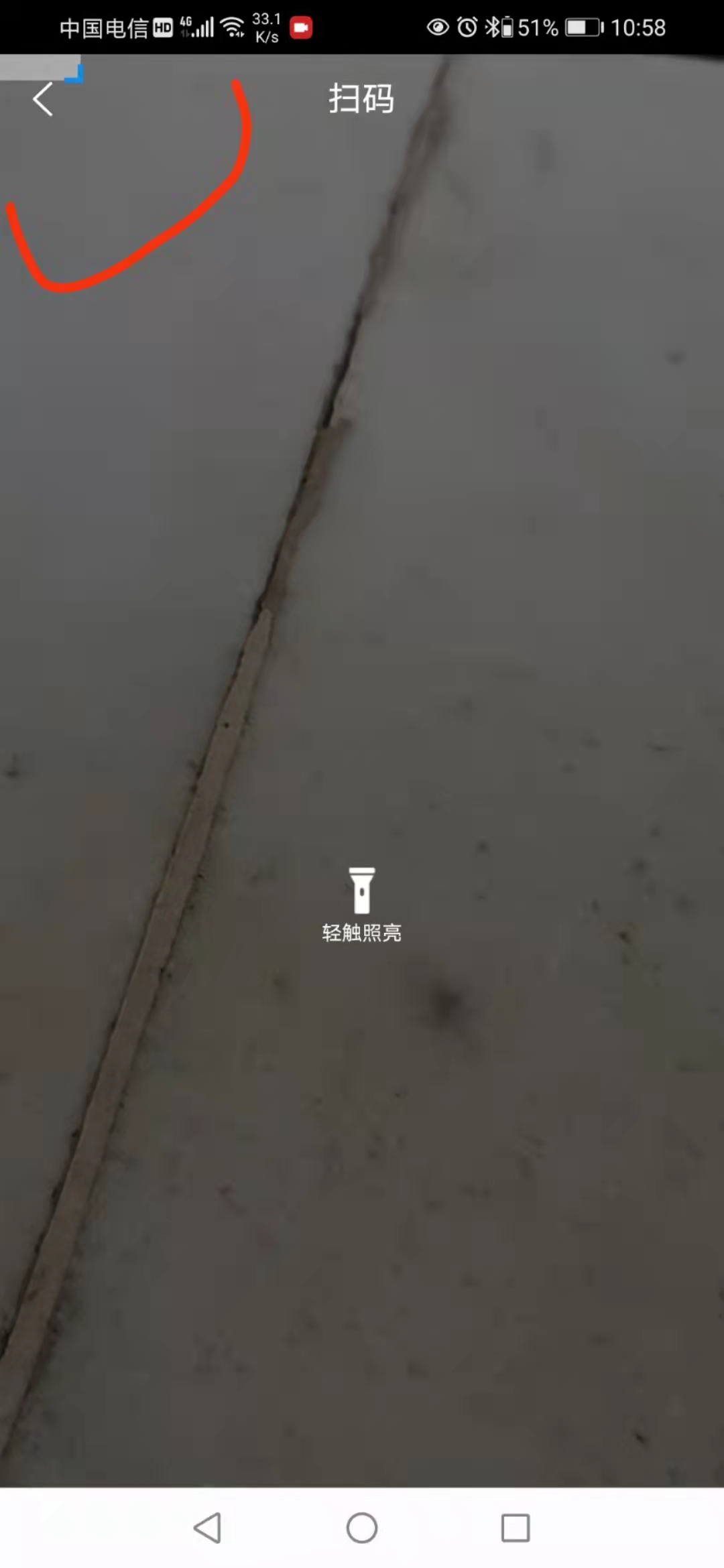
扫描框在左上角很小的一部分
bug描述:
uni-app调用方法uni.scanCode时出现扫描框未在屏幕中间,且位置在屏幕左上角
| 信息项 | 内容 |
|---|---|
| 产品分类 | uniapp/App |
| PC开发环境操作系统 | Windows |
| PC开发环境操作系统版本号 | win10 |
| HBuilderX类型 | 正式 |
| HBuilderX版本号 | 3.2.9 |
| 手机系统 | Android |
| 手机系统版本号 | Android 10 |
| 手机厂商 | 华为 |
| 手机机型 | SEA-AL10 |
| 页面类型 | vue |
| vue版本 | vue2 |
| 打包方式 | 云端 |
| 项目创建方式 | HBuilderX |
相关链接:
更多关于uni-app调用方法uni.scanCode时扫描框未在屏幕中间的实战教程也可以访问 https://www.itying.com/category-93-b0.html
5 回复

此设备在之前版本是否正常?试下示例代码hello uni-app能复现你描述的问题吗?
更多关于uni-app调用方法uni.scanCode时扫描框未在屏幕中间的实战教程也可以访问 https://www.itying.com/category-93-b0.html


我也常出现这种情况
手机:小米9Pro;
安卓版本:11;
hbuilder:3.3.11.20220209;
win:Microsoft Windows10专业版 10.0.19044内部版本19044;
这是一个已知的Android机型兼容性问题,主要出现在部分华为设备上。uni.scanCode的扫描框位置由原生扫码模块控制,在某些机型上可能出现定位异常。
解决方案:
- 检查权限配置:确保在
manifest.json中已正确配置摄像头权限:
{
  "app-plus": {
    "permissions": [
      "camera"
    ]
  }
}
- 使用条件编译处理特定机型:针对华为SEA-AL10等出现问题的机型,可以降级使用旧版扫码组件:
// #ifdef APP-PLUS
if (uni.getSystemInfoSync().model === 'SEA-AL10') {
  // 使用plus.barcode替代
  const barcode = plus.barcode.create('barcode', ['qr'], {
    position: 'fixed',
    top: '0',
    left: '0',
    width: '100%',
    height: '100%'
  });
  barcode.onmarked = function(res) {
    // 处理扫码结果
    barcode.close();
  };
  barcode.start();
} else {
  uni.scanCode({/* 正常参数 */});
}
// #endif