




HarmonyOS 鸿蒙Next中SelectTitleBar实现下拉列表联动
HarmonyOS 鸿蒙Next中SelectTitleBar实现下拉列表联动 SelectTitleBar中的options状态发生变化,为什么不能实现UI的刷新?
附带源码:
import { SelectTitleBar } from '@ohos.arkui.advanced.SelectTitleBar'

@Entry
@Component
struct Index {
  options:Array<SelectOption>=[{value:"广东省"},{value:"河南省"}]
  @State guangdong:Array<SelectOption>=[{value:"广州市"},{value:"深圳市"},{value:"佛山市"},{value:"中山市"},]
  @State henan:Array<SelectOption>=[{value:"郑州市"},{value:"洛阳市"},{value:"南阳市"},{value:"商丘市"}]
  @State @Watch("currentCitys") currentIndex:number=0;
  @State currentCity:Array<SelectOption>=this.guangdong;
     currentCitys(){
       if(this.currentIndex==0){
         this.currentCity=this.guangdong
         console.log("content******",JSON.stringify(this.currentCity))
       }else if(this.currentIndex==1){
         this.currentCity=this.henan
         console.log("content******",JSON.stringify(this.currentCity))
       }
     }
  build() {
    Row({space:20}){
       SelectTitleBar({
         options:this.options,
         selected:0,
         subtitle:"省会名称",
         hidesBackButton:true,
         onSelected:(index)=>{
          this.currentIndex=index
           console.log("content***",JSON.stringify(this.currentCity))
         }
       })
         .width('45%')
      Blank();
       Text(this.currentCity[0].value)
      SelectTitleBar({
        options:this.currentCity,
        selected:0,
        subtitle:"城市名称",
        hidesBackButton:true,
        onSelected:(index)=>{

        }
      })
        .width('45%')


    }
    .height(150)
    .width('100%')
    .justifyContent(FlexAlign.SpaceAround)
    .backgroundColor(Color.Gray)

  }
}
更多关于HarmonyOS 鸿蒙Next中SelectTitleBar实现下拉列表联动的实战教程也可以访问 https://www.itying.com/category-93-b0.html

currentCity 使用 @State 修饰,但赋值操作直接替换了数组引用(如 this.currentCity = this.guangdong)。ArkUI 的响应式系统需要明确的状态变更才能触发刷新,直接替换数组引用可能无法被正确监听。
更多关于HarmonyOS 鸿蒙Next中SelectTitleBar实现下拉列表联动的实战系列教程也可以访问 https://www.itying.com/category-93-b0.html

你好,SelectTitleBar 的属性 options 不是一个状态变量,所以不能响应数据变化更新UI。
方案1、可以尝试使用两个 SelectTitleBar 交替显示来实现联动需求:
if (this.currentIndex===0) {
    SelectTitleBar({
      options: this.guangdong,
      selected: 0,
      subtitle: "城市名称",
      hidesBackButton: true,
      onSelected: (index) => {

      }
    })
      .width('45%')
  } else  {
    SelectTitleBar({
      options: this.henan,
      selected: 0,
      subtitle: "城市名称",
      hidesBackButton: true,
      onSelected: (index) => {

      }
    })
      .width('45%')
  }
方案2: 不使用SelectTitleBar,使用bindMenu自定义实现。
文档中 SelectTitleBar 组件声明:
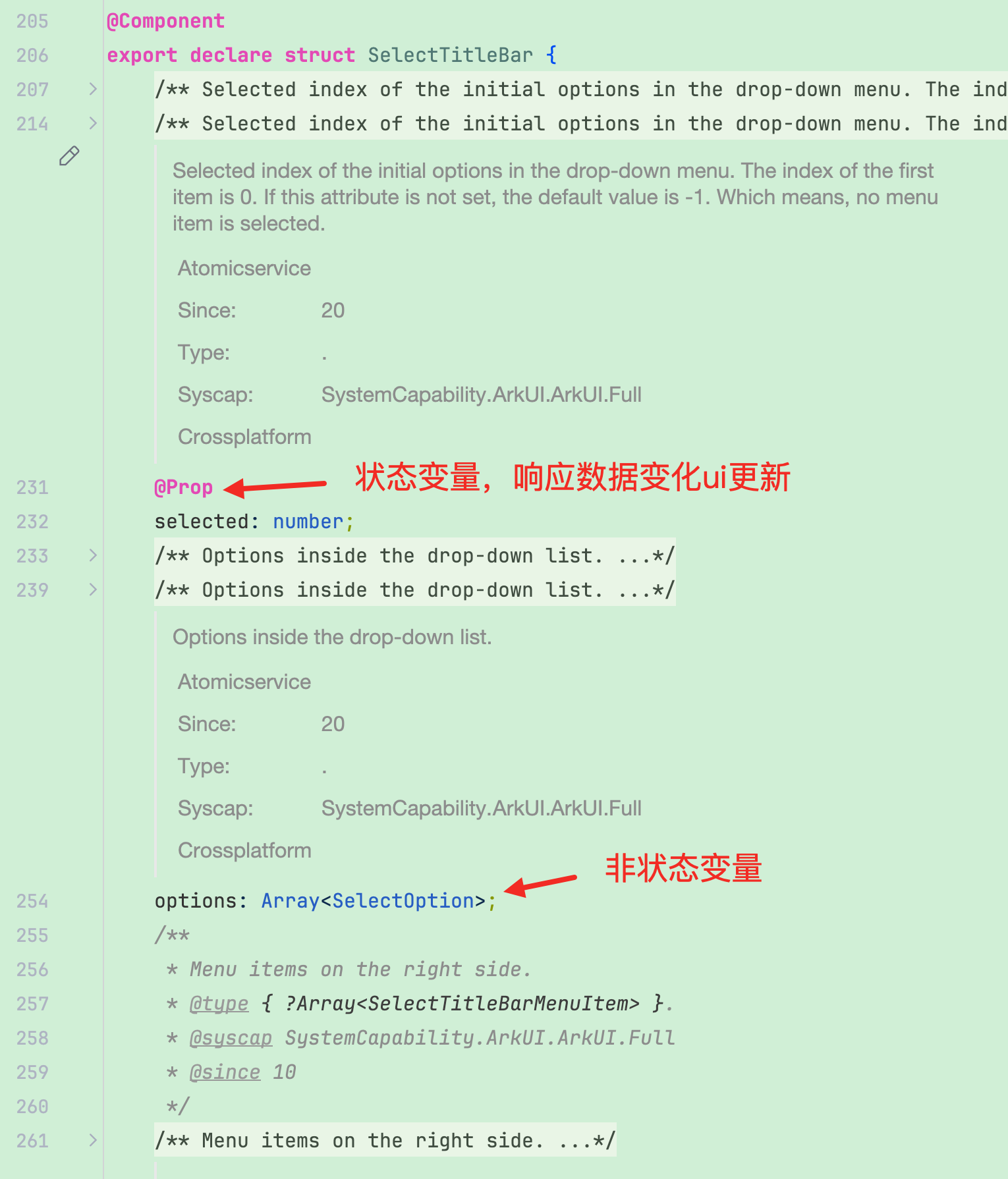
在HarmonyOS Next中,SelectTitleBar组件可通过@State装饰器管理选中状态,实现下拉列表联动。使用@Builder构建下拉菜单,通过状态变量控制菜单显示与选项更新。联动逻辑通常在aboutToAppear或事件回调中处理,确保选项数据同步。

在 HarmonyOS Next 中,SelectTitleBar 的 options 属性发生变化时 UI 未刷新,通常是因为 currentCity 数组的引用没有改变,导致 ArkUI 框架的响应式系统未能检测到状态更新。
在你的代码中,currentCity 被赋值为 this.guangdong 或 this.henan,这只是改变了 currentCity 指向的数组引用,但 currentCity 本身没有用 @State 装饰器声明。虽然 guangdong 和 henan 是 @State 属性,但直接赋值给 currentCity 不会触发 SelectTitleBar 的重新渲染。
解决方案:
- 将
currentCity声明为@State属性:这样当它的值被重新赋值时,会触发 UI 更新。 - 在
@Watch回调中显式更新currentCity:使用this.currentCity = [...this.guangdong]的方式创建新数组,确保引用改变。
修改后的关键代码部分:
@State currentCity: Array<SelectOption> = this.guangdong;

currentCitys() {
  if (this.currentIndex == 0) {
    // 创建新数组以触发更新
    this.currentCity = [...this.guangdong];
  } else if (this.currentIndex == 1) {
    this.currentCity = [...this.henan];
  }
}
完整修正思路:
currentCity必须用@State装饰。- 在
currentCitys()方法中赋值时,应创建新数组(如使用扩展运算符[...]),确保引用变更被框架捕获。 - 第二个
SelectTitleBar的options绑定this.currentCity,当currentCity更新时,下拉选项会同步刷新。
这样修改后,切换第一个 SelectTitleBar 时,currentIndex 变化触发 @Watch 回调,currentCity 被赋予新数组,第二个 SelectTitleBar 的选项列表即可正确联动更新。
