




HarmonyOS鸿蒙Next应用实现手机摇一摇功能,请提供详细步骤和源码
HarmonyOS鸿蒙Next应用实现手机摇一摇功能,请提供详细步骤和源码
鸿蒙应用实现手机摇一摇功能,请提供详细步骤和源码
1. 实现原理
在鸿蒙应用中,可以通过加速度传感器来检测手机的摇晃动作。当用户在短时间内快速摇晃手机时,加速度传感器会检测到加速度的快速变化,从而触发摇一摇事件。
2. 开发步骤
2.1 创建新项目
- 打开DevEco Studio
- 选择"Create HarmonyOS Project"
- 选择"Empty Ability"模板
- 配置项目名称、包名等信息
2.2 配置权限
在config.json文件中添加传感器权限:
{
  "module": {
    "reqPermissions": [
      {
        "name": "ohos.permission.ACCELEROMETER"
      }
    ]
  }
}
2.3 创建摇一摇工具类
package com.example.shakedemo.utils;

import ohos.hiviewdfx.HiLog;
import ohos.hiviewdfx.HiLogLabel;
import ohos.sensor.agent.CategoryOrientationAgent;
import ohos.sensor.bean.SensorBean;
import ohos.sensor.listener.ICategoryOrientationDataCallback;

import java.util.List;

public class ShakeDetector {
    private static final HiLogLabel LABEL = new HiLogLabel(HiLog.LOG_APP, 0x00201, "ShakeDetector");

    // 传感器代理
    private CategoryOrientationAgent orientationAgent;

    // 回调接口
    private OnShakeListener onShakeListener;

    // 上次检测时间
    private long lastUpdateTime;

    // 上次的加速度值
    private float lastX, lastY, lastZ;

    // 阈值
    private static final int SHAKE_THRESHOLD = 2000;
    private static final int UPDATE_INTERVAL = 100;

    public interface OnShakeListener {
        void onShake();
    }

    public ShakeDetector() {
        orientationAgent = new CategoryOrientationAgent();
    }

    public void setOnShakeListener(OnShakeListener listener) {
        this.onShakeListener = listener;
    }

    public void start() {
        List<SensorBean> sensorList = orientationAgent.getAllSensors();
        if (sensorList.isEmpty()) {
            HiLog.error(LABEL, "No orientation sensor found");
            return;
        }

        int sensorId = sensorList.get(0).getSensorId();

        ICategoryOrientationDataCallback callback = new ICategoryOrientationDataCallback() {
            @Override
            public void onSensorDataModified(CategoryOrientationAgent.CategoryOrientationData data) {
                detectShake(data.values);
            }

            @Override
            public void onAccuracyDataModified(CategoryOrientationAgent.CategoryOrientationData data, int accuracy) {
                // 精度变化处理
            }

            @Override
            public void onCommandCompleted(CategoryOrientationAgent.CategoryOrientationData data) {
                // 命令完成处理
            }
        };

        orientationAgent.setSensorDataCallback(callback, sensorId, CategoryOrientationAgent.SENSOR_SAMPLE_RATE_FASTEST);
    }

    public void stop() {
        orientationAgent.releaseSensorDataCallback();
    }

    private void detectShake(float[] values) {
        long currentTime = System.currentTimeMillis();
        long timeInterval = currentTime - lastUpdateTime;

        if (timeInterval < UPDATE_INTERVAL) {
            return;
        }

        lastUpdateTime = currentTime;

        float x = values[0];
        float y = values[1];
        float z = values[2];

        float deltaX = x - lastX;
        float deltaY = y - lastY;
        float deltaZ = z - lastZ;

        lastX = x;
        lastY = y;
        lastZ = z;

        double speed = Math.sqrt(deltaX * deltaX + deltaY * deltaY + deltaZ * deltaZ) / timeInterval * 10000;

        if (speed > SHAKE_THRESHOLD) {
            if (onShakeListener != null) {
                onShakeListener.onShake();
            }
        }
    }
}
2.4 在主页面中使用
package com.example.shakedemo.slice;

import com.example.shakedemo.ResourceTable;
import com.example.shakedemo.utils.ShakeDetector;
import ohos.aafwk.ability.AbilitySlice;
import ohos.aafwk.content.Intent;
import ohos.agp.components.Text;
import ohos.hiviewdfx.HiLog;
import ohos.hiviewdfx.HiLogLabel;

public class MainAbilitySlice extends AbilitySlice {
    private static final HiLogLabel LABEL = new HiLogLabel(HiLog.LOG_APP, 0x00201, "MainAbilitySlice");

    private Text shakeText;
    private ShakeDetector shakeDetector;

    @Override
    public void onStart(Intent intent) {
        super.onStart(intent);
        super.setUIContent(ResourceTable.Layout_ability_main);

        initComponents();
        initShakeDetector();
    }

    private void initComponents() {
        shakeText = (Text) findComponentById(ResourceTable.Id_shake_text);
    }

    private void initShakeDetector() {
        shakeDetector = new ShakeDetector();
        shakeDetector.setOnShakeListener(() -> {
            getUITaskDispatcher().asyncDispatch(() -> {
                shakeText.setText("检测到摇一摇动作!");
                HiLog.info(LABEL, "Shake detected!");

                // 3秒后恢复原文本
                getUITaskDispatcher().delayDispatch(() -> {
                    shakeText.setText("请摇晃手机");
                }, 3000);
            });
        });
    }

    @Override
    protected void onActive() {
        super.onActive();
        shakeDetector.start();
        shakeText.setText("请摇晃手机");
    }

    @Override
    protected void onInactive() {
        super.onInactive();
        shakeDetector.stop();
    }

    @Override
    protected void onBackground() {
        super.onBackground();
        shakeDetector.stop();
    }
}
2.5 布局文件
在resources/base/layout/ability_main.xml中添加:
<?xml version="1.0" encoding="utf-8"?>
<DirectionalLayout
    xmlns:ohos="http://schemas.huawei.com/res/ohos"
    ohos:width="match_parent"
    ohos:height="match_parent"
    ohos:alignment="center"
    ohos:orientation="vertical">

    <Text
        ohos:id="$+id:shake_text"
        ohos:width="match_content"
        ohos:height="match_content"
        ohos:text="请摇晃手机"
        ohos:text_size="24fp"
        ohos:text_alignment="center"
        ohos:margin="20vp"/>

</DirectionalLayout>
3. 关键点说明
3.1 传感器权限
必须先在config.json中声明加速度传感器权限,否则无法获取传感器数据。
3.2 传感器回调
通过ICategoryOrientationDataCallback接口接收传感器数据,在onSensorDataModified方法中处理加速度数据。
3.3 摇动检测算法
通过计算三个方向加速度的变化率来判断是否发生摇动。当变化率超过设定的阈值时,触发摇一摇事件。
3.4 性能优化
- 设置合适的数据采样率
- 添加时间间隔检测,避免频繁处理
- 在页面不可见时停止传感器监听
4. 扩展功能建议
- 灵敏度调节:可以添加设置界面,让用户调节摇动灵敏度
- 声音反馈:摇动时播放提示音
- 振动反馈:摇动时触发手机振动
- 防误触:添加时间间隔限制,避免连续触发
5. 注意事项
- 确保在真机上测试,模拟器可能无法模拟传感器数据
- 注意权限申请流程
- 及时释放传感器资源,避免电量消耗
- 考虑不同设备的传感器差异
以上代码提供了完整的鸿蒙应用摇一摇功能实现,可以直接在项目中集成使用。
更多关于HarmonyOS鸿蒙Next应用实现手机摇一摇功能,请提供详细步骤和源码的实战教程也可以访问 https://www.itying.com/category-93-b0.html

一、结论
手机摇一摇功能,是通过获取手机设备,加速度传感器接口,获取其中的数值,进行逻辑判断实现的功能。
在鸿蒙中手机设备传感器@ohos.sensor (传感器)的系统API监听有以下: [@ohos.sensor (传感器)官网API](https://developer.huawei.com/consumer/cn/doc/harmonyos-references-V5/js-apis-sensor-V5#accelerometer9)
- 加速度传感器
- 环境光传感器
- 气压计传感器
- 重力传感器
- 陀螺仪传感器
- 霍尔传感器
- 心率传感器
- 湿度传感器
- 线性加速度传感器
- 地磁传感器
- 方向传感器
- 计步器传感器
- 接近光传感器
- 旋转矢量传感器
- 大幅动作检测传感器
- 佩戴检测传感器
其中摇一摇用到的,加速度传感器是多个维度测算的,是指x、y、z三个方向上的加速度值。 主要测算一些瞬时加速或减速的动作。比如测量手机的运动速度和方向。
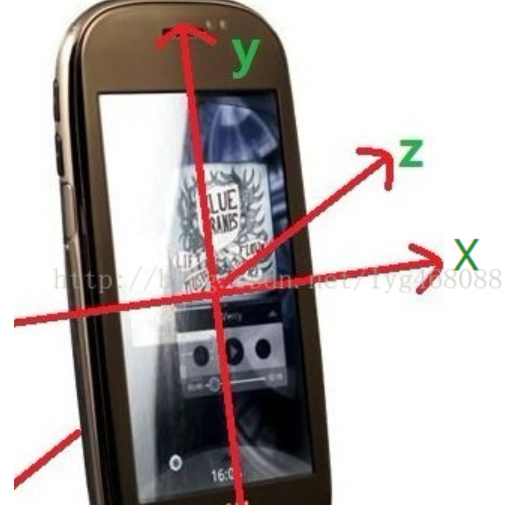
当用户拿着手机运动时,会出现上下摆动的情况,这样可以检测出加速度在某个方向上来回改变,通过检测这个来回改变的次数,可以计算出步数。
在游戏里能通过加速度传感器触发特殊指令。日常应用中的一些甩动切歌、翻转静音等也都用到了这枚传感器。
注意: 至于为什么不用线性加速传感器,是因为线性加速度传感器和加速度传感器在定义、工作原理以及应用场景上存在显著的区别。线性主要是来检测物体在直线方向上的位移。
二、代码实现和详细解释
1.根据通过@ohos.sensor接口,获取加速度传感器的数值,添加权限:ohos.permission.ACCELEROMETER
{
        "name": "ohos.permission.ACCELEROMETER",
        "reason": "$string:reason",
        "usedScene": {
          "abilities": [
            "EntryAbility"
          ],
          "when": "always"
        }
      }
 sensor.on(sensor.SensorId.ACCELEROMETER, (data: sensor.AccelerometerResponse) => {

      }, { interval: 100000000 }); // 设置间隔为100000000 ns  = 0.1 s
2.将x,y,z三个方向的数值进行绝对值处理,获取运动数值
 sensor.on(sensor.SensorId.ACCELEROMETER, (data: sensor.AccelerometerResponse) => {
       console.info(this.TAG, 'Succeeded in invoking on. X-coordinate component: ' + data.x);
        console.info(this.TAG,'Succeeded in invoking on. Y-coordinate component: ' + data.y);
        console.info(this.TAG,'Succeeded in invoking on. Z-coordinate component: ' + data.z);
      }, { interval: 100000000 }); // 设置间隔为100000000 ns  = 0.1 s
3.根据运动数值进行判断,是否符合摇一摇的运动区间
        let x = Math.abs(data.x);
        let y = Math.abs(data.y);
        let z  = Math.abs(data.z);

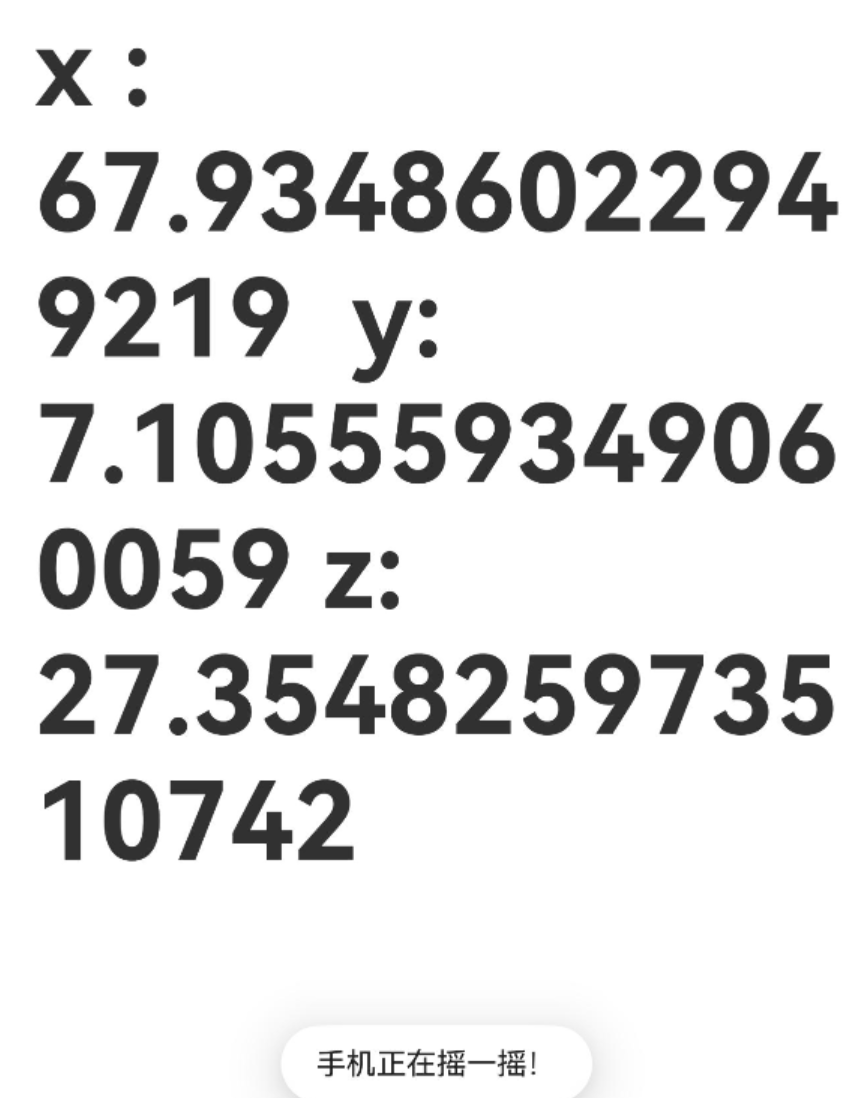
        this.message = "x : " + x + "  y: " +  y + " z: " + z;
        if(x > this.SWING_VAL || y > this.SWING_VAL || z > this.SWING_VAL){
          promptAction.showToast({
            message: "手机正在摇一摇!"
          })
        }
最后一步,当然就是使用手机设备进行代码功能效果的验证。 若没有真机设备,使用模拟器,点击该按钮可实现摇一摇手机的触发。
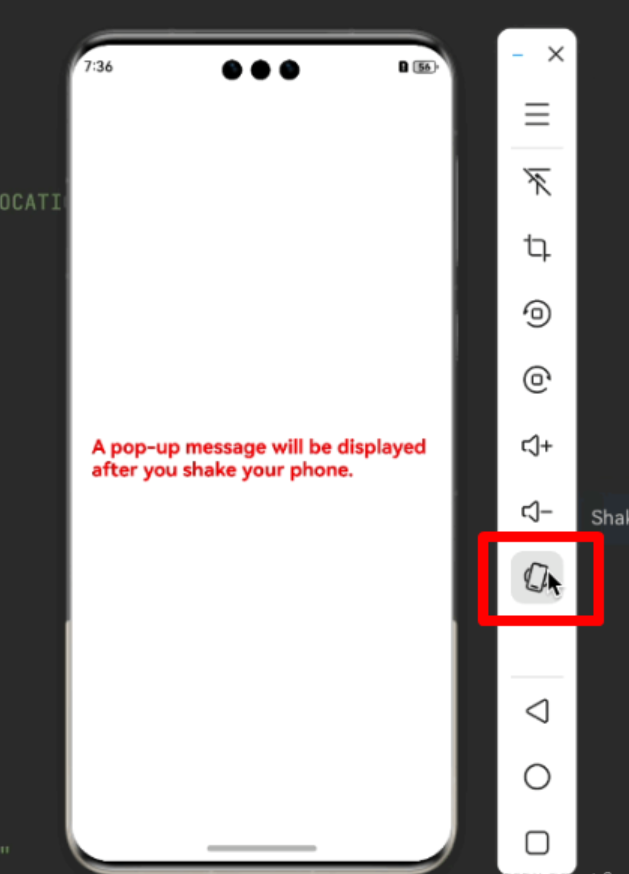
注意: 不使用加速传感器时,一定要移除监听。否则会白白损耗性能。
三、源码示例:
import { sensor } from '@kit.SensorServiceKit';
import { BusinessError } from '@kit.BasicServicesKit';
import { promptAction } from '@kit.ArkUI';

@Entry
@Component
struct SensorTestPage {

  private TAG: string = "SenorTestPage";
  private SWING_VAL: number = 50;

  @State message: string = '';

  aboutToAppear(): void {
    try {
      // 订阅加速度传感器返回的数据
      sensor.on(sensor.SensorId.ACCELEROMETER, (data: sensor.AccelerometerResponse) => {

        console.info(this.TAG, 'Succeeded in invoking on. X-coordinate component: ' + data.x);
        console.info(this.TAG,'Succeeded in invoking on. Y-coordinate component: ' + data.y);
        console.info(this.TAG,'Succeeded in invoking on. Z-coordinate component: ' + data.z);

        let x = Math.abs(data.x);
        let y = Math.abs(data.y);
        let z  = Math.abs(data.z);

        this.message = "x : " + x + "  y: " +  y + " z: " + z;
        if(x > this.SWING_VAL || y > this.SWING_VAL || z > this.SWING_VAL){
          promptAction.showToast({
            message: "手机正在摇一摇!"
          })
        }

      }, { interval: 100000000 }); // 设置间隔为100000000 ns  = 0.1 s

    } catch (error) {
      let e: BusinessError = error as BusinessError;
      console.error(this.TAG, `Failed to invoke on. Code: ${e.code}, message: ${e.message}`);
    }
  }

  aboutToDisappear(): void {
    sensor.off(sensor.SensorId.ACCELEROMETER);
  }

  build() {
    RelativeContainer() {
      Text(this.message)
        .id('SenorTestPageHelloWorld')
        .fontSize(50)
        .fontWeight(FontWeight.Bold)
        .alignRules({
          center: { anchor: '__container__', align: VerticalAlign.Center },
          middle: { anchor: '__container__', align: HorizontalAlign.Center }
        })
    }
    .height('100%')
    .width('100%')
  }
}
注意: 记得添加ohos.permission.ACCELEROMETER权限,否则无法监听到加速传感器!
更多关于HarmonyOS鸿蒙Next应用实现手机摇一摇功能,请提供详细步骤和源码的实战系列教程也可以访问 https://www.itying.com/category-93-b0.html
鸿蒙Next中实现摇一摇功能主要使用传感器模块。以下是核心步骤与代码片段:
- 在
module.json5中申请ohos.permission.ACCELEROMETER权限。 - 在页面中导入传感器模块:
import sensor from '@ohos.sensor'; - 监听加速度传感器数据,计算设备晃动幅度。
关键源码示例(ArkTS):
import sensor from '@ohos.sensor';

// 注册加速度传感器监听
sensor.on(sensor.SensorId.ACCELEROMETER, (data) => {
  // 计算加速度变化量,判断是否达到摇动阈值
  let speed = Math.abs(data.x + data.y + data.z - lastX - lastY - lastZ) / diffTime * 10000;
  if (speed > SHAKE_THRESHOLD) {
    // 触发摇一摇逻辑
    console.log('摇一摇成功');
  }
  // 更新上一次的加速度值
  [lastX, lastY, lastZ] = [data.x, data.y, data.z];
});
- 在适当时机调用
sensor.off()取消监听。

在HarmonyOS Next中实现摇一摇功能,主要通过加速度传感器监听设备加速度变化来判断。以下是关键步骤和示例代码:
1. 权限配置
在module.json5文件中添加传感器权限:
{
  "module": {
    "requestPermissions": [
      {
        "name": "ohos.permission.ACCELEROMETER"
      }
    ]
  }
}
2. 核心实现代码
import { sensor } from '@kit.SensorServiceKit';
import { BusinessError } from '@kit.BasicServicesKit';

export class ShakeDetector {
  private sensorId: number = -1;
  private lastUpdateTime: number = 0;
  private lastX: number = 0;
  private lastY: number = 0;
  private lastZ: number = 0;
  private readonly SHAKE_THRESHOLD = 15; // 摇动阈值
  private readonly TIME_THRESHOLD = 100; // 时间间隔阈值(ms)

  // 开始监听摇动
  startDetection(callback: () => void): void {
    try {
      const sensorType = sensor.SensorType.SENSOR_TYPE_ACCELEROMETER;
      const options: sensor.SensorOptions = {
        interval: sensor.SensorFrequency.SENSOR_DELAY_FASTEST
      };

      this.sensorId = sensor.on(sensorType, options, (data: sensor.AccelerometerResponse) => {
        this.handleSensorData(data, callback);
      });
    } catch (error) {
      const err: BusinessError = error as BusinessError;
      console.error(`Failed to start sensor: ${err.code} ${err.message}`);
    }
  }

  // 处理传感器数据
  private handleSensorData(data: sensor.AccelerometerResponse, callback: () => void): void {
    const currentTime = new Date().getTime();
    const timeDiff = currentTime - this.lastUpdateTime;

    if (timeDiff > this.TIME_THRESHOLD) {
      const x = data.x;
      const y = data.y;
      const z = data.z;

      const speed = Math.abs(x + y + z - this.lastX - this.lastY - this.lastZ) / timeDiff * 10000;

      if (speed > this.SHAKE_THRESHOLD) {
        callback(); // 触发摇动回调
      }

      this.lastX = x;
      this.lastY = y;
      this.lastZ = z;
      this.lastUpdateTime = currentTime;
    }
  }

  // 停止监听
  stopDetection(): void {
    if (this.sensorId !== -1) {
      sensor.off(sensor.SensorType.SENSOR_TYPE_ACCELEROMETER, this.sensorId);
      this.sensorId = -1;
    }
  }
}
3. 在页面中使用
import { ShakeDetector } from './ShakeDetector';

@Entry
@Component
struct ShakePage {
  private shakeDetector = new ShakeDetector();

  aboutToAppear(): void {
    this.shakeDetector.startDetection(() => {
      // 摇动后执行的逻辑
      console.log('Shake detected!');
      // 可以在这里触发UI更新或其他业务逻辑
    });
  }

  aboutToDisappear(): void {
    this.shakeDetector.stopDetection();
  }

  build() {
    Column() {
      Text('摇动手机试试')
        .fontSize(20)
        .margin(20)
    }
    .width('100%')
    .height('100%')
  }
}
关键说明:
- 使用
@kit.SensorServiceKit中的加速度传感器API - 通过计算三维加速度变化率判断摇动手势
SHAKE_THRESHOLD和TIME_THRESHOLD参数可根据实际需求调整灵敏度- 注意在页面生命周期中正确管理传感器的注册和注销
此实现采用ArkTS语法,符合HarmonyOS Next开发规范。实际使用时需根据具体业务场景调整回调逻辑和阈值参数。
