




uni-app vue3 history 模式下刷新非主页,会出现代码
uni-app vue3 history 模式下刷新非主页,会出现代码
| 开发环境 | 版本号 | 项目创建方式 |
|---|---|---|
| Windows | win10 | HBuilderX |
| HBuilderX | 3.3.1 |
操作步骤:
- 刷新非主页
预期结果:
- 只是刷新页面
实际结果:
- 刷新后出现代码
bug描述:
- vue3 history 模式下刷新非主页,会出现代码
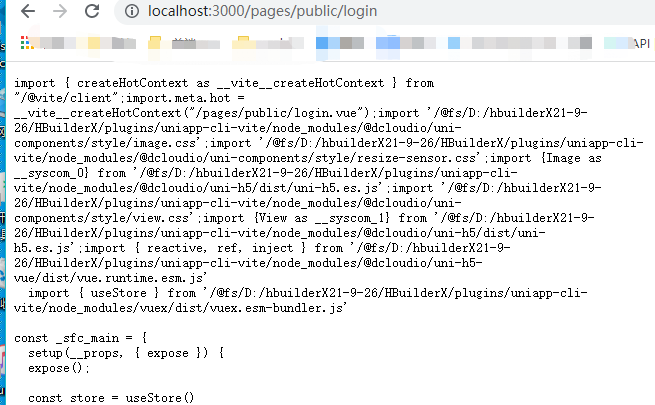
更多关于uni-app vue3 history 模式下刷新非主页,会出现代码的实战教程也可以访问 https://www.itying.com/category-93-b0.html
3 回复

未重现,可以发一个测试工程,并说明测试步骤
更多关于uni-app vue3 history 模式下刷新非主页,会出现代码的实战教程也可以访问 https://www.itying.com/category-93-b0.html


这是 uni-app 在 Vue3 + history 路由模式下刷新非首页时的一个已知问题,主要原因是路由配置和服务器配置不匹配导致的。
问题分析:
- 在 history 模式下,访问
/pages/about/about这样的路径时,浏览器会向服务器请求该路径 - 但 uni-app 打包后是单页应用,实际只有一个
index.html入口文件 - 如果服务器没有正确配置,就会返回 404 或者直接显示源代码
解决方案:
1. 本地开发环境(HBuilderX):
- 确保使用的是内置浏览器预览,不要直接打开文件
- 使用 HBuilderX 的运行菜单启动项目
2. 生产环境部署:
需要在服务器配置 URL 重写,将所有非静态资源的请求重定向到 index.html:
Nginx 配置示例:
location / {
    try_files $uri $uri/ /index.html;
}
Apache 配置示例:
<IfModule mod_rewrite.c>
  RewriteEngine On
  RewriteBase /
  RewriteRule ^index\.html$ - [L]
  RewriteCond %{REQUEST_FILENAME} !-f
  RewriteCond %{REQUEST_FILENAME} !-d
  RewriteRule . /index.html [L]
</IfModule>
3. uni-app 项目配置:
在 manifest.json 中检查路由配置:
{
  "h5": {
    "router": {
      "mode": "history"
    }
  }
}