




uni-app TypeError: t.hasOwnProperty is not a function
uni-app TypeError: t.hasOwnProperty is not a function
操作步骤:
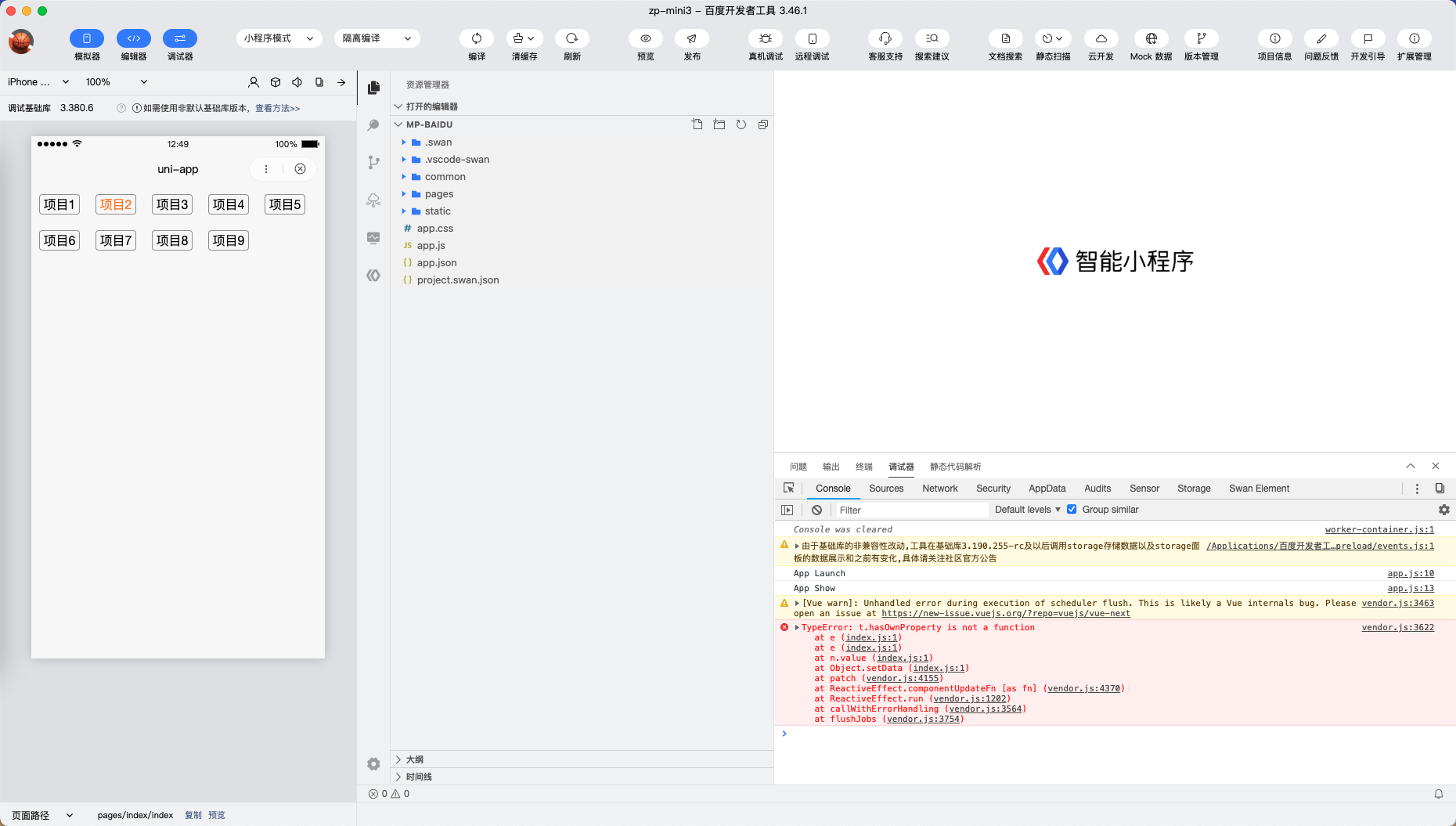
- Vue3模式下,运行至百度小程序,点击按钮切换选中项
预期结果:
- 仅选中项高亮
实际结果:
- 点击后选中项高亮,之前的选中项也是高亮
bug描述:
- Vue3模式下,运行至百度小程序,切换选中项,控制台报错TypeError: t.hasOwnProperty is not a function
- Vue2模式下,未报错
<template>
    <view class="list">

        <view v-for="item in dataList" :key="item.id" @click="changeTown(item)" class="cell"
            :class="{'cell_on' : selectedId === item.id}" >
            {{item.name}}
        </view>

    </view>
</template>

<script>
    export default {
        data() {
            return {
                dataList: [],
                selectedId: 1
            }
        },
        // #ifdef MP-BAIDU
        onInit() {

        },
        // #endif
        onLoad() {
            for (var i = 1; i < 10; i++) {
                this.dataList.push({
                    id: i,
                    name: '项目' + i
                })
            }

        },
        methods: {
            changeTown(item) {
                this.selectedId = item.id;
            }
        }
    }
</script>

<style>
    .list {
        display: flex;
        flex-wrap: wrap;
    }

    .cell {
        flex: none;
        border: 1px solid #999999;
        border-radius: 4px;
        margin: 10px 10px;
        width: 50px;
        height: 24px;
        display: flex;
        align-items: center;
        justify-content: center;
    }

    .cell_on {
        color: #FF7B07;
    }
</style>
| 信息项 | 信息值 |
|---|---|
| 产品分类 | uniapp/小程序/百度 |
| PC开发环境 | Mac |
| PC开发环境版本 | 11.0.1 (20B50) |
| HBuilderX类型 | 正式 |
| HBuilderX版本 | 3.3.4 |
| 第三方开发者工具 | 3.46.1 |
| 基础库版本 | 3.380.6 |
| 项目创建方式 | HBuilderX |
更多关于uni-app TypeError: t.hasOwnProperty is not a function的实战教程也可以访问 https://www.itying.com/category-93-b0.html
3 回复

稍后修复
更多关于uni-app TypeError: t.hasOwnProperty is not a function的实战教程也可以访问 https://www.itying.com/category-93-b0.html


这个错误是Vue3在百度小程序平台下的一个已知兼容性问题。问题核心在于Vue3的响应式系统与百度小程序运行环境的冲突。
原因分析:
在Vue3中,响应式系统使用Proxy实现,而百度小程序环境在某些情况下可能对对象的原型链处理存在差异。当执行hasOwnProperty检查时,如果对象被Vue3的响应式代理包装,可能会在百度小程序环境中出现类型错误。
解决方案:
- 临时解决方案(推荐):
在百度小程序平台下,避免直接使用
hasOwnProperty方法,改用其他方式检查属性:// 修改前 if (obj.hasOwnProperty(key)) { ... } // 修改后 if (Object.prototype.hasOwnProperty.call(obj, key)) { ... }
