




uni-app schemacode BUG
uni-app schemacode BUG
操作步骤:
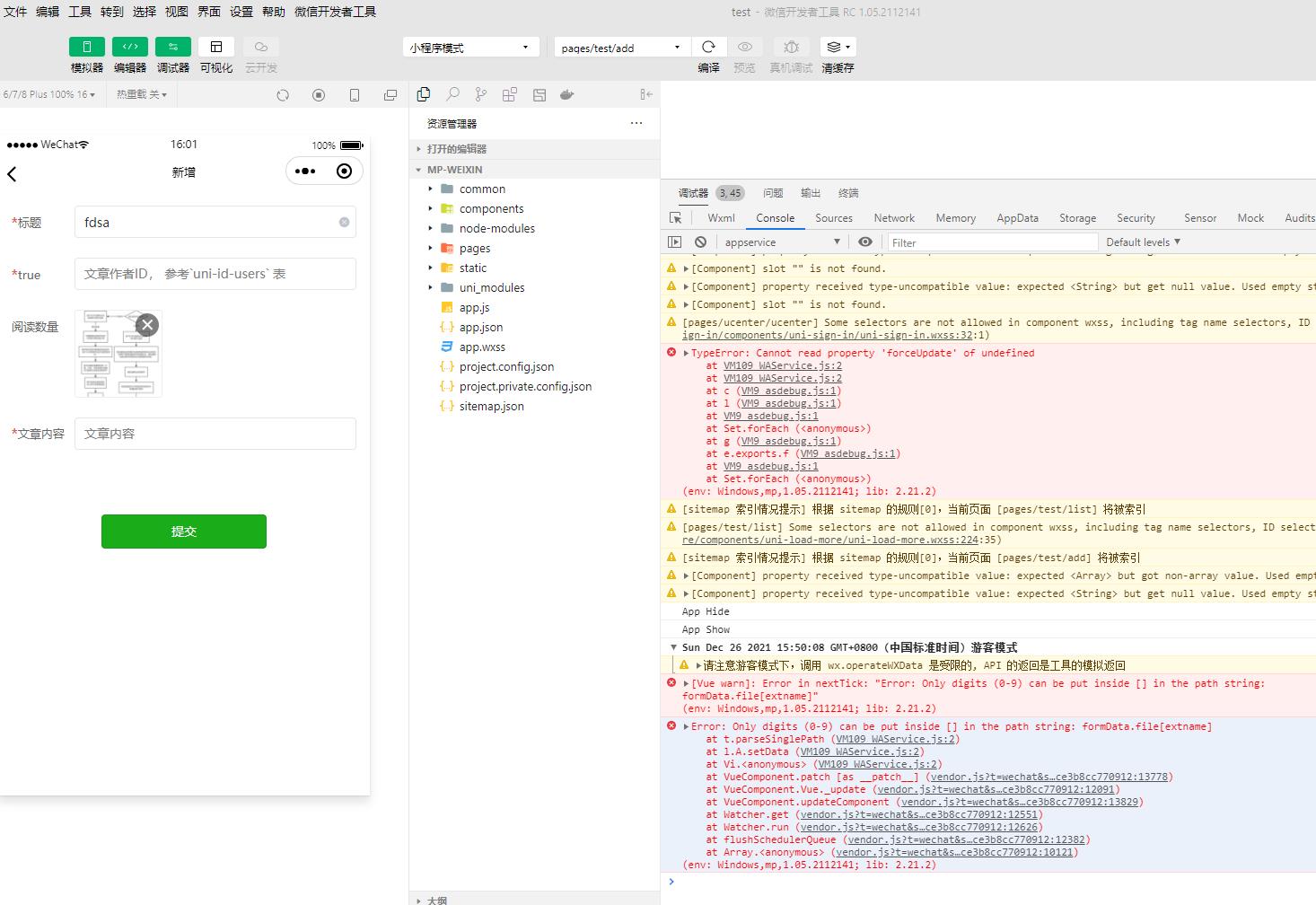
过程:新建uni-starter项目(云空间那些都搞好了)-》新建schema-》选择文章模型-》添加一个类型为file的项-》生成schemacode-》运行微信小程序-》到添加页面上传文件就提示这个
预期结果:
文件上传成功,然后验证无问题
实际结果:
[Vue warn]: Error in nextTick: “Error: Only digits (0-9) can be put inside [] in the path string: formData.file[extname]”(env: Windows,mp,1.05.2112141; lib: 2.21.2);
bug描述:
schemacode BUG
[Vue warn]: Error in nextTick: “Error: Only digits (0-9) can be put inside [] in the path string: formData.file[extname]”(env: Windows,mp,1.05.2112141; lib: 2.21.2);
更多关于uni-app schemacode BUG的实战教程也可以访问 https://www.itying.com/category-93-b0.html

微信小程序更新导致 uni-file-picker组件出现问题,我们排查下
更多关于uni-app schemacode BUG的实战教程也可以访问 https://www.itying.com/category-93-b0.html

这个错误是由于 uni-app 的 schema2code 在生成代码时,对文件字段的处理存在缺陷导致的。错误信息明确指出路径字符串中只能使用数字索引,但生成的代码尝试使用 [extname] 这样的字符串作为索引。
问题分析:
当 schema2code 为 file 类型字段生成代码时,会创建包含文件信息的对象(如 name、extname、url 等),但在数据绑定时错误地使用了 formData.file[extname] 这样的路径格式,这在微信小程序的数据绑定中是不允许的。
解决方案:
-
临时修复方案: 找到生成的页面组件中文件上传相关的代码部分,修改数据绑定方式。通常需要将类似
v-model="formData.file[extname]"的绑定改为正确的形式。例如,如果是 uni-forms 组件,可能需要改为:
<uni-forms-item label="文件">
  <uni-file-picker
    :value="formData.file"
    @select="onFileSelect"
  ></uni-file-picker>
</uni-forms-item>
然后在 methods 中处理文件选择:
onFileSelect(e) {
  const tempFilePaths = e.tempFilePaths
  // 处理文件信息,构建正确的数据结构
  this.formData.file = {
    name: tempFilePaths[0].name,
    extname: tempFilePaths[0].extname,
    url: tempFilePaths[0].path
  }
}
