




uni-app 在iphone12或13pro上点击uni-popup弹出层会穿透到下面的input和textarea上调起输入框
uni-app 在iphone12或13pro上点击uni-popup弹出层会穿透到下面的input和textarea上调起输入框
14 回复

更多关于uni-app 在iphone12或13pro上点击uni-popup弹出层会穿透到下面的input和textarea上调起输入框的实战教程也可以访问 https://www.itying.com/category-93-b0.html

用示例代码hello uni-app能出现你的问题吗?
不能的话你需要排查出来具体你哪个页面,甚至哪一行导致的。
找出来具体原因后提供一个能复现你描述的bug的最小化demo,让我们及时定位问题,及时修复。
【bug优先处理规则】https://ask.dcloud.net.cn/article/38139


回复 DCloud_UNI_Anne: 其实只是看上去正常,点击还是会穿透到input下面去,你看视频里面老是弹出输入框就是因为我点击了弹出框的取消按钮穿透到下面去了,刚我试了iphone XR也会穿透

<template>
<view class="container">
<uni-card is-full :is-shadow="false">
<text class="uni-h6">弹出层组件用于弹出一个覆盖到页面上的内容,使用场景如:底部弹出分享弹窗、页面插屏广告等。</text>
</uni-card>
<input class="test" type="text" value="" placeholder="我是输入框"/>
<input class="test" type="text" value="" placeholder="我是输入框"/>
<input class="test" type="text" value="" placeholder="我是输入框"/>
<input class="test" type="text" value="" placeholder="我是输入框"/>
<input class="test" type="text" value="" placeholder="我是输入框"/>
<input class="test" type="text" value="" placeholder="我是输入框"/>
<input class="test" type="text" value="" placeholder="我是输入框"/>
<input class="test" type="text" value="" placeholder="我是输入框"/>
<input class="test" type="text" value="" placeholder="我是输入框"/>
<input class="test" type="text" value="" placeholder="我是输入框"/>
<input class="test" type="text" value="" placeholder="我是输入框"/>
<input class="test" type="text" value="" placeholder="我是输入框"/>
<input class="test" type="text" value="" placeholder="我是输入框"/>
<input class="test" type="text" value="" placeholder="我是输入框"/>
<input class="test" type="text" value="" placeholder="我是输入框"/>
<input class="test" type="text" value="" placeholder="我是输入框"/>
<input class="test" type="text" value="" placeholder="我是输入框"/>
<input class="test" type="text" value="" placeholder="我是输入框"/>
<input class="test" type="text" value="" placeholder="我是输入框"/>
<input class="test" type="text" value="" placeholder="我是输入框"/>
    <uni-section title="对话框示例" type="line" class="hideOnPc">
        <view class="example-body box">
            <button class="button popup-success" @click="dialogToggle('success')"><text
                    class="button-text success-text">成功</text></button>
            <button class="button popup-error" @click="dialogToggle('error')"><text
                    class="button-text error-text">失败</text></button>
            <button class="button popup-warn" @click="dialogToggle('warn')"><text
                    class="button-text warn-text">警告</text></button>
            <button class="button popup-info" @click="dialogToggle('info')"><text
                    class="button-text info-text">信息</text></button>
        </view>
    </uni-section>
    <input type="text" value="" placeholder="我是输入框"/>
    <uni-section title="输入框示例" type="line" padding>
        <view class="dialog-box">
            <text class="dialog-text">输入内容:{{ value }}</text>
        </view>
        <button class="button" type="primary" @click="inputDialogToggle"><text
                class="button-text">输入对话框</text></button>

    </uni-section>
    <uni-section title="底部分享示例" type="line" padding>
        <button class="button" type="primary" @click="shareToggle"><text class="button-text">分享模版示例</text></button>
    </uni-section>
    <view>
        <!-- 普通弹窗 -->
        <uni-popup ref="popup" background-color="#fff" @change="change">
            <view class="popup-content" :class="{ 'popup-height': type === 'left' || type === 'right' }"><text
                    class="text">popup 内容</text></view>
        </uni-popup>
    </view>

    <view>
        <!-- 提示信息弹窗 -->
        <uni-popup ref="message" type="message">
            <uni-popup-message :type="msgType" :message="messageText" :duration="2000"></uni-popup-message>
        </uni-popup>
    </view>

    <view>
        <!-- 提示窗示例 -->
        <uni-popup ref="alertDialog" type="dialog">
            <uni-popup-dialog :type="msgType" title="通知" content="欢迎使用 uni-popup!" @confirm="dialogConfirm"
                @close="dialogClose"></uni-popup-dialog>
        </uni-popup>
    </view>

    <view>
        <!-- 输入框示例 -->
        <uni-popup ref="inputDialog" type="dialog">
            <uni-popup-dialog ref="inputClose" mode="input" title="输入内容" value="对话框预置提示内容!"
                placeholder="请输入内容" @confirm="dialogInputConfirm"></uni-popup-dialog>
        </uni-popup>
    </view>

    <view>
        <!-- 分享示例 -->
        <uni-popup ref="share" type="share">
            <uni-popup-share></uni-popup-share>
        </uni-popup>
    </view>
</view>

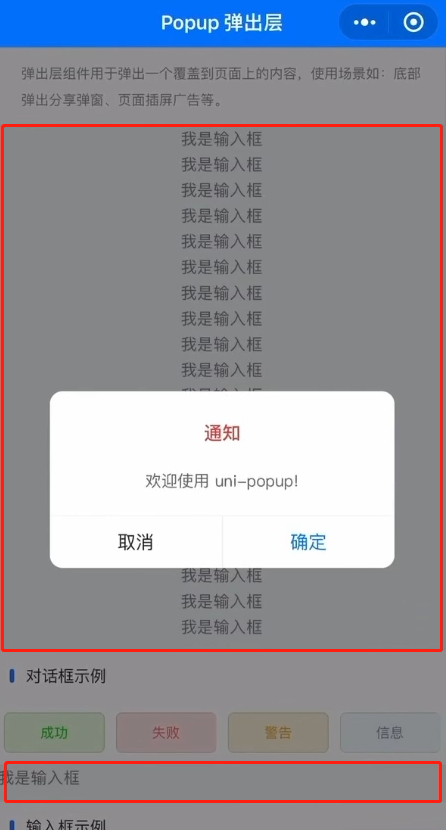


在 uni-app 中,弹出层(如 uni-popup)在 iOS 设备上点击后触发底层输入框(如 input、textarea)的焦点问题,通常是由于 iOS 的事件处理机制和弹出层的遮罩层(mask)事件冒泡或穿透导致的。以下是针对此问题的专业分析和解决方案:
问题原因
- iOS 事件处理机制:iOS 设备对点击事件(tap)的处理较为特殊,尤其是在弹出层和输入框共存时,事件可能穿透到下层元素。
- 弹出层遮罩层事件未阻止冒泡:
uni-popup的遮罩层默认可能未完全阻止事件冒泡,导致点击弹出层时,事件传递到底层输入框。 - 输入框焦点管理:底层输入框可能因事件触发而自动获取焦点,调起键盘。
解决方案
1. 为弹出层添加阻止事件冒泡的属性
- 在
uni-popup组件中,确保遮罩层(mask)或内容区域添加@tap.stop或@touchmove.stop来阻止事件冒泡。例如:<uni-popup ref="popup" @maskClick="closePopup"> <view @tap.stop> <!-- 阻止点击事件冒泡 --> <!-- 弹出层内容 --> </view> </uni-popup> - 如果使用
uni-popup的默认插槽,可以在内容容器上添加事件修饰符。
2. 动态控制输入框的禁用状态
- 在弹出层显示时,通过代码禁用底层输入框的交互,隐藏时再启用。例如:
<input :disabled="isPopupVisible" />
<textarea :disabled="isPopupVisible" />
export default { data() { return { isPopupVisible: false }; }, methods: { showPopup() { this.isPopupVisible = true; this.$refs.popup.open(); }, closePopup() { this.isPopupVisible = false; this.$refs.popup.close(); } } };
3. 使用 pointer-events CSS 属性
- 在弹出层显示时,为底层输入框添加
pointer-events: none;样式,阻止其响应点击事件;隐藏时恢复为auto。例如:<input :style="{ pointerEvents: isPopupVisible ? 'none' : 'auto' }" /> - 注意:此属性在部分旧版本 iOS 中可能兼容性不佳,需测试目标设备。
4. 调整弹出层的 z-index 和层级结构
- 确保弹出层的
z-index值足够高(如 9999),并检查是否有其他元素层级干扰。同时,避免将输入框放在弹出层同级或更高层级。
5. 使用 uni.hideKeyboard() 强制隐藏键盘
- 在弹出层显示时,调用
uni.hideKeyboard()强制隐藏可能被调起的键盘。例如:showPopup() { uni.hideKeyboard(); // 隐藏键盘 this.$refs.popup.open(); }
