




Golang Web开发中如何优雅地处理panic并显示友好的错误追踪信息
Golang Web开发中如何优雅地处理panic并显示友好的错误追踪信息 我使用Python/Django开发已经很多年了。我非常喜欢Django的调试页面:
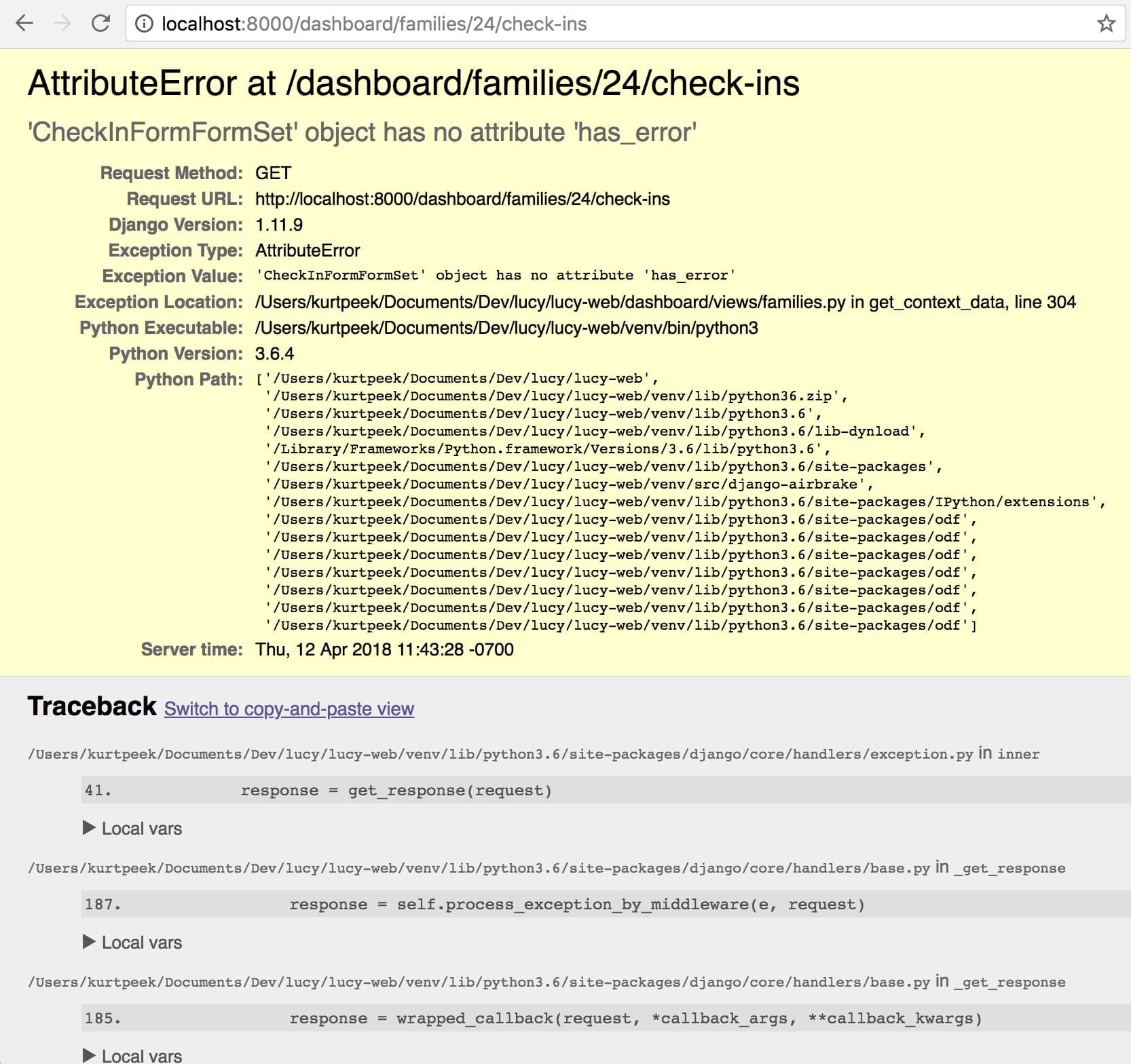
为了理解未知的代码,我经常在代码中添加“assert 0, myvar”,然后调用视图,
接着查看调试页面,观察 myvar 和堆栈跟踪信息。
在Go语言中是否有类似的功能?
我可以在代码中添加 panic(myvar),然后希望在浏览器中看到堆栈跟踪,
并且(如果这能实现就太棒了)如果我能看到每个调用帧的局部变量。
更多关于Golang Web开发中如何优雅地处理panic并显示友好的错误追踪信息的实战教程也可以访问 https://www.itying.com/category-94-b0.html

你的端点处理程序可以使用 recover 从 panic 中恢复,并将堆栈跟踪返回给客户端。runtime package - runtime - Go Packages。这个示例可能对你有帮助:Go Playground - The Go Programming Language
更多关于Golang Web开发中如何优雅地处理panic并显示友好的错误追踪信息的实战系列教程也可以访问 https://www.itying.com/category-94-b0.html

在Go Web开发中,可以通过自定义中间件和recover机制来优雅地处理panic并显示详细的错误信息。以下是一个完整的实现示例:
package main

import (
    "fmt"
    "net/http"
    "runtime/debug"
    "strings"
)

// 自定义恢复中间件
func recoveryMiddleware(next http.Handler) http.Handler {
    return http.HandlerFunc(func(w http.ResponseWriter, r *http.Request) {
        defer func() {
            if err := recover(); err != nil {
                // 获取堆栈跟踪信息
                stack := debug.Stack()

                // 构建详细的错误页面
                w.Header().Set("Content-Type", "text/html; charset=utf-8")
                w.WriteHeader(http.StatusInternalServerError)

                // 输出类似Django的调试页面
                fmt.Fprintf(w, `
<!DOCTYPE html>
<html>
<head>
    <title>Panic Recovery - Go Web Debug</title>
    <style>
        body { font-family: monospace; margin: 20px; background: #f0f0f0; }
        .error { background: #ffdddd; padding: 15px; border-radius: 5px; margin: 20px 0; }
        .stack { background: white; padding: 15px; border-radius: 5px; margin: 20px 0; }
        .frame { margin: 10px 0; padding: 10px; border-left: 3px solid #007bff; }
        .var { color: #0066cc; }
    </style>
</head>
<body>
    <h1>Panic Recovered</h1>
    <div class="error">
        <strong>Panic:</strong> %v
    </div>
    <div class="stack">
        <h3>Stack Trace:</h3>
        <pre>%s</pre>
    </div>
</body>
</html>
                `, err, string(stack))

                // 同时输出到控制台
                fmt.Printf("Panic recovered: %v\n", err)
                fmt.Printf("Stack trace:\n%s\n", stack)
            }
        }()

        next.ServeHTTP(w, r)
    })
}

// 演示panic的处理器
func panicHandler(w http.ResponseWriter, r *http.Request) {
    // 模拟panic并携带变量信息
    myVar := map[string]interface{}{
        "user_id":    123,
        "username":   "testuser",
        "request_id": r.Header.Get("X-Request-ID"),
        "path":       r.URL.Path,
    }

    // 类似Python的 assert 0, myvar
    panic(fmt.Sprintf("Debug panic with variables: %+v", myVar))
}

// 获取局部变量信息的示例(需要配合调试器)
func getLocalVariables() {
    // 在开发环境中,可以使用runtime包获取更多信息
    // 注意:Go不像Python那样能直接获取所有局部变量
    // 但可以通过以下方式模拟

    // 示例:在panic前记录变量
    localVars := map[string]interface{}{
        "var1": "value1",
        "var2": 42,
        "var3": []string{"a", "b", "c"},
    }

    // 将变量信息包含在panic消息中
    panic(fmt.Sprintf("Local variables at panic: %+v", localVars))
}

func main() {
    mux := http.NewServeMux()

    // 注册路由
    mux.HandleFunc("/panic", panicHandler)
    mux.HandleFunc("/debug", func(w http.ResponseWriter, r *http.Request) {
        getLocalVariables()
    })

    // 使用恢复中间件包装整个处理器
    wrappedMux := recoveryMiddleware(mux)

    fmt.Println("Server starting on :8080")
    fmt.Println("Visit http://localhost:8080/panic to see panic recovery")
    fmt.Println("Visit http://localhost:8080/debug to see local variables")

    http.ListenAndServe(":8080", wrappedMux)
}
对于更高级的调试需求,可以使用以下增强版本:
package main

import (
    "encoding/json"
    "fmt"
    "net/http"
    "runtime"
    "runtime/debug"
)

// 增强版恢复中间件
type PanicRecovery struct {
    Development bool
}

func (p *PanicRecovery) Middleware(next http.Handler) http.Handler {
    return http.HandlerFunc(func(w http.ResponseWriter, r *http.Request) {
        defer func() {
            if err := recover(); err != nil {
                if p.Development {
                    // 开发环境:显示详细错误信息
                    p.renderDevelopmentError(w, err)
                } else {
                    // 生产环境:显示通用错误页面
                    p.renderProductionError(w)
                }

                // 记录错误日志
                p.logPanic(r, err)
            }
        }()

        next.ServeHTTP(w, r)
    })
}

func (p *PanicRecovery) renderDevelopmentError(w http.ResponseWriter, err interface{}) {
    stack := debug.Stack()

    // 获取goroutine信息
    numGoroutines := runtime.NumGoroutine()

    w.Header().Set("Content-Type", "text/html; charset=utf-8")
    w.WriteHeader(http.StatusInternalServerError)

    fmt.Fprintf(w, `
<!DOCTYPE html>
<html>
<head>
    <title>Go Web Debug - Panic Details</title>
    <style>
        body { font-family: 'Consolas', monospace; margin: 30px; }
        .header { background: #dc3545; color: white; padding: 20px; border-radius: 5px; }
        .section { background: white; margin: 20px 0; padding: 20px; border-radius: 5px; box-shadow: 0 2px 4px rgba(0,0,0,0.1); }
        .stack-frame { margin: 10px 0; padding: 10px; background: #f8f9fa; border-left: 4px solid #007bff; }
        .var-display { background: #e9ecef; padding: 10px; margin: 5px 0; border-radius: 3px; }
    </style>
</head>
<body>
    <div class="header">
        <h1>🚨 Panic Recovered</h1>
        <h2>%v</h2>
    </div>

    <div class="section">
        <h3>📊 System Info</h3>
        <p><strong>Goroutines:</strong> %d</p>
        <p><strong>Go Version:</strong> %s</p>
    </div>

    <div class="section">
        <h3>🔍 Stack Trace</h3>
        <pre style="background: #f8f9fa; padding: 15px; border-radius: 5px; overflow-x: auto;">%s</pre>
    </div>
</body>
</html>
    `, err, numGoroutines, runtime.Version(), string(stack))
}

func (p *PanicRecovery) renderProductionError(w http.ResponseWriter) {
    w.Header().Set("Content-Type", "application/json")
    w.WriteHeader(http.StatusInternalServerError)
    json.NewEncoder(w).Encode(map[string]string{
        "error": "Internal Server Error",
        "code":  "500",
    })
}

func (p *PanicRecovery) logPanic(r *http.Request, err interface{}) {
    fmt.Printf("[PANIC] %s %s: %v\n", r.Method, r.URL.Path, err)
    debug.PrintStack()
}

// 使用示例
func main() {
    recovery := &PanicRecovery{
        Development: true, // 开发环境设置为true
    }

    mux := http.NewServeMux()

    // 添加带变量跟踪的路由
    mux.HandleFunc("/inspect", func(w http.ResponseWriter, r *http.Request) {
        // 模拟复杂场景
        user := struct {
            ID       int
            Name     string
            Email    string
            Session  map[string]interface{}
        }{
            ID:    1001,
            Name:  "John Doe",
            Email: "john@example.com",
            Session: map[string]interface{}{
                "logged_in": true,
                "role":      "admin",
                "expires":   "2024-12-31",
            },
        }

        // 在panic中携带结构化数据
        panicData := map[string]interface{}{
            "user":       user,
            "request": map[string]interface{}{
                "method": r.Method,
                "url":    r.URL.String(),
                "headers": r.Header,
            },
            "debug_note": "Intentional panic for debugging",
        }

        // 将数据转为JSON便于查看
        jsonData, _ := json.MarshalIndent(panicData, "", "  ")
        panic(fmt.Sprintf("Debug Inspection:\n%s", string(jsonData)))
    })

    // 应用中间件
    handler := recovery.Middleware(mux)

    fmt.Println("Debug server running on :8080")
    fmt.Println("Visit http://localhost:8080/inspect to test panic recovery")

    http.ListenAndServe(":8080", handler)
}
对于需要查看局部变量的场景,可以创建一个调试辅助函数:
// debug_helpers.go
package main

import (
    "encoding/json"
    "fmt"
    "runtime"
)

// DebugVars 用于在panic时捕获局部变量
func DebugVars(vars map[string]interface{}) string {
    // 获取调用者信息
    pc, file, line, ok := runtime.Caller(1)
    if !ok {
        return "Unable to get caller info"
    }

    funcName := runtime.FuncForPC(pc).Name()

    // 格式化变量信息
    jsonData, err := json.MarshalIndent(vars, "", "  ")
    if err != nil {
        jsonData = []byte(fmt.Sprintf("%+v", vars))
    }

    return fmt.Sprintf("Debug at %s (%s:%d):\n%s",
        funcName, file, line, string(jsonData))
}

// 使用示例
func exampleHandler(w http.ResponseWriter, r *http.Request) {
    // 定义要检查的变量
    localVars := map[string]interface{}{
        "userId":   123,
        "userName": "test",
        "query":    r.URL.Query(),
        "headers":  r.Header,
        "bodySize": r.ContentLength,
    }

    // 触发panic并显示变量
    panic(DebugVars(localVars))
}
这个实现提供了类似Django调试页面的体验,包括:
- 完整的堆栈跟踪信息
- 系统状态信息
- 美观的HTML格式化输出
- 开发和生产环境的不同处理
- 局部变量的结构化展示
可以通过访问 /inspect 或 /debug 端点来测试panic恢复功能,并在浏览器中查看详细的调试信息。
