




HarmonyOS 鸿蒙Next中如何使用Animator实现音乐播放器旋转碟效果?
HarmonyOS 鸿蒙Next中如何使用Animator实现音乐播放器旋转碟效果?
如何使用Animator实现音乐播放器旋转碟效果?
3 回复

效果
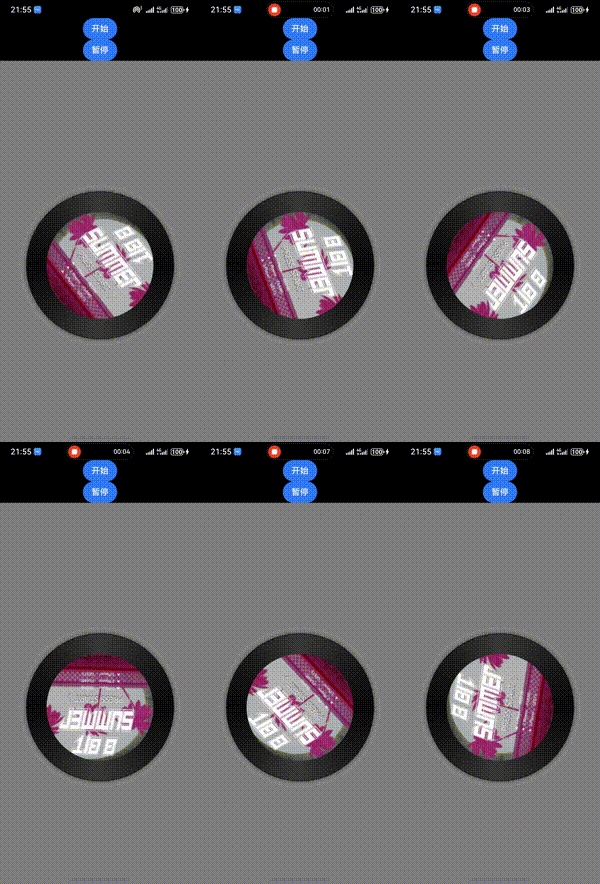
代码
1 首先完成光碟布局,并且给光碟图片增加rotate旋转属性 属性值使用响应式状态
2 通过Animator帧动画改变响应式数据
实现思路
图片是互联网地址,所以要配置网络权限
import { Animator, AnimatorResult } from '@kit.ArkUI';

@Entry
@Component
struct Index {
  @State angle: number = 0

  // 1 创建帧动画对象
  private animator: AnimatorResult = Animator.create({
    duration: 10000,  //   持续时间
    delay: 0,         //   延迟时间
    easing: "linear", //   动画曲线
    iterations: -1,   //   播放次数
    fill: "none",     //   播放模式 播放之外的状态
    direction: "normal", //   播放方向
    begin: 0,   // 开始角度
    end: 360 // 结束角度
  })

  aboutToAppear() {
    //   2 监听帧变化事件
    this.animator.onFrame = (value) => {
      this.angle = value
    }
  }

  build() {
    Column() {
      Button('开始').onClick((event: ClickEvent) => {
        this.animator.play()
      })
      Button('暂停').onClick((event: ClickEvent) => {
        this.animator.pause()
      })
      Stack() {
        Image("https://p6.music.126.net/obj/wonDlsKUwrLClGjCm8Kx/28513831157/e8e9/beeb/912c/468bcb523668065ccf6f853c4a084e31.png")
          .width(300)
          .height(300)

        Image("https://p1.music.126.net/MX4wNwR9eJNvx_Y5AKBEFw==/109951169909770184.jpg?imageView&thumbnail=360y360&quality=75&tostatic=0")
          .width(200)
          .height(200)
          .borderRadius(200)
          .rotate({
            angle: this.angle
          })

      }.backgroundColor(Color.Gray).width('100%').height('100%')
    }
  }
}
更多关于HarmonyOS 鸿蒙Next中如何使用Animator实现音乐播放器旋转碟效果?的实战系列教程也可以访问 https://www.itying.com/category-93-b0.html

在HarmonyOS Next中,使用Animator实现旋转碟效果,主要通过属性动画操作Image组件的rotate属性。
- 在ArkUI中定义Image组件,设置唱片图片。
- 创建Animator对象,配置旋转动画参数:
- 设置duration(持续时间)
- 设置iterations(迭代次数,-1表示无限循环)
- 通过rotate属性设置旋转角度(如0到360度)
- 调用Animator的play()方法启动动画。
关键代码示例(ArkTS):
// 创建动画
const animator = animator.createAnimator({ duration: 3000, iterations: -1 });
animator.update({ rotate: { x: 0, y: 0, z: 1, angle: 360 } });
// 绑定到Image组件并播放
animator.play();
动画可随音乐播放状态控制暂停或继续。

