




HarmonyOS鸿蒙Next中如何实现好看的音乐播放服务卡片静态效果?
HarmonyOS鸿蒙Next中如何实现好看的音乐播放服务卡片静态效果? 如何实现好看的音乐播放服务卡片静态效果?

效果
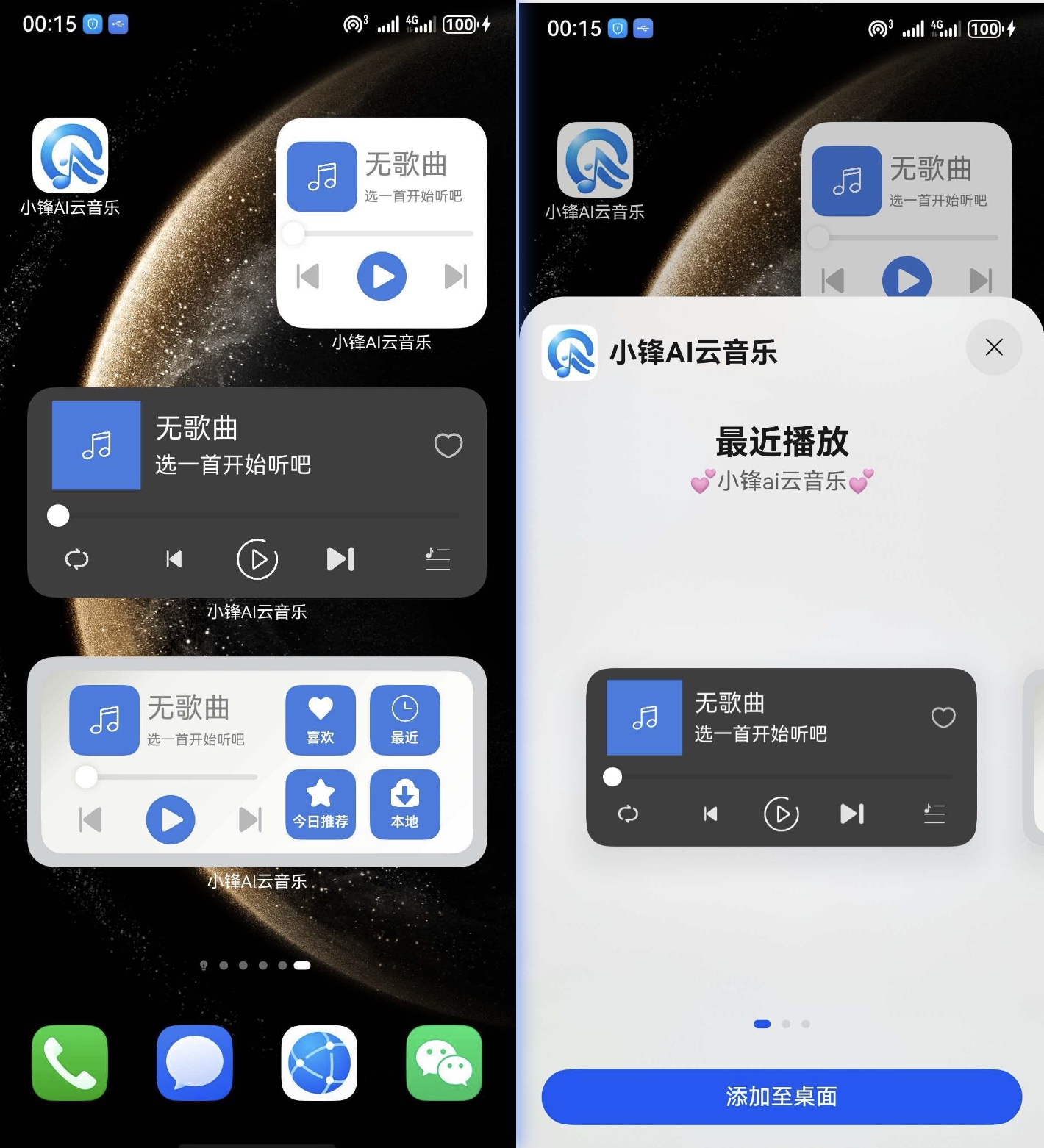
实现思路
主要就是通过ArkUI布局 代码很简单具体如下
完整代码
卡片1
// 按正常布局来写
@Entry
@Component
struct Index {
  build() {
      Column(){
        Row(){
          Row() {
            Row(){
              Image($rawfile('card/music.png')).width(20).height(20)
            }.backgroundColor('#387be1').width(63).height(63).justifyContent(FlexAlign.Center).alignItems(VerticalAlign.Center)
            Column(){
              Text('无歌曲').fontColor(Color.White).fontSize(20).margin({bottom:5}).textAlign(TextAlign.Center).textOverflow({overflow:TextOverflow.Ellipsis}).maxLines(1)
              Text('选一首开始听吧').fontColor(Color.White)
            }.layoutWeight(1).alignItems(HorizontalAlign.Start).justifyContent(FlexAlign.Center).margin({right:10,left:10})
          }.layoutWeight(1)
          Image($rawfile('card/search_x.png')).width(20)
        }.justifyContent(FlexAlign.Start).width('95%').justifyContent(FlexAlign.SpaceBetween)

        Slider().height(1).padding({top:15,bottom:10}).width('%').selectedColor(Color.White)

        Row(){
          Image($rawfile('card/player_xunhuan.png')).width(20).height(20)
          Row(){
            Image($rawfile('card/player_sahngyishou.png'))
              .width(20).height(20)
            Image($rawfile(false ? 'card/player_pause.png' : 'card/player_play.png'))
              .width(35).height(35)
            Image($rawfile('card/player_xiayishou.png'))
              .width(20).height(20)
          }.width('50%').justifyContent(FlexAlign.SpaceBetween)
          Image($r("app.media.player_listMusic")).width(20).height(20)
        }.justifyContent(FlexAlign.SpaceBetween).width('90%').alignItems(VerticalAlign.Center)
      }.backgroundColor('#3e3e3e').width('100%').height('100%').borderRadius(5).padding(10).shadow({ radius: 10, color: Color.Gray })
      .justifyContent(FlexAlign.SpaceBetween)
  }
}
卡片2
@Entry
@Component
struct Index2 {
  build() {
    Column(){
      Row(){
        Column(){
          Row(){
            Row(){
              Image($rawfile('card/music.png')).width(20).height(20)
            }.backgroundColor('#387be1').width(50).height(50).borderRadius(10).margin({right:5}).justifyContent(FlexAlign.Center).alignItems(VerticalAlign.Center)
            Column(){
              Text('无歌曲').fontColor(Color.Gray).fontSize(20).margin({bottom:5}).textAlign(TextAlign.Start).textOverflow({overflow:TextOverflow.Ellipsis}).maxLines(1)
              Text('选一首开始听吧').fontColor(Color.Gray).fontSize(10)
            }.alignItems(HorizontalAlign.Start).layoutWeight(1)
          }.width('100%')

          Slider().height(1).margin({top:15,bottom:10})

          Row(){
            Image($rawfile('card/player_up.png')).width(30).height(30)
            Image($rawfile(false ? 'card/player_pause.png' : 'card/player_center.png')).width(40).height(40)
            Image($rawfile('card/player_down.png')).width(30).height(30)
          }.width('100%').justifyContent(FlexAlign.SpaceBetween)
        }.width('50%').alignItems(HorizontalAlign.Center).margin({right:10,left:10})

        Row(){
          Column(){
            Column(){
              Image($rawfile('card/like.png')).width(20).height(20)
              Text('喜欢').fontSize(10).fontColor(Color.White).margin({top:5}).fontWeight(FontWeight.Bold)
            }.backgroundColor('#387be1').width(50).height(50).margin({bottom:10}).borderRadius(10).justifyContent(FlexAlign.Center).alignItems(HorizontalAlign.Center)

            Column(){
              Image($rawfile('card/collect.png')).width(20).height(20)
              Text('今日推荐').fontSize(10).fontColor(Color.White).margin({top:5}).fontWeight(FontWeight.Bold)
            }.backgroundColor('#387be1').width(50).height(50).margin({bottom:10}).borderRadius(10).justifyContent(FlexAlign.Center).alignItems(HorizontalAlign.Center)
          }.margin({right:10})
          Column(){
            Column(){
              Image($rawfile('card/clock.png')).width(20).height(20)
              Text('最近').fontSize(10).fontColor(Color.White).margin({top:5}).fontWeight(FontWeight.Bold)
            }.backgroundColor('#387be1').width(50).height(50).margin({bottom:10}).borderRadius(10).justifyContent(FlexAlign.Center).alignItems(HorizontalAlign.Center)
            Column(){
              Image($rawfile('card/download.png')).width(20).height(20)
              Text('本地').fontSize(10).fontColor(Color.White).margin({top:5}).fontWeight(FontWeight.Bold)
            }.backgroundColor('#387be1').width(50).height(50).margin({bottom:10}).borderRadius(10).justifyContent(FlexAlign.Center).alignItems(HorizontalAlign.Center)

          }
        }.width('50%')

      }.borderRadius(15).width('100%').height('100%').linearGradient({
        angle: 135,
        colors: [
          [0xcacbc2, 0.0],
          [0xf2f2ef, .2],
          [0xffffff, 1.0],
        ]
      })
      .padding(10)
    }.backgroundColor('#ced0d1').padding(10)
  }
}
卡片3
@Entry
@Component
struct Index3 {
  build() {
    Column(){
          Row(){
            Row(){
              Image($rawfile('card/music.png')).width(20).height(20)
            }.backgroundColor('#387be1').width(50).height(50).borderRadius(10).margin({right:5}).justifyContent(FlexAlign.Center).alignItems(VerticalAlign.Center)
            Column(){
              Text('无歌曲').fontColor(Color.Gray).fontSize(20).margin({bottom:5}).textAlign(TextAlign.Start).textOverflow({overflow:TextOverflow.Ellipsis}).maxLines(1)
              Text('选一首开始听吧').fontColor(Color.Gray).fontSize(10)
            }.alignItems(HorizontalAlign.Start).layoutWeight(1)
          }.width('90%')

          Slider().height(1).margin({top:15,bottom:10})

          Row(){
            Image($rawfile('card/player_up.png')).width(30).height(30)
            Image($rawfile(false ? 'card/player_pause.png' : 'card/player_center.png')).width(40).height(40)
            Image($rawfile('card/player_down.png')).width(30).height(30)
          }.width('90%').justifyContent(FlexAlign.SpaceBetween)
     }.width('100%').height('100%').justifyContent(FlexAlign.Center).alignItems(HorizontalAlign.Center)
  }
}
resource/base/profile/form_config.json
{
  "forms": [
    {
      "name": "小锋ai云音乐💕",
      "displayName": "$string:widget1_display_name",
      "description": "$string:widget1_desc1",
      "src": "./ets/widget1/pages/Widget1Card.ets",
      "uiSyntax": "arkts",
      "window": {
        "designWidth": 720,
        "autoDesignWidth": true
      },
      "colorMode": "auto",
      "isDynamic": true,
      "isDefault": true,
      "updateEnabled": false,
      "scheduledUpdateTime": "10:30",
      "updateDuration": 1,
      "defaultDimension": "2*4",
      "supportDimensions": [
        "2*4"
      ]
    },
    {
      "name": "小锋ai云音乐🍃",
      "displayName": "$string:widget1_display_name",
      "description": "$string:widget1_desc2",
      "src": "./ets/widget1/pages/Widget2Card.ets",
      "uiSyntax": "arkts",
      "window": {
        "designWidth": 720,
        "autoDesignWidth": true
      },
      "colorMode": "auto",
      "isDynamic": true,
      "isDefault": false,
      "updateEnabled": false,
      "scheduledUpdateTime": "10:30",
      "updateDuration": 1,
      "defaultDimension": "2*4",
      "supportDimensions": [
        "2*4"
      ]
    },
    {
      "name": "小锋ai云音乐✨",
      "displayName": "$string:widget1_display_name",
      "description": "$string:widget1_desc3",
      "src": "./ets/widget1/pages/Widget3Card.ets",
      "uiSyntax": "arkts",
      "window": {
        "designWidth": 720,
        "autoDesignWidth": true
      },
      "colorMode": "auto",
      "isDynamic": true,
      "isDefault": false,
      "updateEnabled": false,
      "scheduledUpdateTime": "10:30",
      "updateDuration": 1,
      "defaultDimension": "2*2",
      "supportDimensions": [
        "2*2"
      ]
    }
  ]
}
图片素材网上一堆 实在不行私聊试试 我单独发你
更多关于HarmonyOS鸿蒙Next中如何实现好看的音乐播放服务卡片静态效果?的实战系列教程也可以访问 https://www.itying.com/category-93-b0.html

在HarmonyOS Next中,实现音乐播放服务卡片的静态效果主要使用ArkUI的声明式开发范式。通过Canvas组件绘制自定义图形、文本和图片,结合UI描述语言构建布局。关键点包括:使用Stack、Flex等容器组件管理层级与对齐,应用ResourceManager管理图片与字符串资源,设置组件的opacity、borderRadius等属性实现视觉样式。需在module.json5中配置卡片信息,使用FormExtensionAbility管理卡片生命周期。

在HarmonyOS Next中,实现一个美观的音乐播放服务卡片静态效果,核心在于利用ArkUI的声明式语法和组件能力进行UI构建。以下是关键实现步骤和要点:
-
服务卡片基础配置:在
module.json5配置文件中正确声明卡片,设置"type": "serviceWidget",并定义好卡片的尺寸(如2*4)和初始布局。 -
UI布局与组件:
- 使用
Flex、Row、Column、Stack等容器组件构建卡片整体结构。 - 核心区域通常采用
Row水平布局,左侧放置专辑封面,右侧放置歌曲信息与控制按钮。 - 专辑封面:使用
Image组件,通过borderRadius属性设置为圆形或圆角矩形,并搭配阴影(shadow)效果提升质感。 - 歌曲信息区域:使用
Column垂直排列Text组件,展示歌曲名、歌手。可通过设置不同的字体大小、颜色和粗细来区分主次信息。 - 进度条模拟:静态卡片虽无法真实播放,但可用
Row容器模拟进度条背景,内嵌一个固定宽度的Row作为“已播放进度”,通过设置不同的背景色和圆角来呈现视觉效果。 - 控制按钮:使用
Row排列多个Button或Image组件(作为图标按钮)。为按钮设置透明背景、合适的图标尺寸,并利用padding控制间距。
- 使用
-
样式与美化:
- 颜色:定义和谐的色彩方案,如从专辑封面取色作为主题色,应用于按钮、进度条等元素。
- 圆角与阴影:为卡片根容器、专辑封面、进度条等元素广泛使用
borderRadius和shadow属性,营造现代感的卡片UI。 - 图标:使用清晰、风格统一的图标资源(SVG格式推荐)用于播放、暂停、上一首、下一首等操作。
-
静态数据绑定:在卡片的
build函数中,将UI组件与静态数据(如写死的歌曲名、歌手、封面图片路径)进行绑定,用于呈现预设的展示效果。
示例代码片段(ArkTS)概要:
@Entry
@Component
struct MusicServiceWidget {
  build() {
    Column() {
      // 卡片主体:歌曲信息与控制区域
      Row() {
        // 左侧专辑封面
        Image($r('app.media.album_cover'))
          .width(56)
          .height(56)
          .borderRadius(28)
          .shadow(/* 阴影参数 */)

        // 右侧信息与控制区
        Column() {
          Text('歌曲名称')
            .fontSize(18)
            .fontColor(Color.Black)
          Text('歌手')
            .fontSize(14)
            .fontColor(Color.Gray)
          // 模拟进度条
          Row() {
            Row().width('30%').height(4).backgroundColor('#007DFF').borderRadius(2)
          }
          .width('100%')
          .height(4)
          .backgroundColor('#E5E5E5').borderRadius(2)

          // 控制按钮行
          Row() {
            Image($r('app.media.ic_prev')).width(24).height(24)
            Image($r('app.media.ic_play')).width(32).height(32)
            Image($r('app.media.ic_next')).width(24).height(24)
          }
          .justifyContent(FlexAlign.SpaceAround)
          .width('100%')
          .margin({ top: 12 })
        }
        .padding({ left: 12 })
        .alignItems(HorizontalAlign.Start)
      }
      .padding(12)
    }
    .width('100%')
    .height('100%')
    .backgroundColor(Color.White)
    .borderRadius(24) // 卡片整体圆角
    .shadow(/* 卡片阴影 */)
  }
}
通过以上布局、样式和静态数据的结合,可以构建出一个视觉上吸引人的音乐播放服务卡片静态界面。动态功能(如播放控制、进度更新)需在卡片的动态能力中进一步实现。
