




Golang中如何实现多模板加载
Golang中如何实现多模板加载
在我的代码中,有一个 layout、一个 view 和一个 partial 模板。
我能够顺利加载布局和视图,现在我正在一个名为 model 的模板中添加一个新的 div,该模板需要在我点击布局上的按钮时弹出。
我的代码是:
import (
	"embed"
)

//go:embed libs/scripts layouts views partials scripts styles
var Views embed.FS

func Run(port string) {
	http.Handle("/static/", http.StripPrefix("/static/", http.FileServer(http.FS(Views))))

	http.HandleFunc("/messages/", messages)

	http.ListenAndServe(port, nil)
}

func main() {
	go func() {
		Run(":1235")
		println("server closed")
	}()
加载模板的代码如下:
func messages(w http.ResponseWriter, r *http.Request) {

	if tmpl, err := template.ParseFS(Views,
		"layouts/base.html",
		"views/messages.html",
		"partials/model.html"); err != nil {
		fmt.Println("Error in file parsing:", err)
	} else {
		err = tmpl.ExecuteTemplate(w, "messages.html", nil)
		if err != nil {
			fmt.Println("error executing the template:", err)
		}
	}
}
模板本身如下:
partials/model.html:
{{define "model"}}
<link rel="stylesheet" href="http://localhost:1235/static/styles/model.css">
<div id="modal1" class="overlay">
	<a class="cancel" href="#"></a>
	<div class="modal">
		<h2>This is Modal Overlay 1</h2>
		<div class="content">
			<p>Click outside the modal to close.</p>
		</div>
	</div>
</div>
{{end}}
views/messages.html:
<!-- messages -->
{{template "base" .}}
{{define "body"}}

<body>

<div></div>

<script src="http://localhost:1235/static/scripts/messages.js" charset="utf-8" type="text/javascript"></script>

</body>
</html>
{{end}}
layouts/base.html:
<!-- base layout -->
{{define "base"}}
<!DOCTYPE html>
<html lang="ar-AR">
<head>
  <meta charset="utf-8">
  <meta name="viewport" content="width=device-width, initial-scale=1">
  <title>WhatsApp</title>
  <link rel="stylesheet" href="http://localhost:1235/static/styles/style.css">
</head>

<body>
<button type="button" onClick="showModel()">
   Send
</button>
        {{template "body" .}}
</body>
<script>
  function showModel(){
    {{template "model" .}}
  }
</script>
</html>
{{end}}
运行代码后,我得到了错误:
error executing the template: html/template:base.html:20:15: no such template "model"
error executing the template: html/template:base.html:20:15: no such template "model"
我在这个代码块中遇到了错误:
<script>
  function showModel(){
    {{template "model" .}}
  }
</script>
更多关于Golang中如何实现多模板加载的实战教程也可以访问 https://www.itying.com/category-94-b0.html

我无法复现这个问题。我将你的代码示例复制到了这个目录结构下的单独文件中:
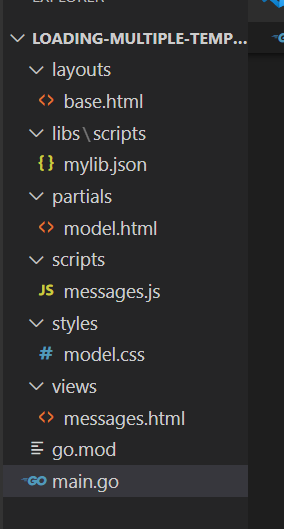
然后使用 go run . 构建并运行程序,当我访问 http://localhost:1235/messages 时,我看到了一个发送按钮。当我检查源代码时,得到了以下内容:
<!DOCTYPE html>
<html lang="ar-AR">
<head>
  <meta charset="utf-8">
  <meta name="viewport" content="width=device-width, initial-scale=1">
  <title>WhatsApp</title>
  <link rel="stylesheet" href="http://localhost:1235/static/styles/style.css">
</head>

<body>
<button type="button" onClick="showModel()">
   Send
</button>


<body>

<div></div>

<script src="http://localhost:1235/static/scripts/messages.js" charset="utf-8" type="text/javascript"></script>

</body>
</html>

</body>
<script>
  function showModel(){

<link rel="stylesheet" href="http://localhost:1235/static/styles/model.css">
<div id="modal1" class="overlay">
	<a class="cancel" href="#"></a>
	<div class="modal">
		<h2>This is Modal Overlay 1</h2>
		<div class="content">
			<p>Click outside the modal to close.</p>
		</div>
	</div>
</div>

  }
</script>
</html>
所以 model.html 被模板直接注入到了 JavaScript 代码中,这显然无法正常工作,但我并没有得到你展示的那个错误。你的文件夹结构是否有所不同?
更多关于Golang中如何实现多模板加载的实战系列教程也可以访问 https://www.itying.com/category-94-b0.html

问题在于模板解析和执行的顺序。{{template "model" .}} 在 base.html 的 JavaScript 代码块中,但此时 model 模板尚未被定义,因为模板是在执行时动态解析的。
以下是修正后的代码:
func messages(w http.ResponseWriter, r *http.Request) {
    // 先解析所有需要的模板文件
    tmpl := template.New("").Funcs(template.FuncMap{})

    // 使用 ParseFS 解析所有模板
    tmpl, err := tmpl.ParseFS(Views,
        "layouts/base.html",
        "views/messages.html",
        "partials/model.html")

    if err != nil {
        fmt.Println("Error in file parsing:", err)
        http.Error(w, err.Error(), http.StatusInternalServerError)
        return
    }

    // 执行 messages 模板
    err = tmpl.ExecuteTemplate(w, "messages.html", nil)
    if err != nil {
        fmt.Println("error executing the template:", err)
        http.Error(w, err.Error(), http.StatusInternalServerError)
    }
}
更好的做法是预编译模板,避免每次请求都重新解析:
var (
    messagesTmpl *template.Template
    once         sync.Once
)

func initMessagesTemplate() {
    once.Do(func() {
        var err error
        messagesTmpl, err = template.ParseFS(Views,
            "layouts/base.html",
            "views/messages.html",
            "partials/model.html")
        if err != nil {
            panic(fmt.Sprintf("Failed to parse templates: %v", err))
        }
    })
}

func messages(w http.ResponseWriter, r *http.Request) {
    initMessagesTemplate()

    err := messagesTmpl.ExecuteTemplate(w, "messages.html", nil)
    if err != nil {
        fmt.Println("error executing the template:", err)
        http.Error(w, err.Error(), http.StatusInternalServerError)
    }
}
另外,base.html 中的 JavaScript 代码需要调整,不能在 JavaScript 中直接使用 Go 模板语法。应该改为:
<!-- layouts/base.html -->
{{define "base"}}
<!DOCTYPE html>
<html lang="ar-AR">
<head>
  <meta charset="utf-8">
  <meta name="viewport" content="width=device-width, initial-scale=1">
  <title>WhatsApp</title>
  <link rel="stylesheet" href="http://localhost:1235/static/styles/style.css">
</head>

<body>
<button type="button" onClick="showModel()">
   Send
</button>
        {{template "body" .}}

        <!-- 在这里包含 model 模板 -->
        {{template "model" .}}
</body>
<script>
  function showModel(){
    // 通过 JavaScript 控制 modal 的显示/隐藏
    document.getElementById('modal1').style.display = 'block';
  }
</script>
</html>
{{end}}
partials/model.html 需要添加初始隐藏样式:
{{define "model"}}
<link rel="stylesheet" href="http://localhost:1235/static/styles/model.css">
<div id="modal1" class="overlay" style="display: none;">
    <a class="cancel" href="#" onclick="closeModel()"></a>
    <div class="modal">
        <h2>This is Modal Overlay 1</h2>
        <div class="content">
            <p>Click outside the modal to close.</p>
        </div>
    </div>
</div>
<script>
    function closeModel() {
        document.getElementById('modal1').style.display = 'none';
    }
</script>
{{end}}
