




HarmonyOS 鸿蒙Next中通过bindSheet半模态实现创建歌单功能?
HarmonyOS 鸿蒙Next中通过bindSheet半模态实现创建歌单功能? 通过bindSheet半模态实现创建歌单功能?
3 回复

效果图
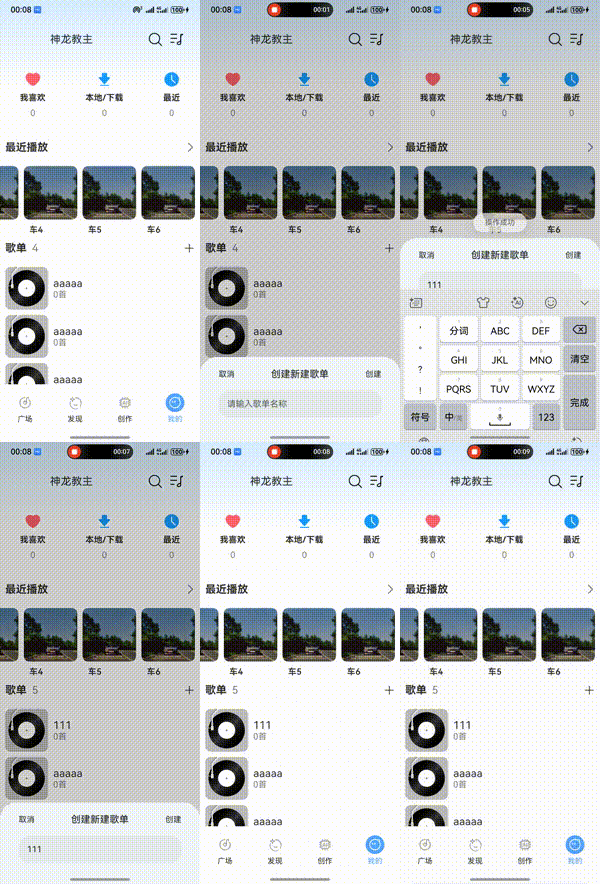
实现思路
1 通过@Builder 实现模态 ui 开发
- 通过鸿蒙内置的 bindSheet api 实现半模态框展示
完整代码
@State playerListCreateState:boolean = false
@State songListTitle:string = ''
[@Builder](/user/Builder)
PlayerListCreateBuilder() {
  Column() {
    Row(){
      Text('取消').fontSize(15) .onClick(() =>  this.playerListCreateState = false)
      Text("创建新建歌单").fontSize(18).fontWeight(500)
      Text('创建').fontSize(15).onClick(async () => {
        const serverData:ApiResultType = await request({
          method: 'post',
          url: '/songlist/create',
          data: {title: this.songListTitle} as ESObject
        })
        toast(serverData.msg)
        if (serverData.state===201)  {
          // 关闭弹窗
          this.playerListCreateState = false
          // 更新列表
          this.onListSong()
        }
      })
    }.width('90%').justifyContent(FlexAlign.SpaceBetween)

    TextInput({ placeholder: "请输入歌单名称",text:$$this.songListTitle })
      .width('90%')
      .height(50)
      .margin({ bottom: 20,top:20 })
      .onChange((value: string) => {
        // this.playlistName = value
      })
  }
  .padding({ left: 18, right: 18, top: 22 })
  .width('100%')
  .height('100%')
  .backgroundColor('#f1f5f8')
}


[@Builder](/user/Builder)
PlayListBuilder() {
  Row() {
    Row() {
      Text('歌单').fontWeight(700).fontSize(20).margin({ right: 10, left: 10 })
      Text(this.listSong.length.toString()).fontSize(20).fontColor(Color.Gray)
    }
    Image($r('app.media.profile_plus')).width(20).margin({ right: 10 })
      .onClick(() => this.playerListCreateState = true)
      // 💕 核心代码
      .bindSheet(this.playerListCreateState, this.PlayerListCreateBuilder(), {
        height: 160,
        dragBar: false,
        showClose: false,
        onDisappear: () => this.playerListCreateState = false
      })
  }
  .height(50)
  .width('100%')
  .margin({ bottom: 10 })
  .backgroundColor(Color.White)
  .justifyContent(FlexAlign.SpaceBetween)

}
更多关于HarmonyOS 鸿蒙Next中通过bindSheet半模态实现创建歌单功能?的实战系列教程也可以访问 https://www.itying.com/category-93-b0.html

在HarmonyOS Next中,通过bindSheet半模态实现创建歌单功能,主要涉及UIAbility与自定义组件的交互。使用bindSheet方法绑定一个自定义弹窗组件,该组件包含歌单名称输入框和确认按钮。在UIAbility中调用bindSheet展示半模态界面,用户输入歌单名后,通过事件回调将数据传回UIAbility处理,完成歌单创建逻辑。

在HarmonyOS Next中,可以使用bindSheet半模态弹窗实现创建歌单功能。以下是实现步骤:
-
定义Sheet组件:创建自定义弹窗组件,包含歌单名称输入框、封面选择、描述输入等UI元素。
-
使用bindSheet绑定:在页面中通过
bindSheet绑定弹窗的显示状态,例如:[@State](/user/State) isShowSheet: boolean = false; -
触发弹窗显示:通过按钮或其他交互触发
isShowSheet = true,弹出创建歌单界面。 -
处理创建逻辑:在Sheet组件中实现表单验证、数据提交等逻辑,完成后关闭弹窗。
-
优化体验:可结合
[@State](/user/State)、@Link等状态管理,确保数据响应式更新。
此方案能保持用户操作连贯性,适合轻量级输入场景。
