




从C#调用Golang函数的实现方法
从C#调用Golang函数的实现方法 我正在尝试从C#调用一个Go语言编写的DLL,并将其结果和性能与从C#调用C语言编写的DLL进行比较,因此我进行了以下操作:
我首先从构建C语言的DLL并调用它开始。 第一步:编写C代码
// cmdll.c
// 编译选项: -LD
int __declspec(dllexport) SampleMethod(int i)
{
  return i*10;
}
第二步:编译C代码:
- 打开
Visual Studio x64 Native Tools Command Prompt - 运行命令:
cl -LD cmdll.c
第三步:编写C#代码
// cm.cs
using System;
using System.Runtime.InteropServices;
public class MainClass
{
    [DllImport("Cmdll.dll")]
    public static extern int SampleMethod(int x); // 函数签名,必须有返回类型

    static void Main()
    {
        Console.WriteLine("SampleMethod() returns {0}.", SamplMethod(5));
    }
}
第四步:编译C#文件并构建可执行文件:
- 打开
Visual Studio x64 Native Tools Command Prompt - 运行命令:
csc -platform:x64 cm.cs
以上步骤运行顺利。
我想用Go语言实现同样的功能,并遵循了以下步骤:
第一步:编写Go代码:
//lib.go
package main

import "C"

//export SamplMethod
func SamplMethod(i int) int {
	return i * 10
}

func main() {
	// 需要一个main函数来让CGO将包编译为C共享库
}
第二步:通过编译上述代码来构建DLL文件:
go build -ldflags="-s -w" -o lib.dll -buildmode=c-shared lib.go
我使用了 -ldflags="-s -w" 来减小生成的文件大小,并且不确定应该使用哪个 -buildmode,所以随机选择了 c-shared 而不是 c-archive。
更新:我也尝试了 go build -ldflags="-s -w" -o lib.dll -buildmode=c-archive lib.go,得到了相同的结果。
第三步:编写一个C代码,将 go 生成的 .dll 和 .h 文件结合起来,生成一个等效的 c dll
//goDll.c
#include <stdio.h>
#include "lib.h"
// 强制gcc链接Go运行时(可能有比这更好的解决方案)
GoInt SamplMethod(GoInt i);

void main() {
}
第四步:编译goDll.c文件:
gcc -shared -pthread -o goDll.dll goDll.c lib.dll -lWinMM -lntdll -lWS2_32
第五步:构建C#代码来调用生成的DLL,代码与上面相同,但更改了DLL文件名:
// cm.cs
using System;
using System.Runtime.InteropServices;
public class MainClass
{
    [DllImport("goDll.dll")]
    public static extern int SampleMethod(int x); // 函数签名,必须有返回类型

    static void Main()
    {
        Console.WriteLine("SampleMethod() returns {0}.", SamplMethod(5));
    }
}
第四步:编译C#文件并构建可执行文件:
- 打开
Visual Studio x64 Native Tools Command Prompt - 运行命令:
csc -platform:x64 cm.cs
然后尝试运行生成的 ./cm.exe 文件,但遇到了以下错误:
Unhandled Exception: System.EntryPointNotFoundException: Unable to find an entry point named 'SampleMethod' in DLL 'goDll.dll'.
   at MainClass.SampleMethod(Int32 i)
   at MainClass.Main()
更多关于从C#调用Golang函数的实现方法的实战教程也可以访问 https://www.itying.com/category-94-b0.html

我发现自己在过程中多做了一个不必要的步骤,以下是我顺利运行的方法:
步骤1:编写Go代码:
// main.go
package main

import "C"
import "fmt"

//export HelloWorld
func HelloWorld() {
	fmt.Printf("hello world from GO\n")
}

func main() {}

// 编译命令:
// go build -ldflags="-s -w" -buildmode=c-shared -o libgo.dll main.go
步骤2:编写C#代码:
// main.cs
using System;
using System.Runtime.InteropServices;
public class MainClass
{
    [DllImport("libgo.dll")]
    public static extern void HelloWorld(); // 函数签名,必须有返回类型

    static void Main()
    {
        HelloWorld();
    }
}

// 编译命令:
// 打开:
// Visual Studio x64 Native Tools Command Prompt
// csc -platform:x64 cm.cs
步骤3:编译两个文件,首先编译go文件
步骤4:运行可执行文件:
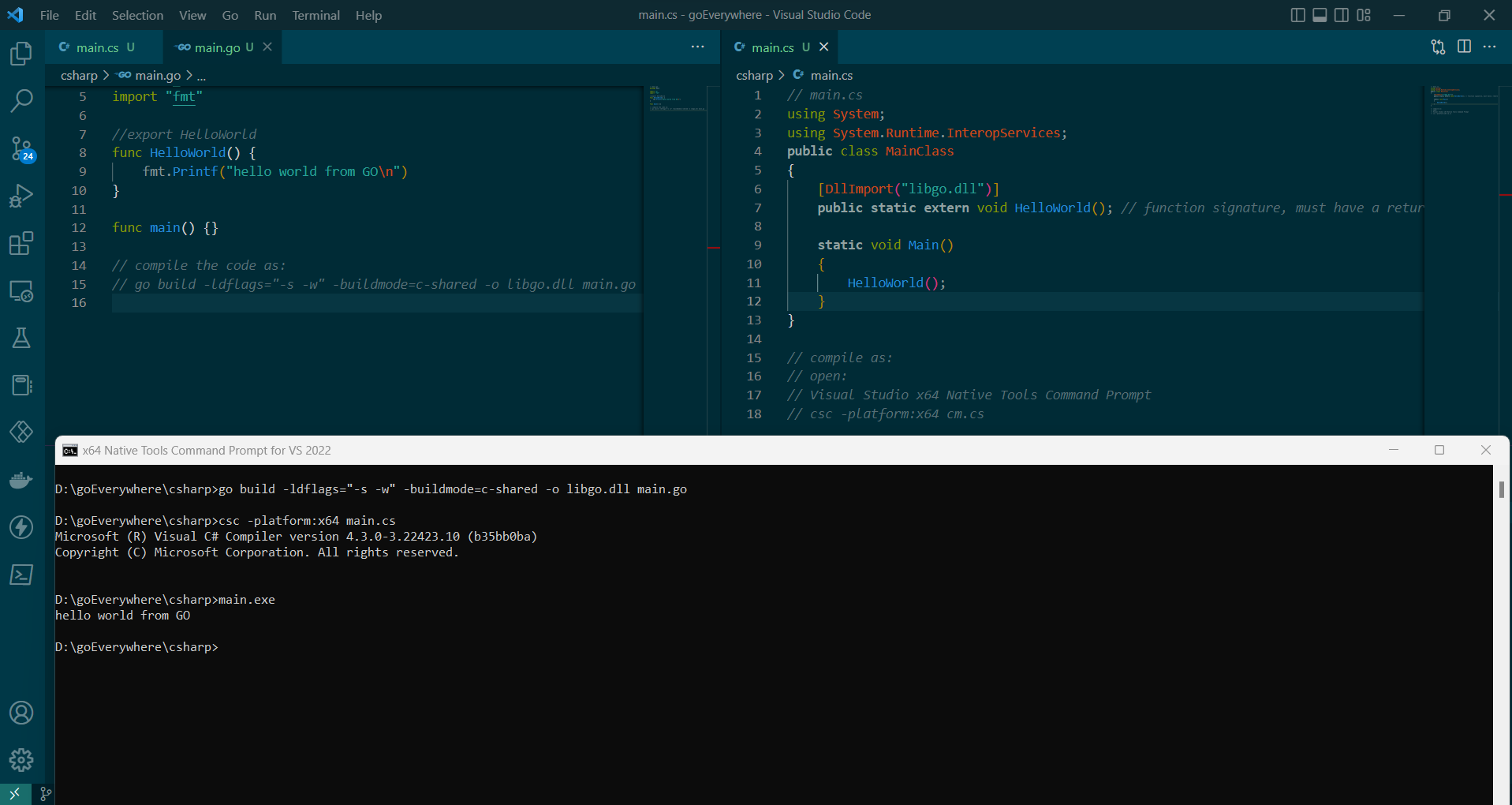
更多关于从C#调用Golang函数的实现方法的实战系列教程也可以访问 https://www.itying.com/category-94-b0.html

从C#调用Go函数需要直接使用Go生成的DLL,而不是通过C包装层。以下是正确的实现方法:
1. 编写Go代码
// lib.go
package main

import "C"

//export SampleMethod
func SampleMethod(i C.int) C.int {
    return i * 10
}

func main() {
    // 空main函数,仅用于编译
}
关键点:
- 使用
C.int类型而不是Go的int类型 - 导出函数名必须与C#中调用的名称完全一致
2. 编译Go DLL
go build -o goLib.dll -buildmode=c-shared lib.go
这会生成两个文件:goLib.dll和goLib.h
3. 直接C#调用Go DLL
// Program.cs
using System;
using System.Runtime.InteropServices;

public class MainClass
{
    // 直接调用Go生成的DLL
    [DllImport("goLib.dll", CallingConvention = CallingConvention.Cdecl)]
    public static extern int SampleMethod(int x);

    static void Main()
    {
        try
        {
            int result = SampleMethod(5);
            Console.WriteLine($"SampleMethod() returns {result}.");
        }
        catch (Exception ex)
        {
            Console.WriteLine($"Error: {ex.Message}");
        }
    }
}
4. 编译和运行
# 编译C#
csc -platform:x64 Program.cs

# 运行(确保goLib.dll在同一目录)
./Program.exe
性能对比示例
如果你需要对比C和Go的性能,可以这样实现:
// benchmark.go
package main

import "C"

//export Fibonacci
func Fibonacci(n C.int) C.int {
    if n <= 1 {
        return n
    }
    return Fibonacci(n-1) + Fibonacci(n-2)
}

//export ProcessArray
func ProcessArray(arrPtr *C.int, length C.int) {
    // 处理数组的逻辑
    arr := (*[1 << 30]C.int)(unsafe.Pointer(arrPtr))[:length:length]
    for i := C.int(0); i < length; i++ {
        arr[i] = arr[i] * 2
    }
}

func main() {}
对应的C#调用:
[DllImport("goLib.dll", CallingConvention = CallingConvention.Cdecl)]
public static extern int Fibonacci(int n);

[DllImport("goLib.dll", CallingConvention = CallingConvention.Cdecl)]
public static extern void ProcessArray(IntPtr array, int length);
关键注意事项
- 调用约定:必须使用
CallingConvention.Cdecl - 类型匹配:Go中的
C.int对应C#的int - 内存管理:复杂类型需要手动管理内存
- 线程安全:Go的runtime需要初始化,确保单线程初始化调用
你的问题在于通过C语言进行了不必要的包装层。Go可以直接生成C兼容的DLL,C#可以直接调用。移除中间C包装步骤,直接使用Go生成的DLL即可解决EntryPointNotFoundException错误。
